- Product

- Pricing
- Affiliate Program
- Developers
- Resource
 EN
EN
A YouTube proxy lets you access YouTube through another IP address, which is enough for simple browsing or checking content from a different region.
But not every use case is that simple. Watching videos casually is very different from managing or logging into an important channel, where stability and a consistent environment matter more than just changing IPs.
This guide breaks down the main proxy types, when to use each one, the key risks, and how to set up a YouTube proxy in MoreLogin.
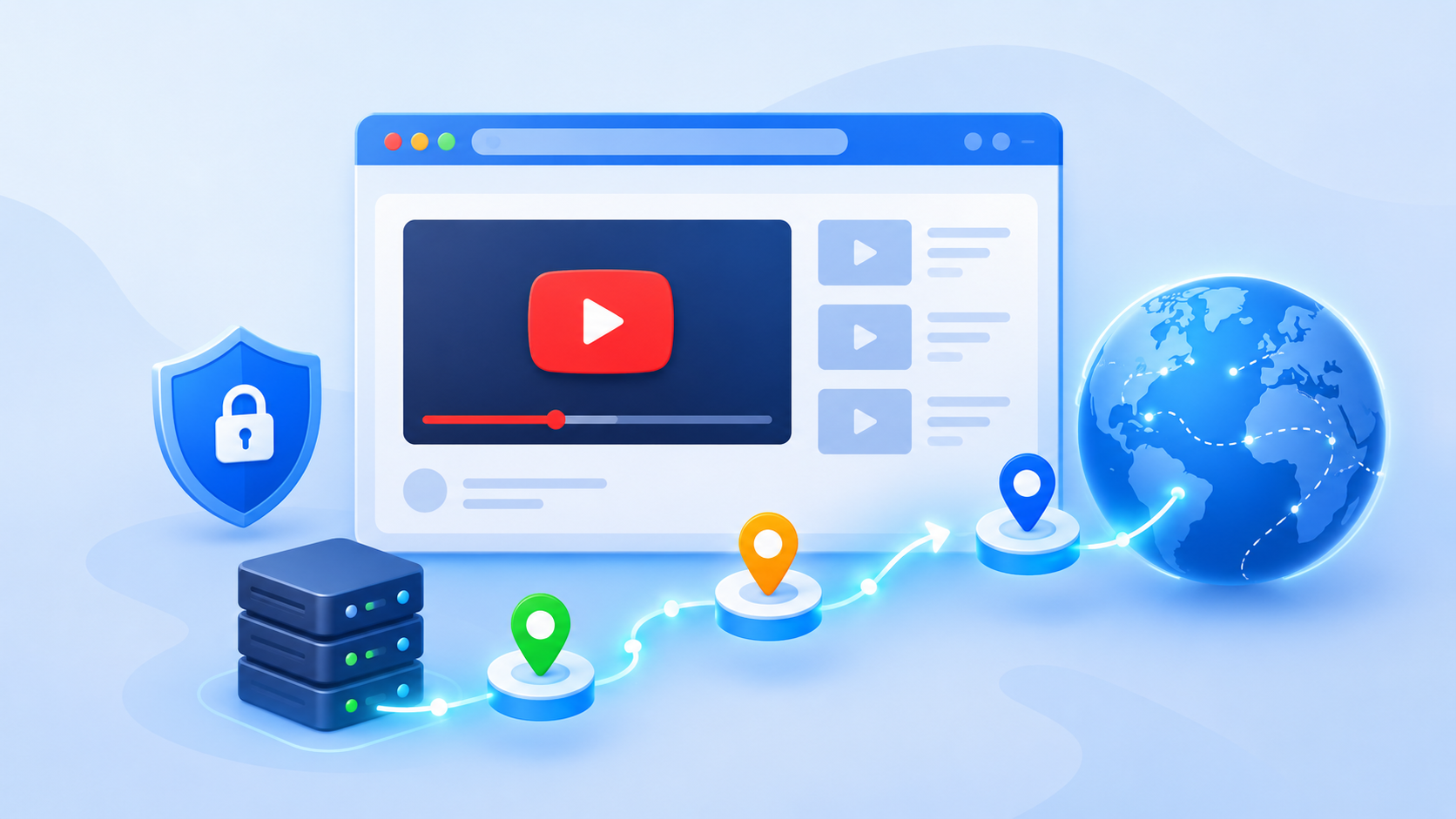
A YouTube proxy is a server placed between your device and YouTube.
Instead of connecting directly to YouTube, your traffic goes to the proxy first. The proxy sends the request on your behalf.
YouTube then sees the public IP address of the proxy connection rather than the public IP you normally use.
The basic route looks like this:
You open YouTube.
Your browser sends the request to the proxy server.
The proxy connects to YouTube.
YouTube returns the requested page or video through the proxy.
The proxy sends the data back to you.
Depending on the provider, a YouTube proxy server may support HTTP, HTTPS, SOCKS5, or several protocols.
One detail is easy to miss. A proxy changes the network route. It does not automatically change your Google account, cookies, browser storage, language, device information, or browser fingerprint.
That difference becomes important when several accounts are involved.
There is no single proxy type that makes sense for every YouTube task.
Quick browsing, regional research, channel management, and mobile testing all have different requirements.
A web proxy loads YouTube through a website operated by the proxy service. You normally enter a URL and browse inside that page without configuring the browser manually.
It can be useful when YouTube is blocked by a school, office, hotel, or another local network.
If your main goal is simply to regain access, a YouTube proxy is one of several options worth understanding alongside mobile data and other browser based methods.
A web proxy for YouTube is convenient, but I would keep it for low value browsing.
Free services can be slow. Video quality may be limited. Some inject advertising. Others provide very little information about how browsing data is handled.
That makes a random YouTube proxy site a poor place to enter an important Google password.
Search results, trending content, ads, recommendations, and video availability can differ between countries.
A marketer targeting Canada may want to see what Canadian users see. A creator expanding into Japan may want to check local search results or competitor videos.
A proxy located in the target country can help with that research.
A YouTube proxy can change the network location used by the browser, but location is not the only signal YouTube receives.
Language, cookies, account history, and YouTube location settings may still affect the result.
For cleaner comparisons, use a separate browser profile and keep the language and location settings aligned with the market you are testing.
Proxy requirements become stricter once you start signing in.
For regular channel management, stability is usually more useful than constant IP rotation.
Imagine that the same Google account signs in from Los Angeles in the morning, Germany in the afternoon, and Singapore that evening. There is rarely a practical reason to create that pattern.
A static ISP or good residential proxy for YouTube is usually easier to manage because the connection can stay within one reasonable location.
The browser environment matters too.
If several independent Google accounts are managed from one computer, keeping cookies and sessions separated can prevent simple operational mistakes.
Also check the ownership structure first. One Google Account can control multiple YouTube channels. Creating another browser environment for every channel is not always necessary.
Proxies are also useful for regional checks.
You may want to verify:
Localized video titles
Descriptions and subtitles
Search results
Landing pages
Regional promotions
Ad delivery
Country specific creative
The proxy provides the network location. A clean browser session makes the comparison more useful.
If you need this setup across different profiles, you can configure a proxy for YouTube at the profile level rather than changing the connection for your entire computer.
The label on the proxy matters less than the quality of the actual IP.
Still, each proxy category has clear strengths and weaknesses.
A web proxy is the easiest option to start with.
You visit a proxy website, enter the YouTube URL, and browse through its server.
It works best for temporary access when you do not need to sign in.
The tradeoff is control. You depend on the service for speed, privacy, video compatibility, and session stability.
Residential proxies use IP addresses associated with consumer internet connections.
They are commonly used for regional research and account related workflows because the connection resembles normal residential internet traffic.
When comparing residential proxy providers, look at factors such as IP quality, location coverage, sourcing model, and rotation options rather than relying on marketing claims alone.
That does not mean every residential IP is good.
Shared pools can still contain overused addresses. Rotating services can also change the IP more often than you want.
Check the provider, sourcing model, location accuracy, and rotation rules before buying.
Static residential and ISP proxies are often a practical choice for regular channel access.
The main advantage is consistency.
Instead of receiving a different IP every few minutes, you can keep the same address for longer periods.
That makes them useful when a Google account needs to return to roughly the same network environment each day.
Ask whether the address is dedicated or shared. A static IP is less useful if many unrelated users are sending traffic through it.
A mobile proxy for YouTube sends traffic through a cellular network such as 4G or 5G.
It makes sense for tasks where the mobile network itself matters, such as carrier testing, mobile app research, or mobile focused campaigns.
It is not automatically the best choice for every account.
Mobile proxies are often more expensive. Some rotate frequently because cellular networks naturally share and reassign IP addresses.
For a desktop based channel workflow, paying more for mobile traffic may add little value.
Datacenter proxies come from hosting providers and server infrastructure.
They are usually fast and relatively inexpensive. This makes them useful for public research, content checks, and tasks where account login is not central.
The main concern is reputation.
Large datacenter ranges are easier to identify as server traffic. Cheap shared pools may also have a long history of use by other customers.
Test the actual address before depending on it.
If residential IPs are your main option, this YouTube proxy guide can also help when comparing residential proxy providers.
A proxy, VPN, and antidetect browser are not interchangeable.
They control different parts of the environment.
A VPN is convenient when you want the whole device to use one network route.
A proxy gives you more granular control. Profile A can use a US IP while Profile B uses a UK IP.
The proxy alone does not separate their cookies or browser storage.
That is why the distinction between a proxy, VPN, and antidetect browser matters when several independent logins are involved.
For account work, think in layers.
The proxy handles the network connection. The browser profile handles browser data and session separation. The Google account keeps its own history, settings, permissions, and recovery information.
Changing one layer does not erase the others.
Do not choose a provider from its marketing label alone.
Two residential proxies can perform very differently. So can two ISP proxies.
Start with the provider.
Look for clear information about how its IP addresses are sourced, how authentication works, what locations are available, and what happens when an IP stops working.
Then test the address itself.
Check:
Country
Region or city
ISP
Proxy status
Connection stability
Previous reputation signals
A pool with millions of addresses is not automatically better if many of those addresses are unreliable.
For market research, choose the market you want to inspect.
If you are checking US search results, use a US connection.
For an existing account, consistency usually matters more. A location that reasonably matches the account's normal working pattern is easier to maintain than one that changes constantly.
City targeting is useful when the task is genuinely local. Otherwise, country level targeting is often enough.
Static connections are usually easier for regular logins.
Rotating proxies make more sense for public research where many requests or locations are needed.
Some residential providers offer sticky sessions. This means the same IP remains assigned for a limited period before rotation.
Check the actual session duration. Do not assume sticky means permanent.
YouTube places more pressure on a connection than ordinary web browsing.
A proxy that loads a search page quickly may still struggle with 1080p playback or a large upload.
Before assigning it to important work, check:
Connection success
Page loading
Video startup
Buffering
Upload speed
Stability during longer sessions
Test a small package first.
A real 30 minute session tells you more than a provider claiming high speed on its pricing page.
Once you have a suitable proxy, the setup itself is fairly simple.
The more important part is keeping the profile and network settings organized.
Collect the connection details from your proxy provider.
You will normally need:
Proxy protocol
Host or IP
Port
Username
Password
Some providers use IP based authentication instead of a username and password.
Decide which Google account or workflow will use the proxy before creating profiles.
If your work depends mainly on the YouTube Android app or Shorts, the network setup may be part of a cloud phone workflow instead. This YouTube proxy setup explains the mobile side in more detail.
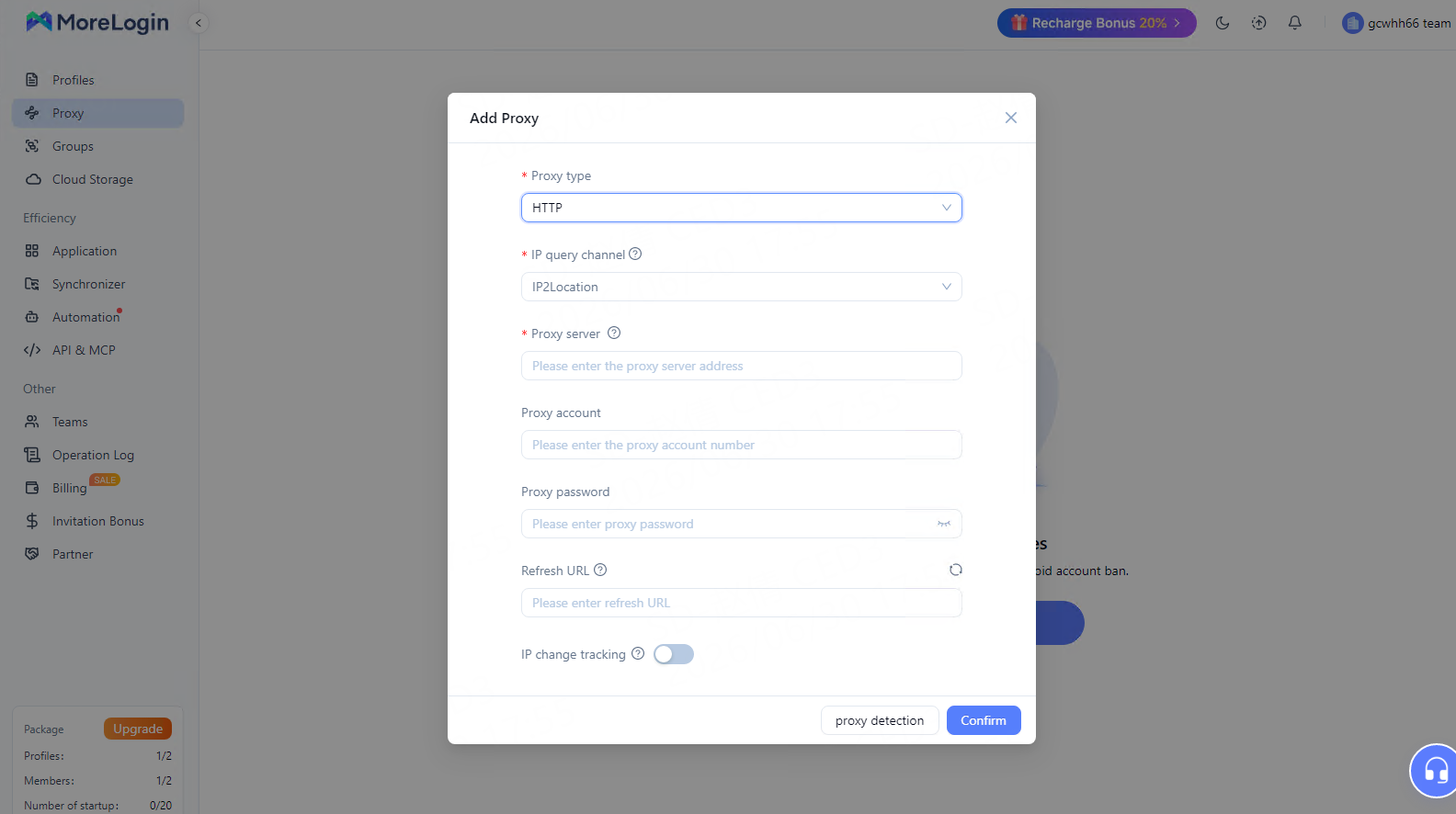
Create a new browser profile in MoreLogin.
Give it a name that makes sense to the team. A random profile number becomes difficult to manage once you have dozens of environments.
Do not put passwords or recovery codes into general shared notes.
Open the profile proxy settings.
Select the required protocol and enter the proxy details. If the proxy is already saved in MoreLogin, select it from the existing list.
Test the connection before launching the profile.
This becomes especially important when using a proxy for YouTube account management. A failed or incorrectly located proxy is easier to fix before an important Google account signs in.
Open the profile and check its public IP before opening YouTube.
Confirm that:
The proxy is connected
The expected country is shown
The connection is reasonably fast
The browser time zone makes sense for the selected location
Then open YouTube.
For regional research, also check YouTube's language and location settings. A US IP with an old UK account history may still produce results influenced by that history.
Reuse the same profile for the same independent Google login.
This allows cookies and local browser data to remain in one environment instead of creating a fresh session every time.
If a proxy fails and has to be replaced, choose a sensible replacement location. Record the change so the team knows why the IP changed.
Consistency is easier to operate than unnecessary rotation.
A proxy is useful infrastructure, but poor proxy choices can create more problems than they solve.
Free proxies are attractive because there is no commitment.
The problem is that you often know very little about the server.
The IP may be heavily shared. Bandwidth may be limited. The service may log traffic. The server may disappear without warning.
Use free options for disposable browsing, not for accounts with business value.
Rotation is a feature, not a goal.
If an account normally operates from one region, changing countries several times a day adds complexity without a clear benefit.
For normal account work, stable access is usually easier to maintain.
Technically, several profiles can use the same proxy.
Operationally, that is not always a good idea.
If dozens of unrelated accounts share one IP, their network histories become connected through the same address. Heavy activity can also affect connection speed.
Decide how proxies are assigned before scaling.
A proxy changes the network layer.
It does not automatically replace cookies, local storage, browser fingerprint data, Google account history, or recovery information.
This is one of the biggest misconceptions around a YouTube proxy browser setup.
If session isolation matters, the browser environment needs to be handled separately.
Using a proxy does not override YouTube policies, copyright rules, workplace network policies, or local law.
It also does not repair an already suspended account.
Treat the proxy as networking infrastructure, not as a way to make problematic activity invisible.
A good YouTube proxy does not need to be complicated.
Start with the task.
Use a web proxy for quick, low value access. Use residential or static ISP connections when stable regional access matters. Consider mobile proxies when you actually need cellular network testing. Use datacenter IPs when speed and cost matter more than maintaining a regular signed in environment.
For account workflows, pay attention to more than the IP. Keep the browser profile, location, session data, and proxy assignment consistent.
MoreLogin gives teams a way to keep those browser environments separated and assign different proxy connections to different profiles. That makes the setup easier to organize when several markets or independent Google accounts are involved.
Start with one tested profile and one reliable connection. Once that works without constant changes, scale the same structure to the rest of the workflow.
Is it legal to use a proxy for YouTube?
Proxy technology is legal in many places. The activity performed through it still needs to follow applicable laws, network policies, and YouTube rules.
What is the best proxy for YouTube?
It depends on the task. Static residential or ISP proxies are often practical for regular account access. Residential proxies work well for regional research. Mobile proxies fit carrier or mobile testing. Datacenter proxies can be enough for public research.
Can I use a free YouTube proxy?
Yes, for low value browsing. I would avoid entering an important Google account into an unknown free web proxy because privacy, IP reputation, and connection quality can be difficult to verify.
Can I upload videos through a proxy?
Yes, provided the connection supports enough upload bandwidth and remains stable. Test the connection with a smaller private upload before sending a large production file.
Does changing my proxy change my YouTube account country?
No. The proxy changes the network location visible during that connection. Google account country, YouTube settings, language, and payment information remain separate.
Is a residential proxy better than a mobile proxy for YouTube?
Not automatically. A stable residential or ISP connection can be more practical for desktop channel management. Mobile proxies make more sense when the cellular network or mobile environment is part of the test.
Does MoreLogin provide a proxy?
MoreLogin allows users to configure third party proxies and manage proxy connections alongside browser profiles. Available proxy options and services can vary, so check the current product interface before choosing a setup.
<!-- Begin SF Tag -->
<div class="sf-root" data-id="3609697" data-badge="light-default" data-variant-id="sf" style="width:125px">
    <a href="https://sourceforge.net/software/product/MoreLogin/" target="_blank">MoreLogin Reviews</a>
</div>
<script>(function () {var sc=document.createElement('script');sc.async=true;sc.src='https://b.sf-syn.com/badge_js?sf_id=3609697&variant_id=sf';var p=document.getElementsByTagName('script')[0];p.parentNode.insertBefore(sc, p);})();
</script>
<!-- End SF Tag -->
 EN
EN