- Product

- Pricing
- Affiliate Program
- Developers
- Resource
 EN
EN
Residential proxies sound harder than they are. The basic idea is simple. Your traffic goes through an IP address that belongs to a real home network instead of a data center server.
People usually start looking into residential proxies when normal proxies stop working well. Maybe Google keeps showing CAPTCHAs during SEO checks. Maybe an ad page looks different in each country. Maybe an account workflow needs a cleaner and more stable browsing setup.
The confusing part is that residential proxies are often sold as a fix for everything. They are not. They can help with IP quality and location signals, but they do not fix poor browser settings, bad account behavior, or messy workflows.
This guide explains what is a residential proxy, how it works, when it makes sense, and how to use residential proxies with MoreLogin in a more organized way.
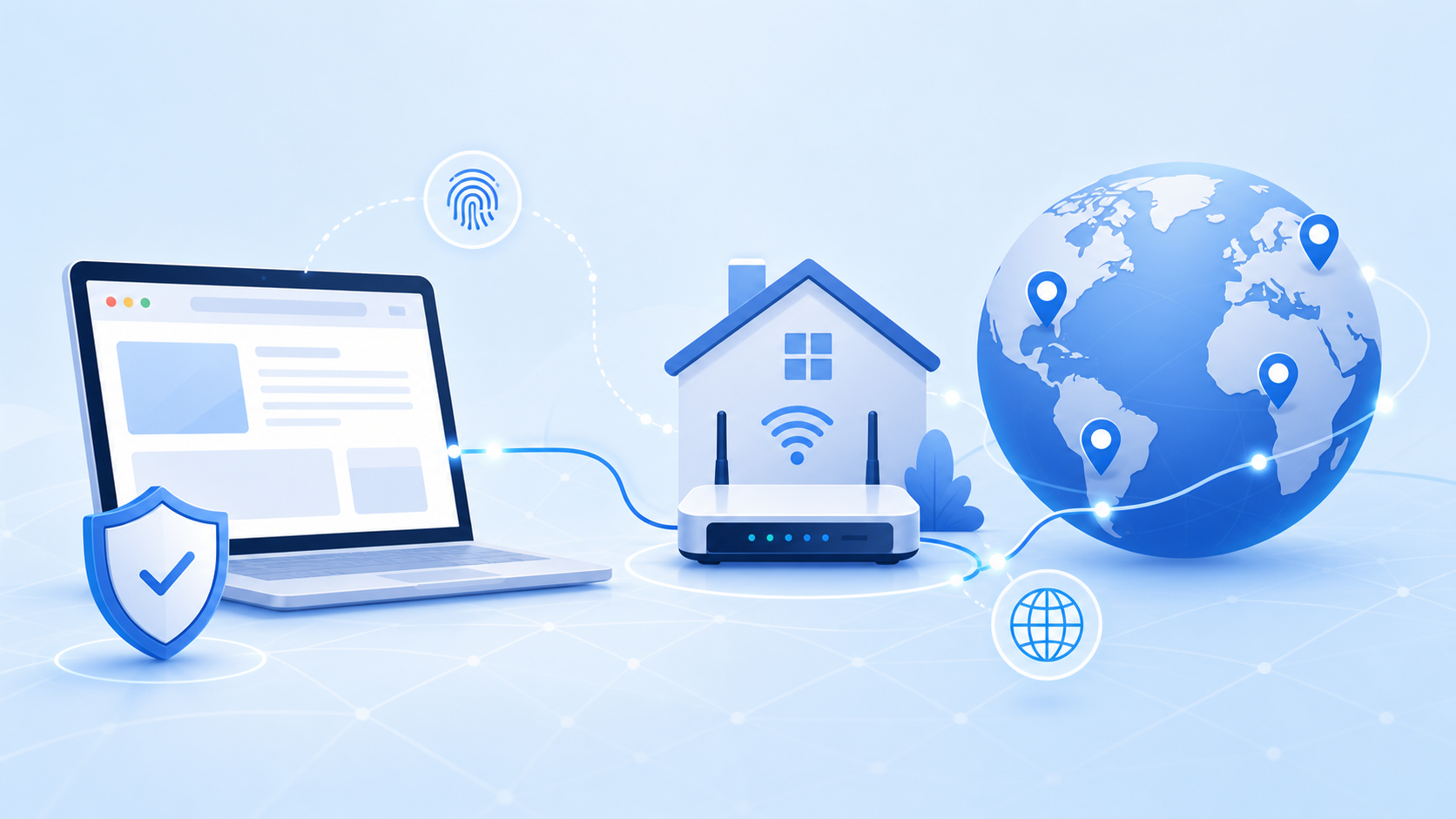
A residential proxy is a proxy that routes your traffic through an IP address assigned by an internet service provider to a real household network.
That IP is tied to physical devices like home routers, computers, and phones, and assigned by internet service providers (ISPs). When a website receives your request, it sees a real IP address associated with a household connection instead of your original IP.
This is why residential proxies are different from datacenter proxies. A datacenter proxy comes from hosting infrastructure. A residential proxy comes from a consumer ISP range. To many websites, that looks closer to normal user traffic.
So, what is residential proxy in plain English? It is a proxy server—an intermediary server between you and the website—that lets you browse, test, or collect public data through an IP that appears to come from a real user location.
This does not mean the setup becomes invisible. A proxy only changes the network layer. Websites can still look at browser fingerprints, cookies, DNS, WebRTC, timezone, language, and user behavior.
That is where many beginners get burned. They buy residential proxies, connect them to a browser, and assume the setup is clean. Then the timezone points to one country, the IP points to another, and the browser profile has old cookies from a third place. The proxy is not the problem there. The full environment is.
A residential proxy server acts as an intermediary server between your device and the website.
You send a request through the proxy. The proxy server intercepts that request and forwards it through a residential IP. The website sends the result back to that IP. Then the proxy returns the response to you.
From your side, the page opens as usual. From the website side, the request blends in better with normal internet traffic from real users.
This is useful when location matters. A team in one country can check how a search result, ad, landing page, product price, or website layout appears in another country.
Still, the IP is only one signal. If the proxy is in Germany, but the browser timezone and DNS look unrelated, the setup may feel off. That is why residential proxies work better when the browser environment also matches the proxy location.
A static residential proxy, often called a static proxy, keeps the same IP address for a longer time. It is usually better for account login, store management, long sessions, and workflows where stability matters.
A rotating residential proxy uses IP rotation to change IPs after a set time, after each request, or after a manual trigger. It is often used for SEO checks, public data collection, market research, and ad verification.
Neither one is better for every job. If you are checking search results across many regions, rotating proxies can be useful. If you are managing an account that expects a stable login pattern, frequent IP changes can create problems. In some cases, static residential proxies can also be cheaper than rotating proxies when providers price long-lived sessions more simply.
Residential proxies are often the middle choice. They look more natural than datacenter proxies, but they can be slower because they rely on consumer connections and usually cost less than mobile proxies.
Datacenter proxies still have a place. They are fast and cheaper. Because they use datacenter ip addresses from server farms, their traffic is easier to recognize than residential IPs, and many sites already watch for datacenter ip ranges during blocking.
Mobile proxies fit mobile first tasks better, but the price is often higher. They are not the first choice for every workflow. In practice, mobile residential proxies run over cellular networks, so they better match traffic patterns from mobile users.
isp proxies are a hybrid option that use ISP-issued residential IPs while keeping datacenter-style performance, so they can help when you need steadier sessions without giving up as much legitimacy.
The honest answer is simple. Do not choose residential proxies because they sound more advanced. Choose them when datacenter proxies are too easy to detect, or when location accuracy matters.
A lot of people ask what are residential proxies because of SEO testing.
Search results change by location, language, device, and sometimes even browsing context. A residential proxy can help SEO teams check how results look from different countries or cities.
For example, a site may rank well in one city but not in another. A local landing page may show up in one region and disappear in the next. If you only check from your office network, you may miss that difference.
For occasional manual checks, residential proxies may be overkill. For regular local rank tracking, SERP checks, and geo based testing, they become more useful.
One of the main residential proxies use cases for public data collection is gathering product prices, search pages, reviews, public listings, and market data. This section covers common cases residential proxies handle when businesses need broad, location-aware access.
Price monitoring helps businesses track competitor pricing in real time.
The reason is practical. A large number of requests from datacenter IPs can get blocked quickly. Requests sent through proxy IPs sourced from residential networks often look more like normal user traffic, and a residential proxy IP may reduce blocks and CAPTCHAs.
That does not remove responsibility. Public data collection should respect website terms, privacy rules, and local laws. A proxy is a tool, not a permission slip. Some teams also extend residential proxies use to social media management, including running multiple social media accounts with less detection risk.
Ad teams often route checks through residential proxy networks or larger proxy networks when verifying ads across regions.
This matters more than people think. An ad may appear differently across multiple geographic locations. A landing page may redirect based on location. A price, language, payment method, or compliance notice may change by market.
Residential proxies let teams check these details from the user side. It is not glamorous work, but it prevents expensive mistakes.
E-commerce teams may use residential proxies for regional store checks, marketplace research, price monitoring, and account workflow separation, though dedicated residential proxies are usually the better fit when those workflows need exclusivity and stability.
shared residential proxies can be more affordable, but they may be used by multiple users at the same time, which reduces control.
For account based work, the proxy is only part of the setup. You also need clean cookies, stable profile settings, consistent timezone, and a browser environment that does not look patched together, especially when some workflows also involve accessing geo restricted content or region-specific storefront views.
A residential proxy controls the IP layer. It does not manage the whole browser identity by itself.
Benefits
They use real residential IP addresses assigned to households by internet service providers, so traffic may look closer to normal user traffic.
They support country, region, and sometimes city level browsing tests.
They are useful for SEO checks, ad verification, market research, and account workflows.
Rotating residential proxies help when one task needs many IPs.
Static residential proxies are better for long sessions and stable account use.
The legitimacy of a residential network depends on how companies obtain residential proxies and build their pools, often by partnering with real consumers for shared bandwidth.
Limits
They are usually more expensive than datacenter proxies.
Speed can be less stable because the IPs come from real networks.
Poor quality residential proxies can still be blocked.
Wrong timezone, DNS, WebRTC, or browser fingerprint settings can create mismatches.
A proxy only changes the network layer. It does not manage the full browser environment by itself.
An ethical provider or residential proxy service should use explicit user consent for IP participation, compensate users, and provide simple opt-out controls. Unethical sourcing can create legal exposure for the proxy user, even if the technical setup seems effective.
This is the part that people often skip. A residential proxy can improve the IP side, but it cannot clean up a weak browser setup. If the browser leaks the wrong timezone or DNS, the proxy will not carry the whole workflow.
A good residential proxy provider should cover the regions you actually need, and comparing residential proxy providers by pool quality and geographic reach is usually more useful than chasing marketing claims. Do not get distracted by huge IP pool numbers. Strong residential proxy networks matter more than headline pool size alone, because a large pool means little if the IPs are dirty, unstable, or missing your target locations.
For SEO checks, city level targeting may matter. For ad verification, country or region targeting may be enough. For account workflows, session stability can matter more than pool size.
If you are comparing options, this guide to the 8 best residential proxies can help you narrow the list.
Residential proxies are often slower than datacenter proxies. That is not always a deal breaker. For many workflows, stability matters more than raw speed.
Check whether the provider supports sticky sessions. Check how long one session can keep the same IP. Check whether rotation happens by time, request, or manual change.
For account work, random IP changes can cause friction. For data collection or regional checks, rotation may be useful.
Most users need HTTP, HTTPS, or SOCKS5 support. Choosing the right residential proxy provider also means checking the pricing model, support quality, and protocol fit for the browser profile or tool you use.
Pricing also needs a closer look. Many residential proxy plans are sold through a proxy service that charges by traffic, while others charge by IP. Residential proxies typically cost about $1 to $15 per GB. Traffic based pricing can fit rotating tasks. Per IP pricing can fit stable sessions.
For example, IPRoyal's 1GB residential proxy plan costs $7.00, while its 50GB plan lowers the price to $4.90 per GB.
Support is not a small detail. If proxies fail during real work, fast replacement matters. For a broader provider overview, you can also check this guide to the best proxy sites.
Do not put a new proxy into an important workflow without testing it first. This sounds obvious, but it is still one of the most common mistakes.
Start with the IP location. Does it match the country or city you selected? Then check the ASN and ISP details. A residential proxy should not look like a random hosting server.
Then check blacklist status and abuse history. Some residential IPs have been overused. Some have already been flagged. The word residential does not mean the IP is clean.
MoreLogin has a practical guide on how to check proxy quality before using proxies in real workflows.
A basic IP lookup is not enough.
Check DNS. Check WebRTC. Check timezone. Check language. Check connection speed and stability.
If the IP points to France but the timezone shows another region, that mismatch can look strange. If WebRTC exposes another IP, the environment is not clean. If DNS routes through the wrong place, that can also create a weak signal.
Run a small test first. Open a few normal pages. See if the connection holds. Then decide whether the proxy is ready for real work.
Choosing residential proxies only because they sound safer.
Using one proxy for too many unrelated accounts.
Using rotating IPs for accounts that need stable login sessions.
Using the same IP address when stability matters is often safer than rotating without a clear reason.
Ignoring timezone, language, and browser fingerprint consistency.
Using cheap proxies without checking IP quality.
Mixing residential, datacenter, and mobile proxies without a clear reason.
Thinking a proxy alone can create a clean account environment.
Residential proxies alone are not enough for avoiding IP bans if the wider setup still looks suspicious, and they will not prevent ip bans caused by inconsistent behavior or fingerprints.
The worst mistake is treating proxies as a shortcut. They are not.
A good setup needs a clean IP, a separate browser profile, consistent settings, and normal user behavior. If one part is messy, the whole setup becomes weaker.
Start with the task, not the proxy.
For SEO checks, ad verification, and regional content testing, think first in terms of types of residential proxies: rotating options fit broad checks across many regions, while mobile or other proxy variations only make sense when the workflow truly needs them.
For account login, store management, and long term workflows, a static residential proxy or sticky session is usually a better fit. A stable account should not jump between random IPs every few minutes.
This is the most practical way to think about how to use residential proxies. First decide the workflow. Then choose the proxy type.
After choosing a provider, test the proxy before adding it to an important profile.
Check location, ASN, ISP details, speed, DNS, WebRTC, and blacklist signals.
This step is not exciting. It is still worth doing. Five minutes of checking can save hours of cleanup later.
Open MoreLogin and create a new browser profile for the task or account.
Each profile should keep its own cookies, cache, browser settings, fingerprint configuration, and login state. Do not mix unrelated accounts in the same profile.
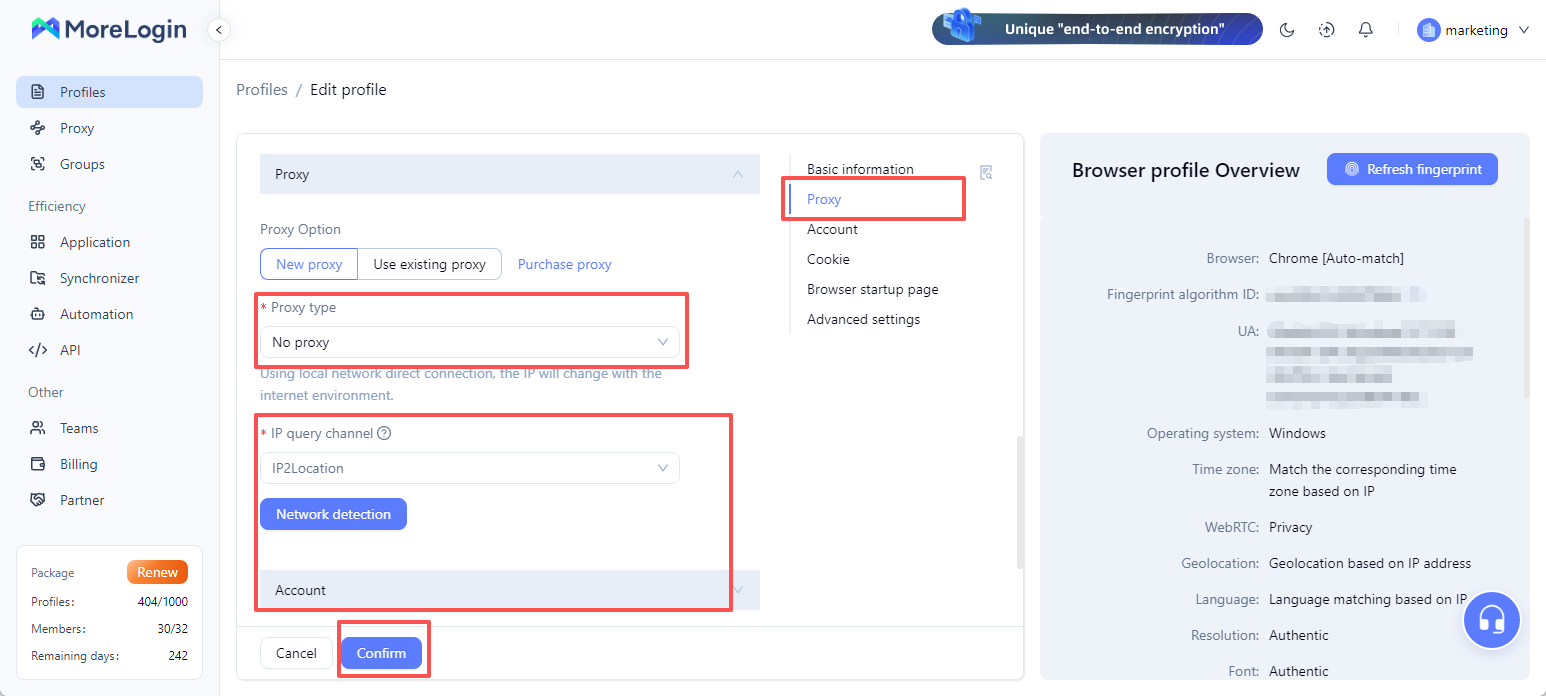
This is where the proxy and browser profile start to work together. The residential proxy handles the IP and location layer. MoreLogin helps keep the browser environment separated.
Go to the proxy settings inside the profile.
Choose the proxy type that matches your provider details. This may be HTTP, HTTPS, or SOCKS5. Add the host, port, username, and password. Save the settings after the connection test passes.
If your provider gives an IP change link or session control option, use it only when the workflow needs rotation. For stable account work, avoid changing the IP too often.
This step is easy to overlook.
If your residential proxy is in the United States, the browser timezone, language, and system settings should not point to a completely unrelated region. The same logic applies to DNS, WebRTC, and general browser signals.
A proxy browser setup is not only about adding an IP. It is about keeping the profile consistent. MoreLogin explains this idea further in its guide on what is a proxy browser.
After saving the profile, launch it and run another environment check.
Confirm that the IP, DNS, WebRTC, timezone, and location signals match your plan. Visit a few normal websites first. Make sure pages load correctly and the connection stays stable.
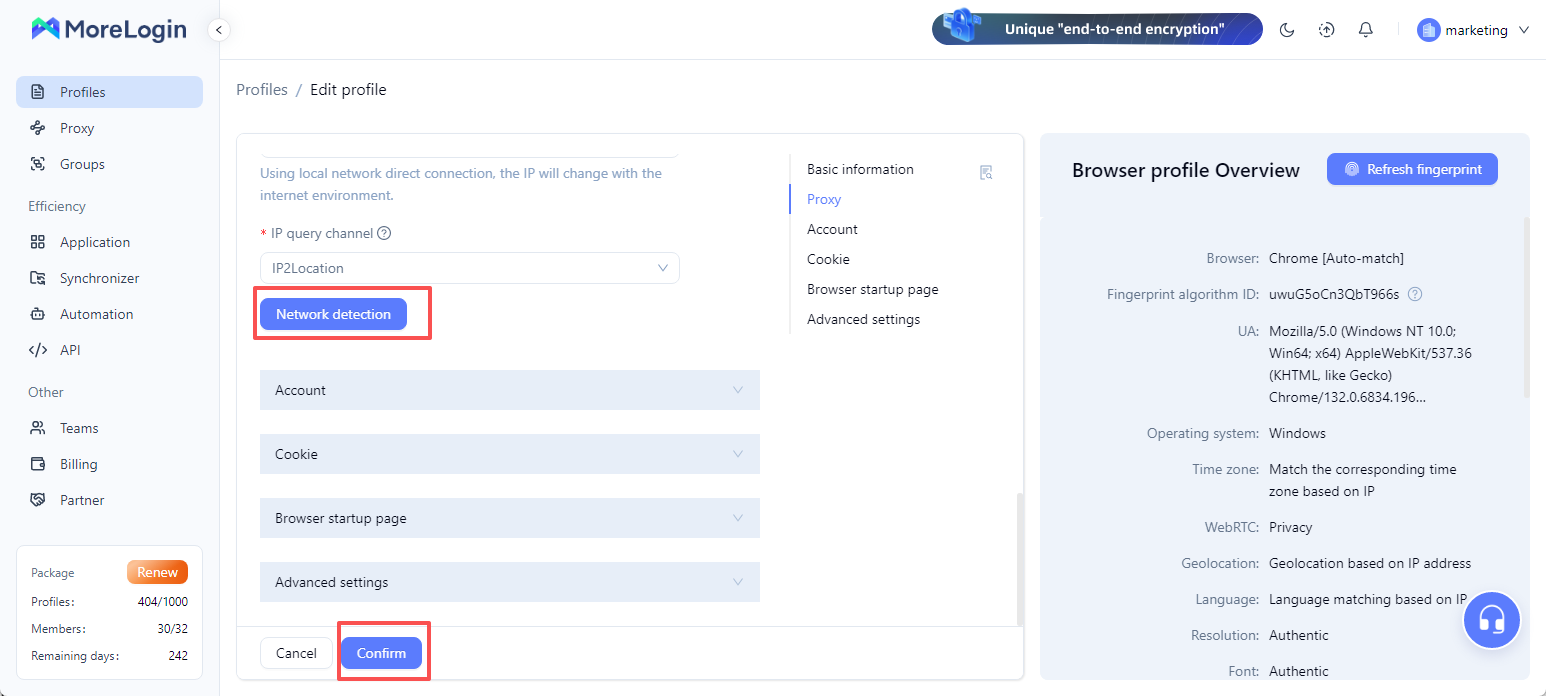
Do not rush straight into an important login or campaign task. A short test can catch issues early.
For long term account workflows, keep one stable proxy with one profile where possible. Keep the same country, timezone, language, and browsing pattern.
For SEO checks or regional testing, you can rotate IPs based on the task. Still, keep the workflow organized. Random changes make debugging harder.
A simple rule works well. One important account should have one stable environment. That environment includes the proxy, browser profile, cookies, and settings.
Replace a proxy when it becomes unstable.
Warning signs include frequent disconnects, sudden location changes, slow loading, blacklist issues, or failed environment checks.
Do not wait until an account workflow has problems. Proxy quality should be checked as part of normal maintenance.
MoreLogin anti detect browser does not replace a residential proxy. A residential proxy does not replace MoreLogin. The proxy controls where traffic comes from. MoreLogin helps manage separated browser profiles and consistent browser environments.
A residential proxy is useful when IP source and location matter. It can help with SEO checks, ad verification, market research, regional browsing, and account workflows.
But it is not always needed. If the task is simple, a datacenter proxy may be enough. If the task is mobile focused, a mobile proxy may fit better. If the task needs real ISP backed traffic and regional accuracy, a residential proxy is often a better choice.
The real lesson is not only what is a residential proxy. The real lesson is how to use it without making the environment messy.
Check proxy quality. Choose the right proxy type. Keep sessions stable when stability matters. Match the browser environment with the proxy location. Do not expect the proxy to handle everything alone.
For teams that need to manage residential proxies together with separated browser profiles, MoreLogin can help organize profiles, proxy settings, and browser environments in one workspace.
What is a residential proxy?
A residential proxy routes traffic through a real ISP backed IP address, acting as an intermediary server and proxy server between you and the website. The website sees the residential IP instead of your original IP.
What are residential proxies used for?
Residential proxies are used for SEO checks, ad verification, regional browsing, public data collection, market research, account workflow separation, and social media management.
Is a residential proxy better than a datacenter proxy?
Not always. A residential proxy usually looks more natural, but it costs more and may be slower. A datacenter proxy can still be better for simple, fast, and low risk tasks, though those IPs often come from server farms and data centers and are easier to detect.
Are residential proxies legal?
Residential proxies are legal in many places when used for lawful tasks, though legality also depends on ethical sourcing and user consent from the provider. The risky part is how they are used. Always respect local laws, website rules, privacy requirements, and provider terms.
Do I need residential proxies for SEO testing?
You may need them if you do regular local SERP checks, rank tracking, or geo based search testing. For occasional manual checks, they may not be necessary.
How to use residential proxies with MoreLogin?
Choose the right proxy type, test proxy quality, create a separate MoreLogin profile, add proxy details, match browser settings with the proxy location, and test the full environment before real use.

 EN
EN