- Product

- Pricing
- Affiliate Program
- Developers
- Resource
 EN
EN
LinkedIn has become an essential platform for B2B communication, recruitment, sales, networking, and personal branding. As businesses grow, it is increasingly common for agencies, recruiters, sales teams, and marketing professionals to work with multiple LinkedIn accounts as part of their day-to-day operations.
Managing several accounts, however, can quickly become complicated. Different accounts may require separate login sessions, browser environments, team permissions, and workflows. Using a single browser for everything can lead to mixed sessions, lost cookies, accidental logouts, and unnecessary confusion between accounts.
A structured browser-profile setup can make this process much easie
This is where MoreLogin can be useful. MoreLogin provides isolated browser environments that allow users to create and manage separate profiles for different online accounts. For teams working with multiple LinkedIn profiles, this creates a more organized environment for everyday account management.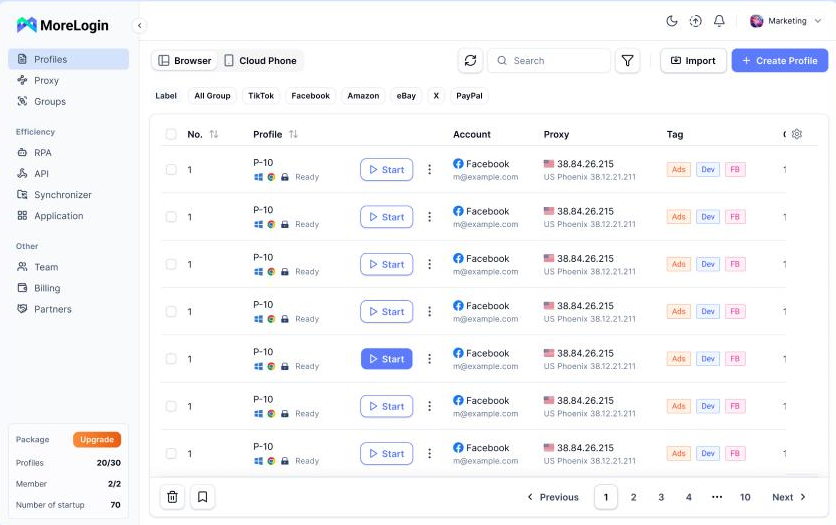
The main challenge of managing multiple LinkedIn accounts is keeping each account's environment separate.
For example, imagine a company managing ten LinkedIn profiles for different employees, clients, or business development campaigns. If all of these accounts are accessed through the same standard browser profile, cookies and sessions can easily become mixed.
A team member might accidentally open the wrong LinkedIn session, log out of another user's account, or spend unnecessary time switching between accounts.
Using multiple standard Chrome profiles can solve some of these problems, but as the number of accounts increases, managing them can still become inconvenient.
A dedicated browser-profile solution provides a more structured approach.
Instead of treating the browser as one large workspace, every account can have its own environment.
MoreLogin is a browser-profile management platform designed to provide separate browser environments for different online accounts.
Each profile can maintain its own browser data, cookies, sessions, extensions, and configuration. This means that users can create dedicated environments rather than constantly switching accounts inside the same browser session.
For teams, this can make account management considerably more organized.
For example:
LinkedIn Account A → MoreLogin Profile A
LinkedIn Account B → MoreLogin Profile B
LinkedIn Account C → MoreLogin Profile C
LinkedIn Account D → MoreLogin Profile D
Each profile can then be launched independently when the corresponding account needs to be accessed.
A practical way to use MoreLogin with LinkedIn is to assign a dedicated browser profile to each account.
Instead of logging into several LinkedIn accounts from the same browser environment, each account remains associated with its own profile.
This approach helps keep account-specific browser information organized and reduces the possibility of accidentally mixing sessions.
For example, a sales agency could create profiles such as:
LinkedIn – Sales – Account 01
LinkedIn – Sales – Account 02
LinkedIn – Recruiting – Account 03
LinkedIn – Client A – Account 04
A consistent naming system is particularly useful when several employees are working with the same group of profiles.
MoreLogin's profile-based approach allows teams to treat each environment as a separate workspace rather than managing everything through one browser.
One of the simplest ways to improve organization is to maintain a one-profile-per-account workflow.
When a LinkedIn account is assigned to a dedicated MoreLogin profile, its browser data and session information remain associated with that environment.
This is useful for teams that need to work with many accounts over an extended period.
Instead of repeatedly logging in and out, a team member can simply launch the appropriate profile and continue working in the corresponding LinkedIn session.
This also makes internal processes easier to document.
For example, an agency can maintain an internal list showing which MoreLogin profile belongs to which client or team member. If a new employee joins the team, the administrator can provide access to the appropriate profile rather than giving the employee access to every account.
When managing professional accounts, consistency matters.
Teams should avoid making unnecessary changes to account environments and should maintain a predictable workflow. The objective is not to constantly change technical parameters, but to create a stable environment that is easy for the team to manage.
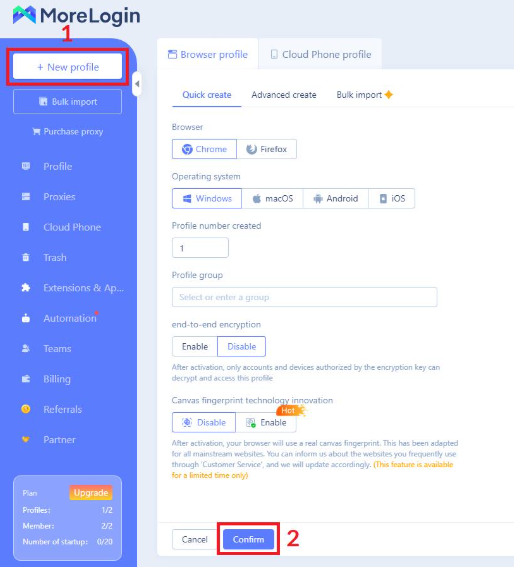
MoreLogin allows users to configure individual browser profiles and maintain their settings separately.
Network settings can also be managed at the profile level when required by a legitimate business workflow.
At the same time, browser-profile management should not be viewed as a way to bypass LinkedIn's policies or security systems. Users should always follow LinkedIn's terms of service, account policies, and applicable laws.
The purpose of using separate browser environments is primarily organization, separation, and efficient account management.
The challenge becomes even greater when several employees need access to multiple LinkedIn accounts.
Sharing passwords through messaging apps or spreadsheets is difficult to control and creates unnecessary security risks.
A centralized profile-management workflow can provide a better alternative.
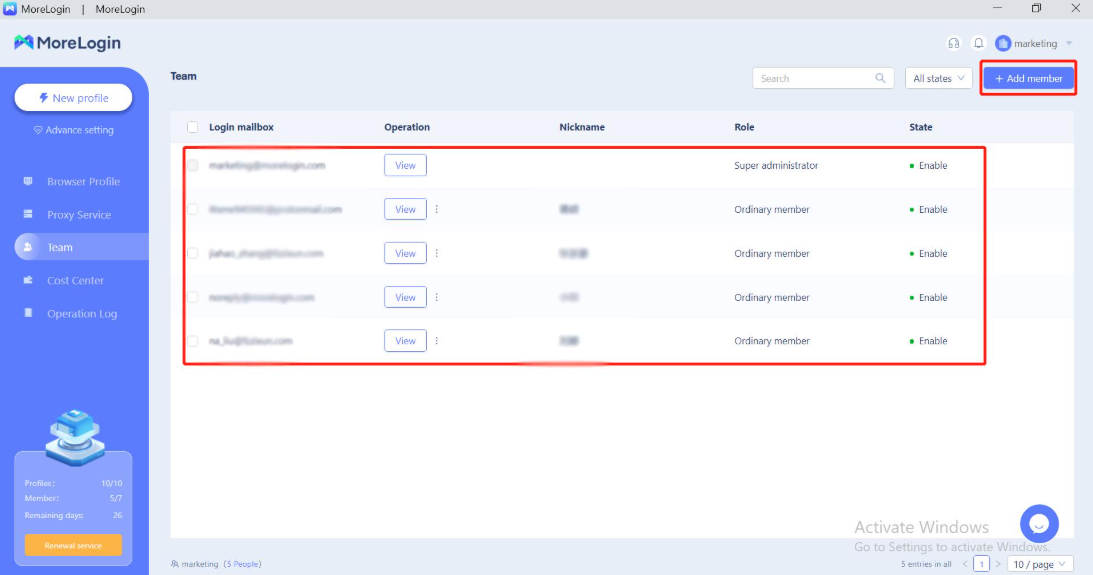
MoreLogin includes team collaboration features that allow organizations to manage browser profiles and assign access to team members.
For example, a company could have:
an administrator responsible for account management;
sales representatives responsible for outreach;
recruiters responsible for candidate communication;
account managers responsible for individual clients.
Instead of giving every employee unrestricted access, the organization can structure access around specific browser profiles and responsibilities.
This creates a clearer division of work and makes it easier to manage access when employees join or leave the company.
A practical example of this workflow can be seen in the work of Outzeach, a company operating in the LinkedIn account solutions space.
Outzeach works with businesses and teams that need access to LinkedIn accounts for professional outreach, recruitment, networking, and business development workflows.
When working with multiple LinkedIn accounts, keeping browser environments separated is an important part of maintaining an organized workflow.
Outzeach uses MoreLogin as part of its account-management infrastructure. Dedicated browser profiles allow different LinkedIn environments to be kept separate while making it easier for the team to identify and manage individual accounts.
Instead of having multiple LinkedIn sessions open inside the same browser, each account can be associated with its own MoreLogin profile.
This approach is particularly useful when a team works with a larger number of accounts.
For example, an internal workflow might look like this:
Outzeach LinkedIn Account → Dedicated MoreLogin Profile → Assigned Team Member → Specific Business Workflow
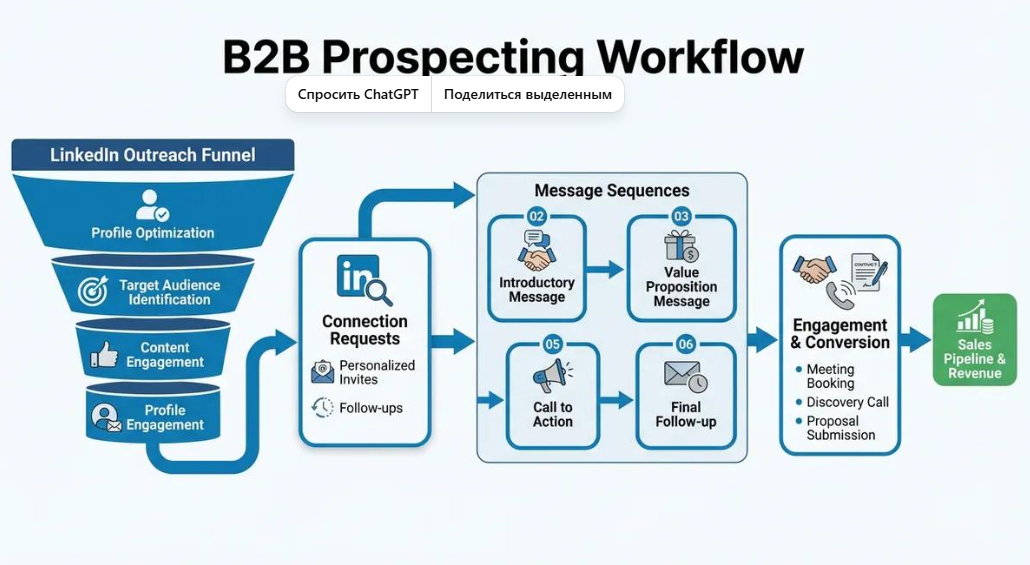
This structure makes it easier to understand which account is being used, who is responsible for it, and which browser environment should be opened.
You can learn more about Outzeach and its LinkedIn account solutions at Outzeach.com.
Account security involves more than protecting passwords.
Browser sessions may contain cookies, authentication information, extensions, and other account-related data. When several employees work with multiple accounts, keeping this information organized and separated becomes increasingly important.
MoreLogin provides profile-based management that helps keep different browser environments separate.
For organizations, this can reduce the risk of accidental session mixing and make account administration easier.
It also provides a more structured way to manage browser profiles when compared with keeping dozens of accounts inside one standard browser environment.
Companies should still follow standard security practices, including using strong passwords, appropriate access controls, multi-factor authentication where available, and limiting account access to authorized employees.
Once each LinkedIn account has its own dedicated environment, everyday work can become more straightforward.
Instead of opening a browser and searching through numerous tabs, a team member can launch the profile associated with the account they need.
This is particularly useful for agencies managing accounts for multiple clients.
MoreLogin also offers features designed for team workflows and browser automation. Depending on the use case, these capabilities can help organizations streamline repetitive browser-based processes.
Automation should always be implemented responsibly and within the policies of the platforms being used.
For LinkedIn specifically, teams should ensure that their workflows respect LinkedIn's rules, limits, and applicable account policies.
Consider a company managing 20 LinkedIn accounts.
With a traditional browser setup, employees might have dozens of tabs and windows open simultaneously. Over time, it becomes increasingly difficult to remember which session belongs to which account.
With MoreLogin, the company can create 20 dedicated browser profiles.
Each profile can have:
a clear name;
its own browser environment;
its own cookies and session data;
its own configuration;
appropriate team access;
a clearly defined purpose.
An employee working with Client A can launch the corresponding profile, complete their work, and close the environment when finished.
Later, another employee can access the profile assigned to Client B without needing to search through a collection of unrelated browser sessions.
For a growing team, this structure can make account management much easier to organize.
Managing multiple LinkedIn accounts does not have to mean constantly switching between browser tabs, logging in and out, or sharing credentials between team members.
A dedicated browser-profile workflow can provide a cleaner and more organized way to manage multiple professional accounts.
MoreLogin provides the browser infrastructure needed to create separate environments, manage profiles, collaborate with team members, and organize account sessions.
For companies such as Outzeach, which work with multiple LinkedIn accounts as part of their business operations, this type of infrastructure can be particularly useful.
The key is to combine the right technical organization with responsible account management. Dedicated browser profiles, controlled team access, secure credentials, consistent workflows, and compliance with LinkedIn's policies can help organizations build a more structured approach to managing multiple accounts.
For teams looking for a dedicated solution for managing multiple browser environments, MoreLogin provides a platform built around isolated browser profiles and team-oriented account management.
And for businesses interested in LinkedIn account solutions, Outzeach provides services designed for teams working with LinkedIn accounts and professional outreach workflows.

 EN
EN