- Product

- Pricing
- Affiliate Program
- Developers
- Resource
 EN
EN
Dexodata is a global proxy ecosystem built on a fully opt-in network, with rigorous KYC and AML compliance and extensive IP coverage worldwide.
One-time promo code MORELOGIN – 10% off your port purchase (until September 22, 2027)
You can start at no upfront cost: test the Dexodata network on a $1 starting balance, and your first top-up earns a 25% bonus (on deposits up to $50).
Running many accounts from one machine only works when every identity looks like a separate, ordinary person. An antidetect browser such as MoreLogin handles one half of that job: it gives each browser profile its own isolated fingerprint. The other half is the network – each profile also needs its own believable IP address, and that is where proxies come in. This guide shows how the Dexodata proxy network pairs with MoreLogin: which proxy type fits which task, how to rent a port in Dexodata, and how to connect that port inside a MoreLogin profile, all the way to a verified connection.
Marketplace sellers, social media teams, and agencies running client projects all rely on the same principle: separate identities need separate, believable connections.
A browser fingerprint tells a website which device is visiting. The IP address tells it where the visit comes from and whether many visits share one origin. If ten MoreLogin profiles all leave through a single IP, a platform can group them together no matter how carefully their fingerprints are separated, because the network signal still points to one source. Give each profile its own IP and that shared signal disappears: every account then carries its own location and its own connection history. In short, the browser isolates who is visiting and the proxy isolates where the visit comes from, and account safety depends on getting both layers right.
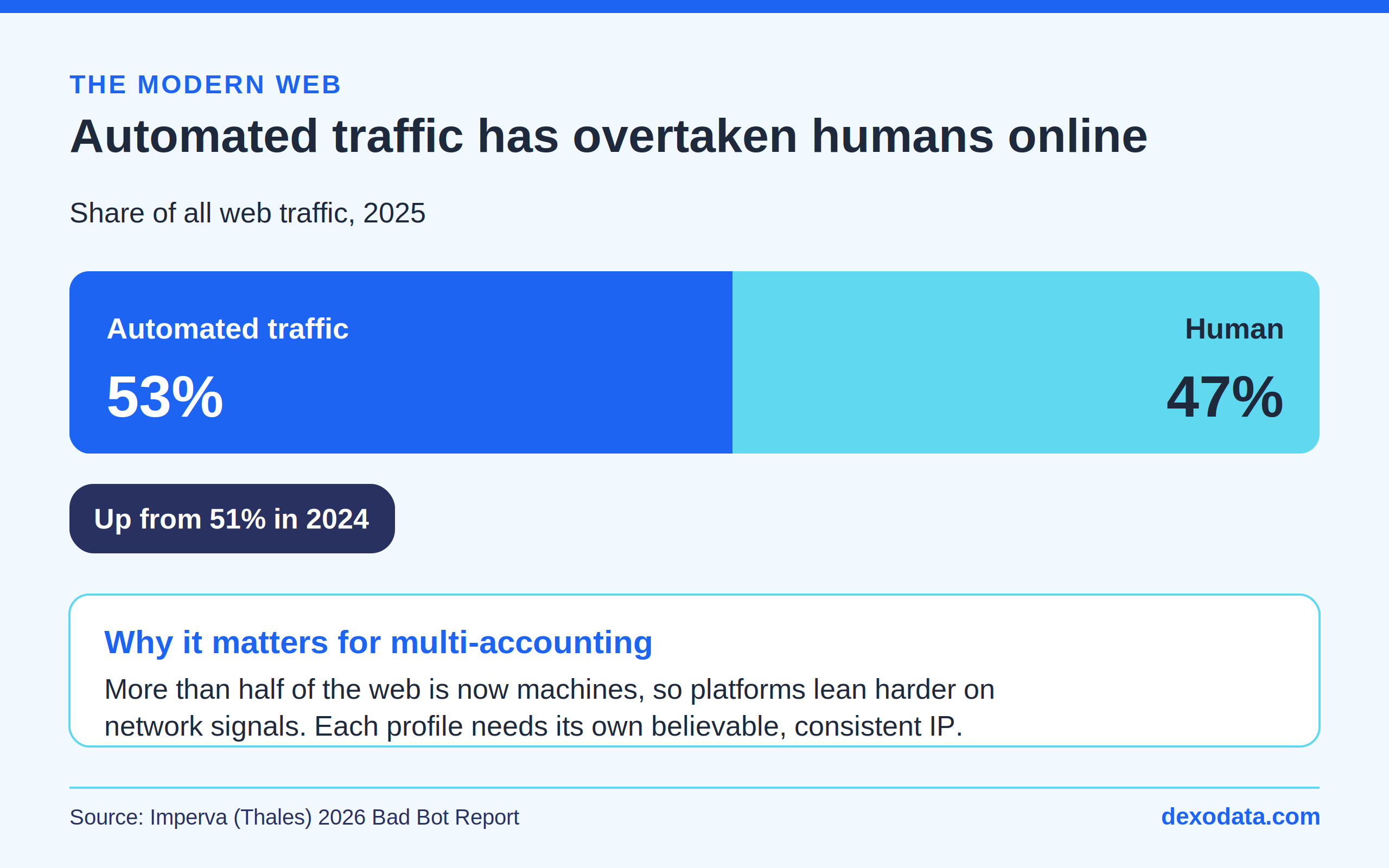
Image 1. Automated traffic has overtaken human activity online (Imperva/Thales, 2026).
This matters more every year. According to the Imperva (Thales) 2026 Bad Bot Report, automated traffic reached 53% of all web traffic in 2025, up from 51% a year earlier, while human activity fell to 47%. As a growing share of the web becomes automated, platforms lean harder on network signals to tell real users apart – which is exactly why each profile needs its own consistent, trustworthy IP.
The quality of an IP matters as much as its uniqueness. Addresses obtained responsibly, which behave like ordinary user connections, meet far less friction than ones a platform has already seen misused. Every IP in the Dexodata network is obtained with user consent and handled in line with KYC and AML standards, which keeps the pool predictable and stable for accounts you plan to run over a long period.
Image 2. The global proxy server market keeps expanding (Zion Market Research, 2025).
Demand for reliable proxies tracks the growth of the wider data economy. The global proxy server market was valued at about $4.29 billion in 2023 and is projected to reach $7.59 billion by 2032, a compound annual growth rate of roughly 7.5% (Zion Market Research). Growth is driven by data privacy, cloud adoption, e-commerce, and large-scale data collection – all workloads that depend on a stable supply of relevant IP addresses.
The Dexodata network offers residential, mobile, and datacenter proxies, and MoreLogin works with all three. Choosing well is mostly a matter of matching the IP source to how closely the target platform inspects new connections.
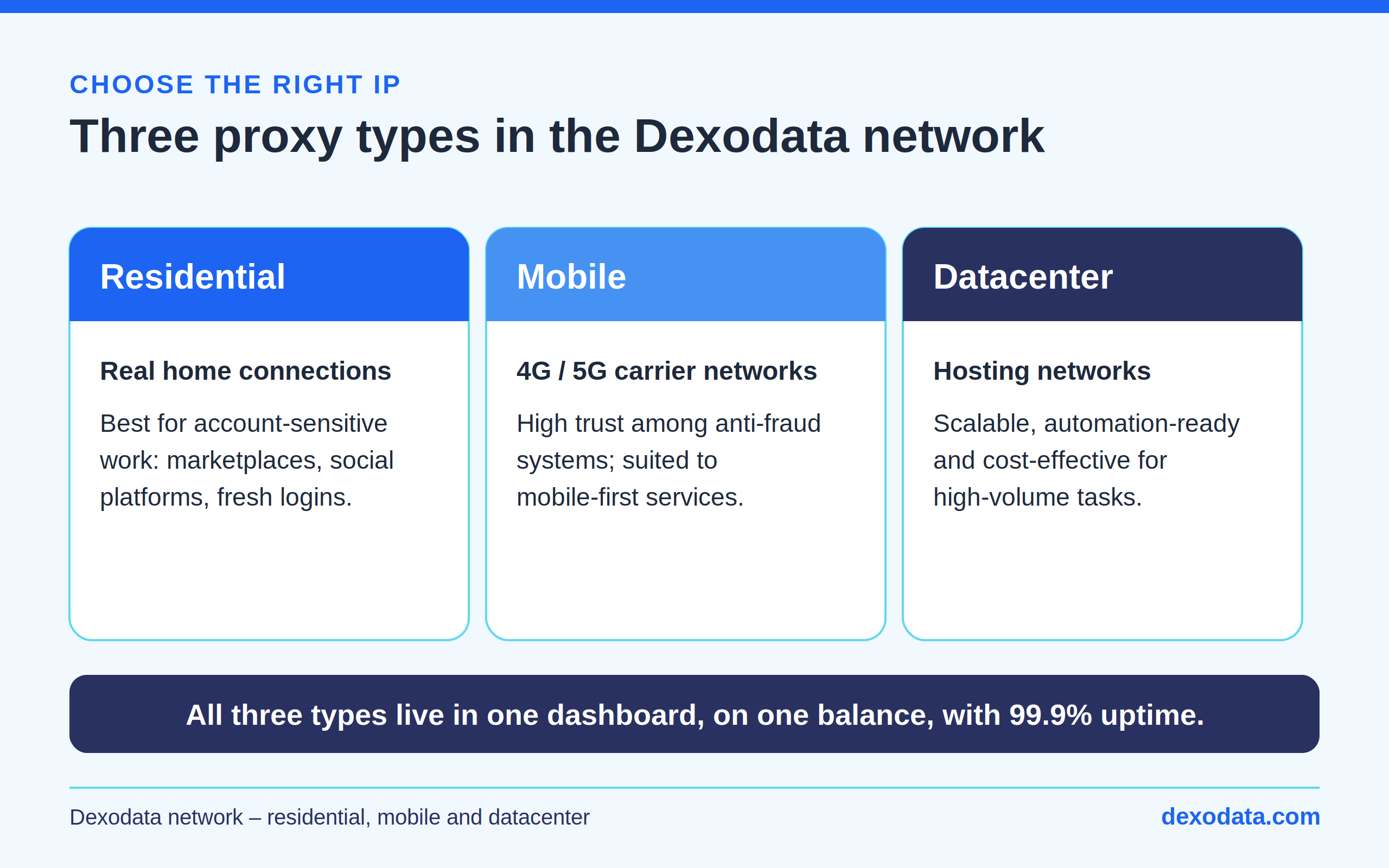
Image 3. Three proxy types in the Dexodata network, all on one dashboard and one balance.
Residential. Residential proxies route through real home internet connections, so they read as everyday household traffic. That makes them the strongest choice for account-sensitive work – marketplaces, social platforms, and any service that scrutinizes fresh logins.
Mobile. Mobile proxies use 4G and 5G carrier networks and inherit the high level of trust that anti-fraud systems grant to mobile users. They suit mobile-first services and any scenario where an account is expected to appear on a cellular connection.
Datacenter. Datacenter proxies come from hosting networks. They are the most cost-effective option in the catalog, which makes them a practical pick for automation and high-volume tasks where scalability and price per port matter more than the connection profile.
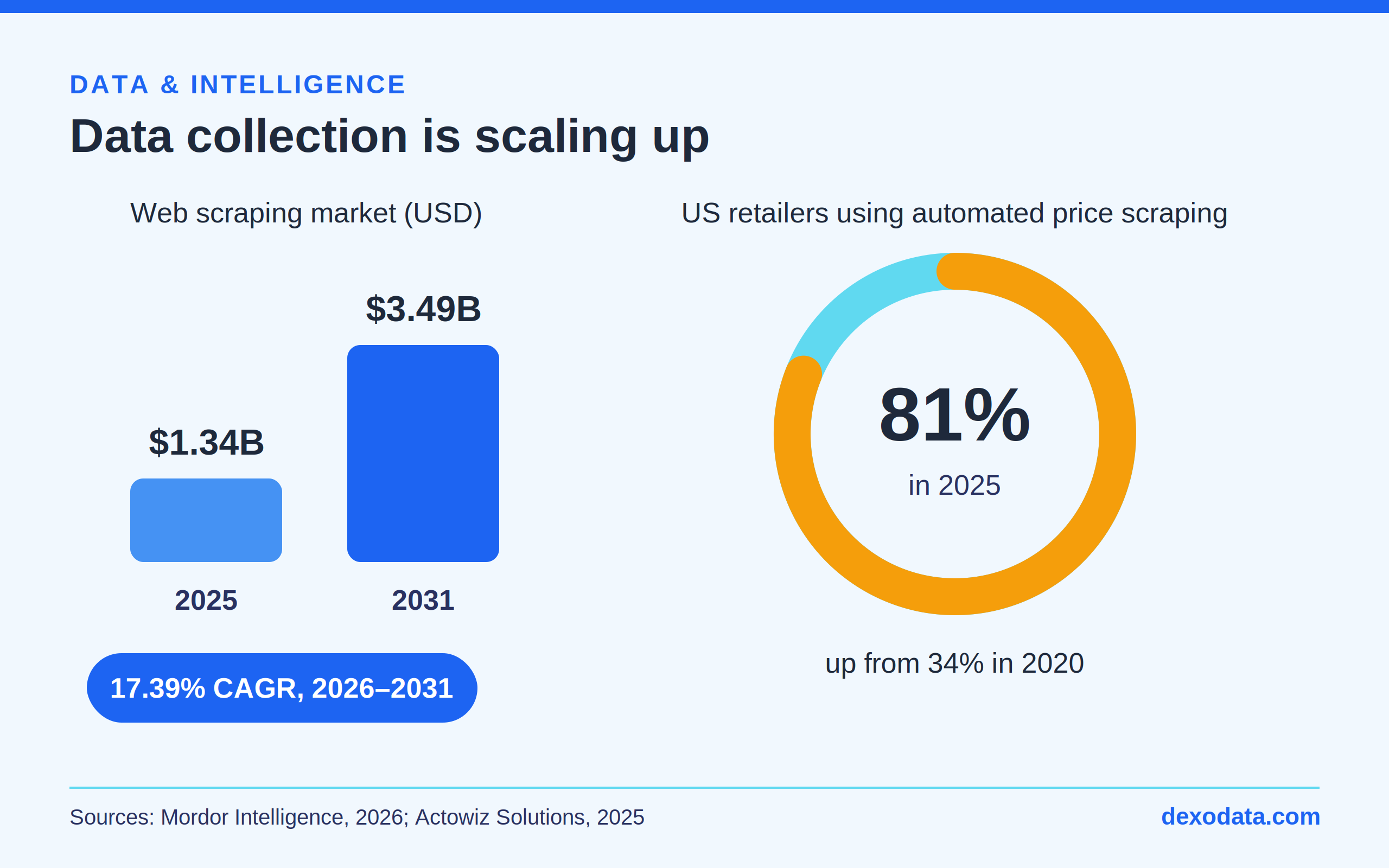
Image 4. Data collection is scaling up (Mordor Intelligence, 2026; Actowiz Solutions, 2025).
A large share of multi-accounting overlaps with structured data collection – price monitoring, catalog checks, ad verification, and rank tracking. That field is expanding quickly: the web scraping market is projected to grow from $1.34 billion in 2025 to $3.49 billion by 2031, a compound annual growth rate of 17.39% (Mordor Intelligence). The shift is already visible on the ground: 81% of United States retailers used automated price scraping in 2025, up from 34% in 2020 (Actowiz Solutions). For these pipelines, a steady stream of relevant IPs is what keeps requests flowing without being grouped or throttled.
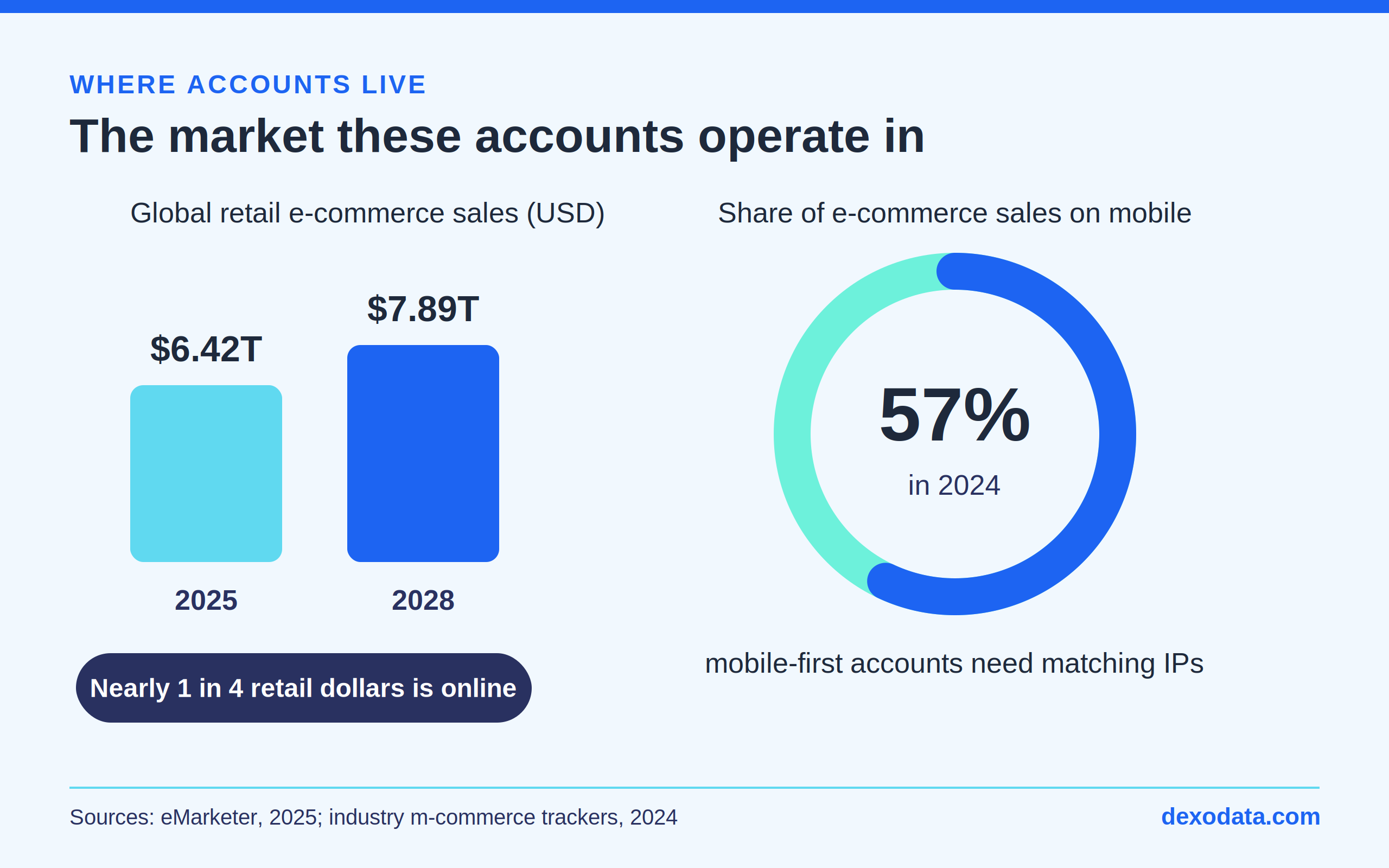
Image 5. The e-commerce market these accounts operate in (eMarketer, 2025).
Many multi-accounting tasks live inside e-commerce, and the scale there is substantial. Global retail e-commerce sales are forecast to rise from $6.42 trillion in 2025 to $7.89 trillion by 2028 (eMarketer), and mobile already accounts for about 57% of e-commerce sales worldwide (2024). Two things follow: a marketplace or social account usually needs to appear in a specific location, and mobile-first accounts benefit from IPs that match how their users actually connect.
For localized accounts, where the IP appears matters as much as the IP itself. The Dexodata network targets down to four levels – country, region, city, and provider-level – so a marketplace store, a local ad account, and a regional social profile can each sit in exactly the geography it should. Matching the proxy location to an account’s stated location keeps its story consistent and cuts down on verification prompts.
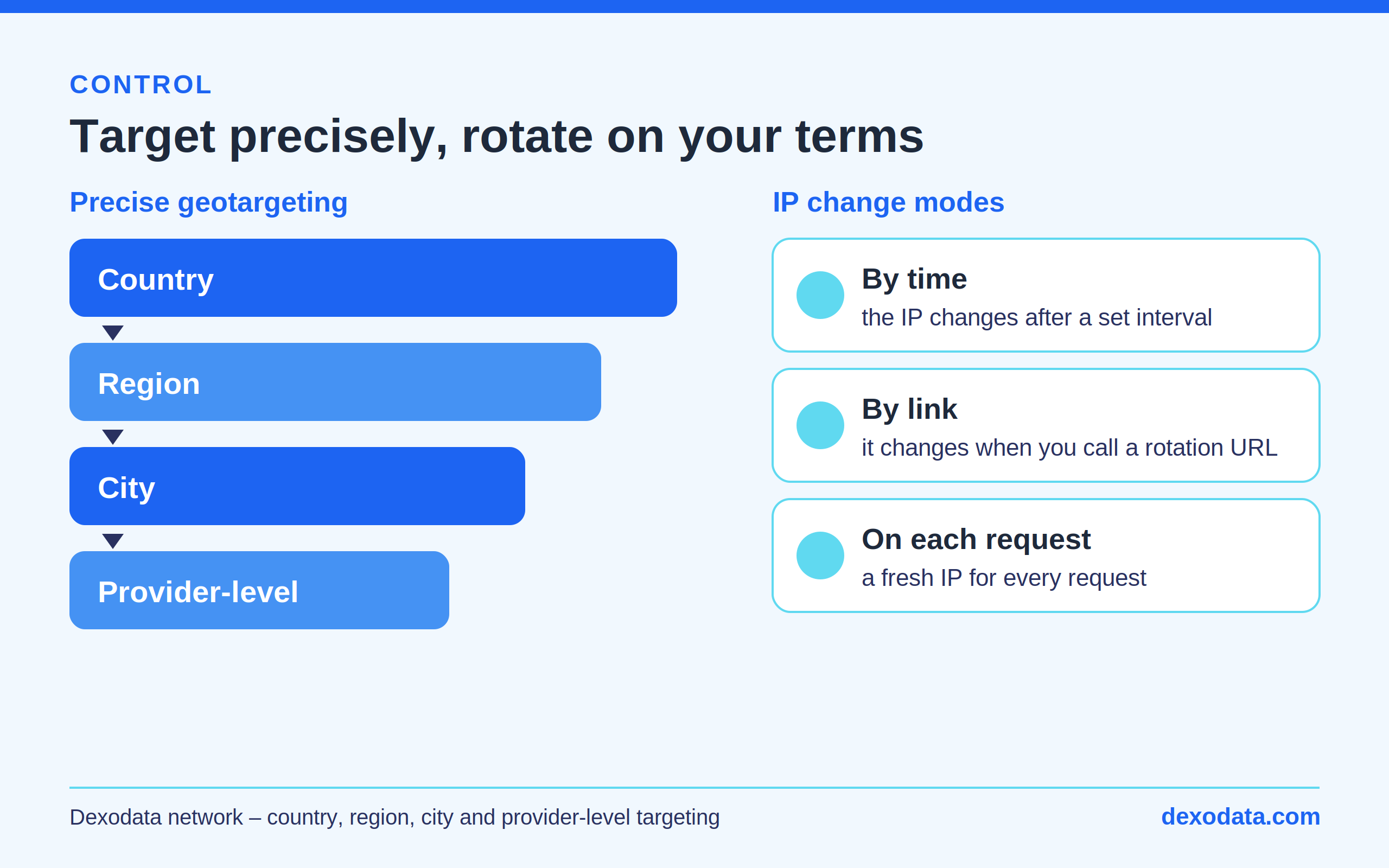
Image 6. Precise geotargeting and three IP change modes in the Dexodata network.
Rotation is just as flexible. Dexodata offers three IP change modes, named exactly as they appear in the interface: by time (the IP changes after a set interval), by link (it changes when you call a rotation URL), and on each request (a new IP for every outgoing request). Keep one steady address for a long-lived MoreLogin profile, and lean on link-based or per-request rotation for collection tasks.
In Dexodata you rent a port, and that port becomes the connection you paste into MoreLogin. The whole path lives in the dashboard and takes about a minute. Log in to your Dexodata dashboard and follow the steps below.
Steps 1–2. Open the Ports section. On the dashboard, open the Ports section using the ports icon in the left sidebar (1), then the Ports card (2).
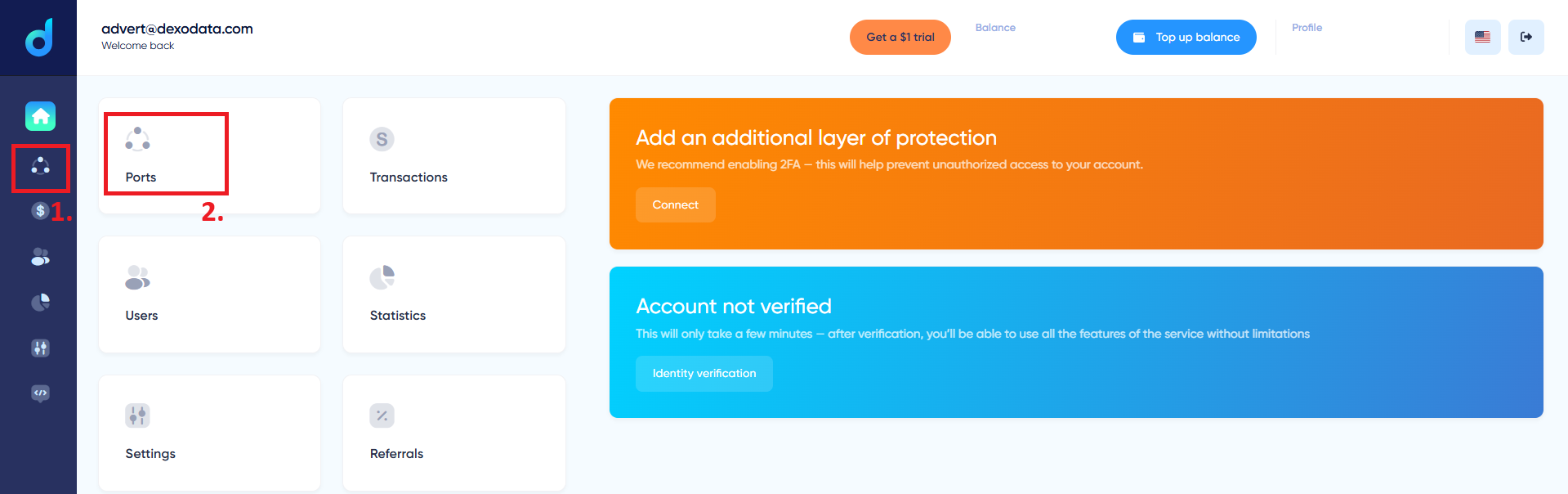
Image 7. Steps 1–2. Opening the Ports section from the Dexodata dashboard.
Step 3. Add a new port. On the Ports page, click + Add port (3). Accounts without verification are capped at 25 ports, so completing verification lifts that limit.
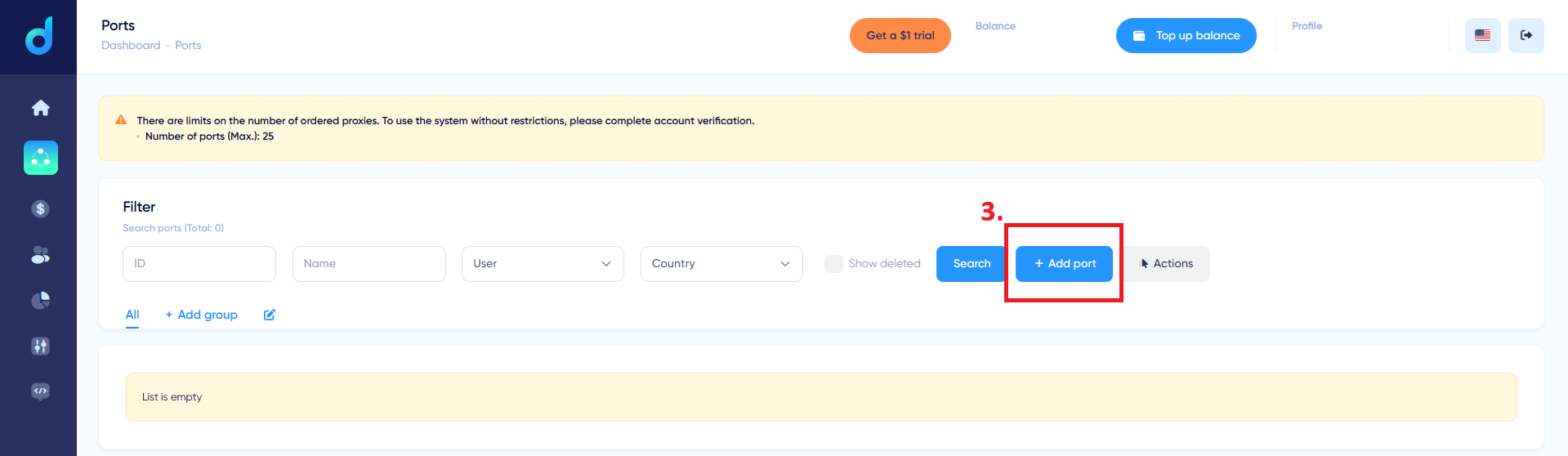
Image 8. Step 3. The + Add port button on the Ports page.
Step 4. Open the proxy-type block. The New port form opens. Set the Name and Count, the Login/Password, and the IP change mode. The proxy type block (4) defaults to Residential / home internet providers.
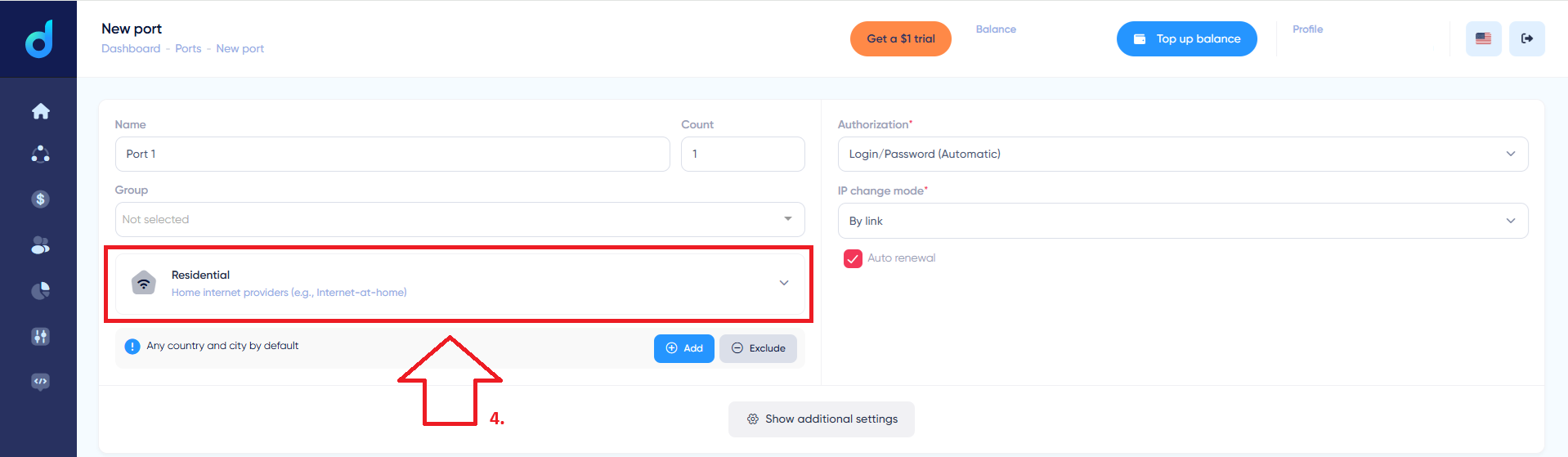
Image 9. Step 4. The New port form and the proxy type block.
Step 5. Pick the proxy type. Expand the type list (5) and choose what you need: Residential (home internet providers), Datacenter (datacenter and hosting networks), or Mobile (mobile networks such as MTS, Tele2, Beeline).
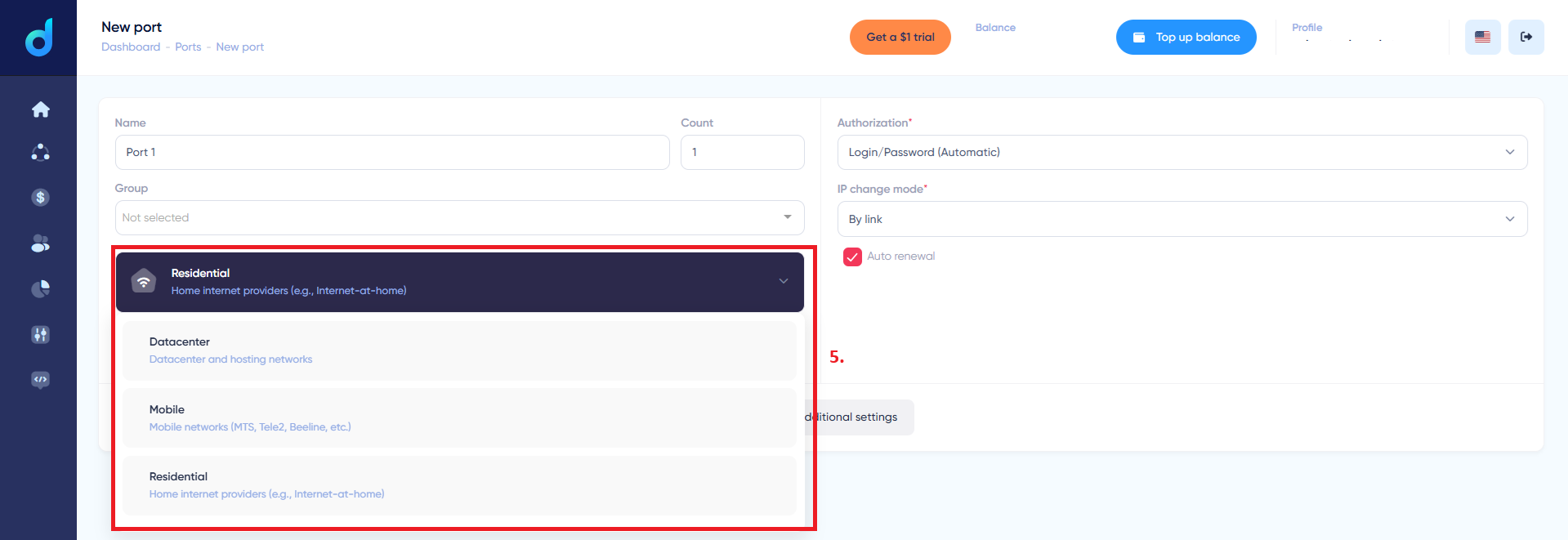
Image 10. Step 5. Choosing the proxy type: residential, datacenter, or mobile.
Step 6. Add geotargeting. To set the geo, click Add (6) on the Any country and city by default row (or Exclude to leave out specific regions).
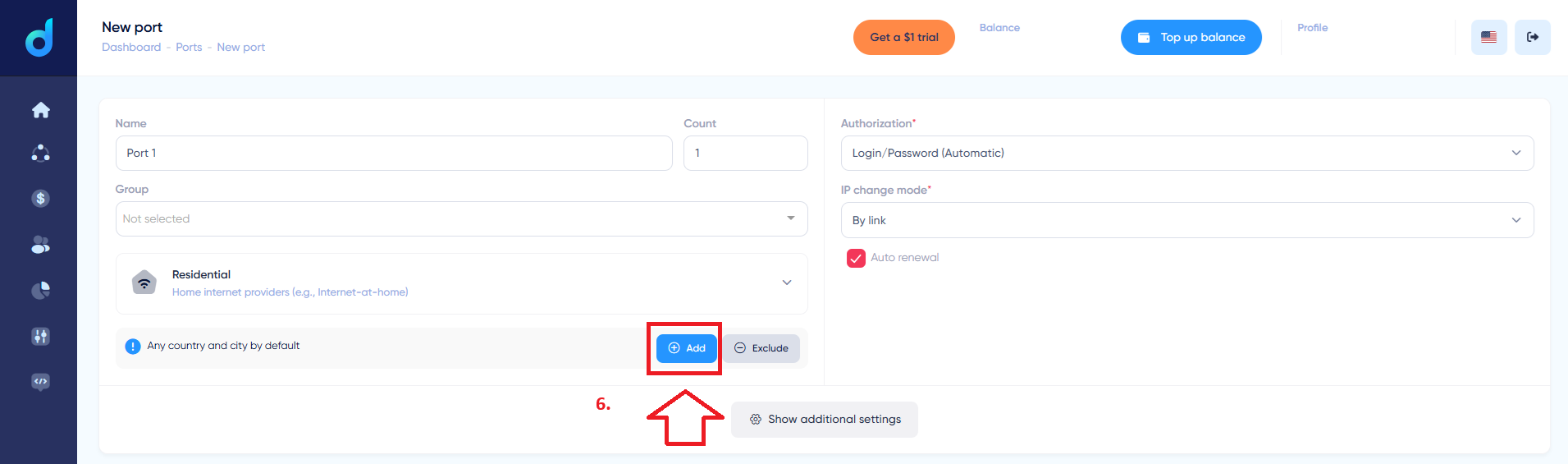
Image 11. Step 6. The Add button for geo settings.
Step 7. Select a country. In the country list, pick the one you need – for example, United States (7). Below, refine region, city, and operator when the task calls for provider-level targeting.
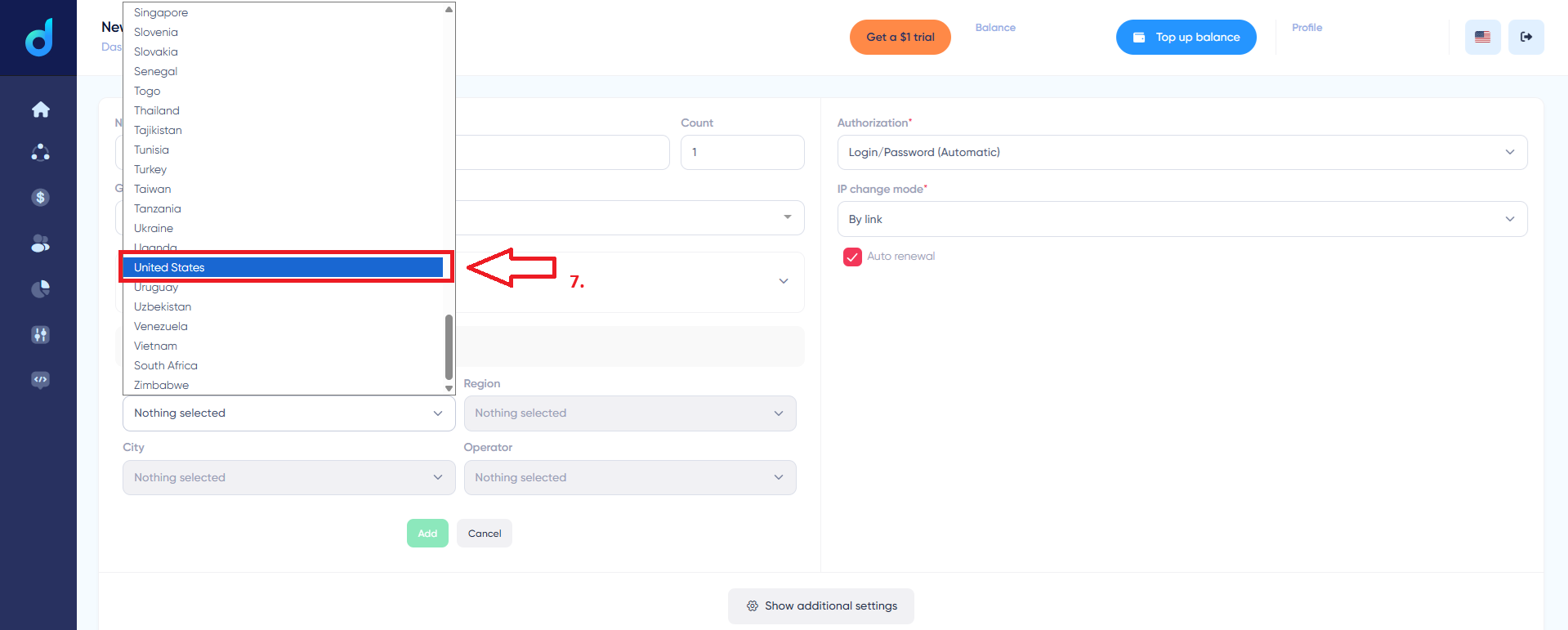
Image 12. Step 7. Selecting a country from the list.
Steps 8–10. Choose the IP change mode and order. In the IP change mode block (8), choose a mode from the list (9): By time, By link, or On each request. The estimated cost is shown at the bottom (for example, 0.03 Gt / ~$0.2), then click Order port (10). The port details are what you will paste into MoreLogin.
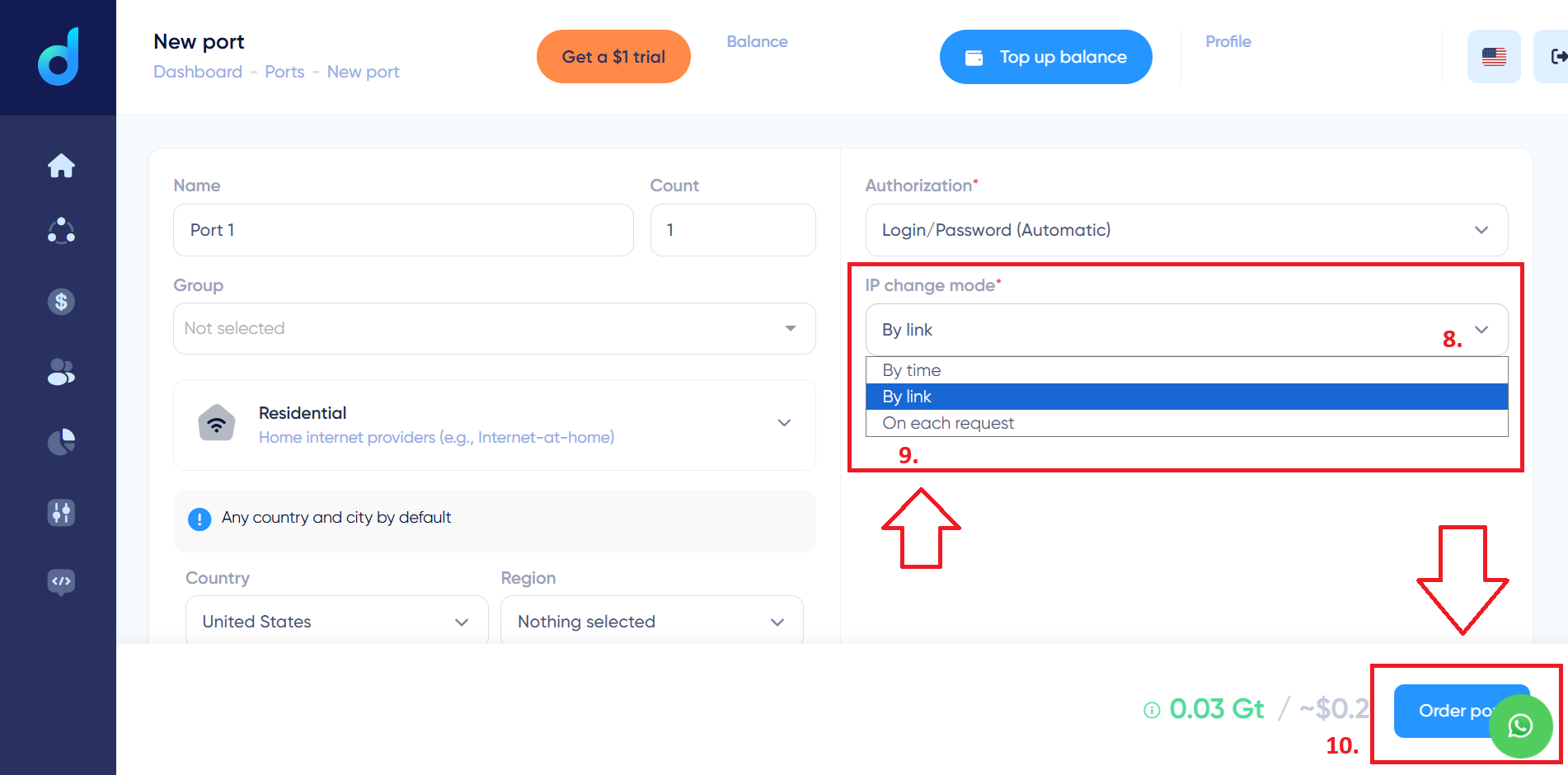
Image 13. Steps 8–10. Choosing the IP change mode and ordering the port.
Before moving to MoreLogin, here is what the port you just ordered plugs into. The Dexodata network brings everything multi-accounting needs into one place, and its strength is flexible setup:
Residential, mobile, and datacenter proxies on one balance. Switch between IP types per task without separate dashboards or balances.
Geotargeting by country, region, city, and ISP. Each port's location is set exactly as the account needs.
Flexible IP rotation options. By time, by link, or on each request — from one stable address to a new IP on every request.
Pay-As-You-Go pricing on a tokenized balance. Pay only for the traffic you actually use, with no fixed packages.
API for automation, with WireGuard VPN compatibility and Xray support. Create and manage ports programmatically.
99.9% uptime and a built-in firewall. Customizable domain allowlists and blocklists keep long-running sessions stable.
Opt-in pool, KYC and AML compliant. Every IP is obtained with user consent, so the pool stays responsible and predictable.
With a port ordered in Dexodata, the rest happens in MoreLogin – the antidetect browser that creates and isolates browser profiles. Keep the port’s connection details from the Dexodata dashboard at hand: the host, port, and its login and password (these are the credentials for the port, not your Dexodata account login).
Step 1. Open a profile. In MoreLogin, go to Profiles and open the profile you want to route through Dexodata, or create one with New profile.
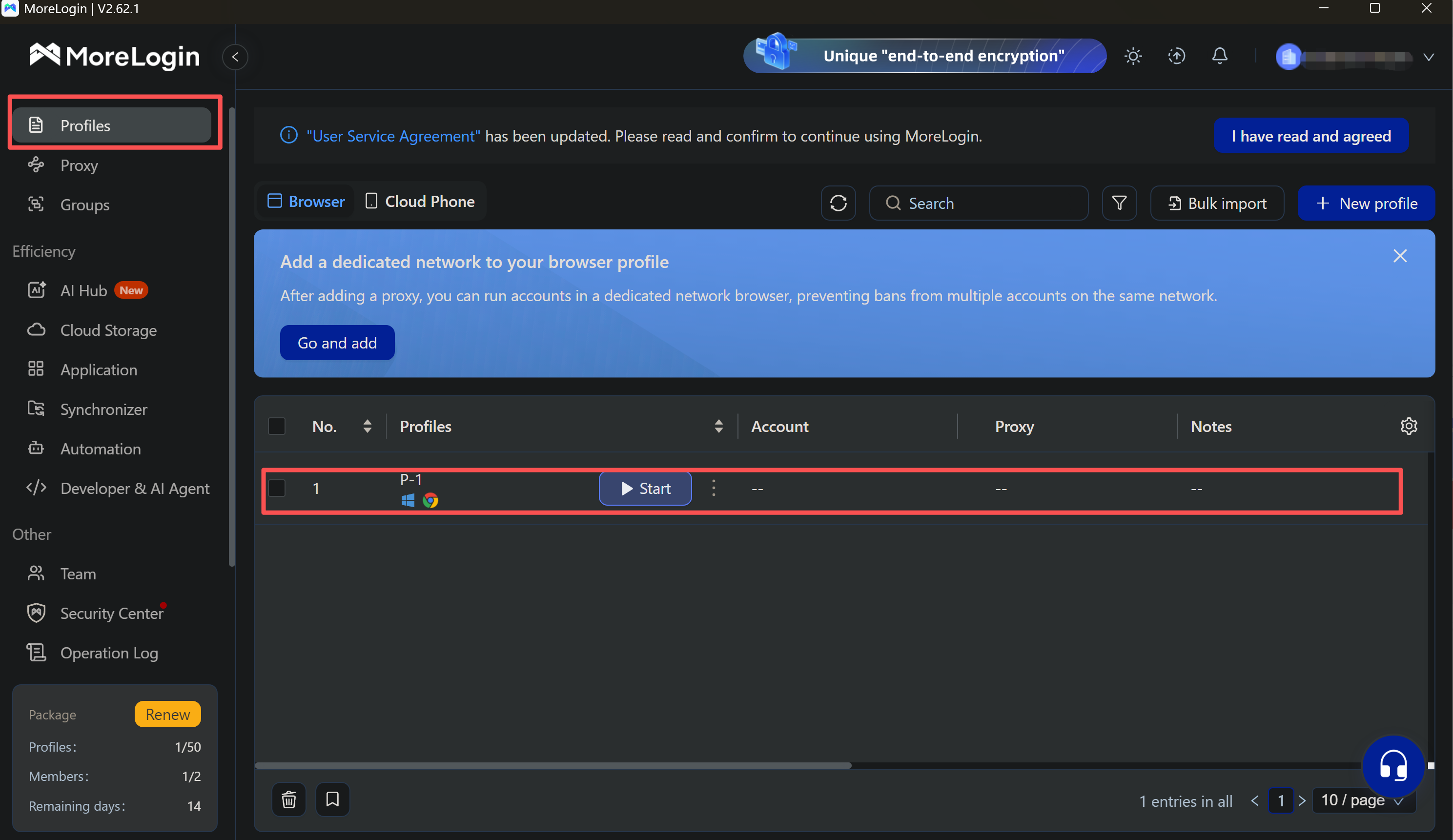
Image 14. Step 1. Open a profile in MoreLogin.
Step 2. Enter the Dexodata port details. Open the profile’s proxy settings (Modify Proxy). At the top, select the connection type that matches your Dexodata port. Enter the port’s host and its port number in Proxy server, then the Proxy account and Proxy password from the Dexodata dashboard. Under IP resolution, select IPv4. Run proxy detection to test the connection – MoreLogin returns the exit IP and its location on success – then click Confirm.
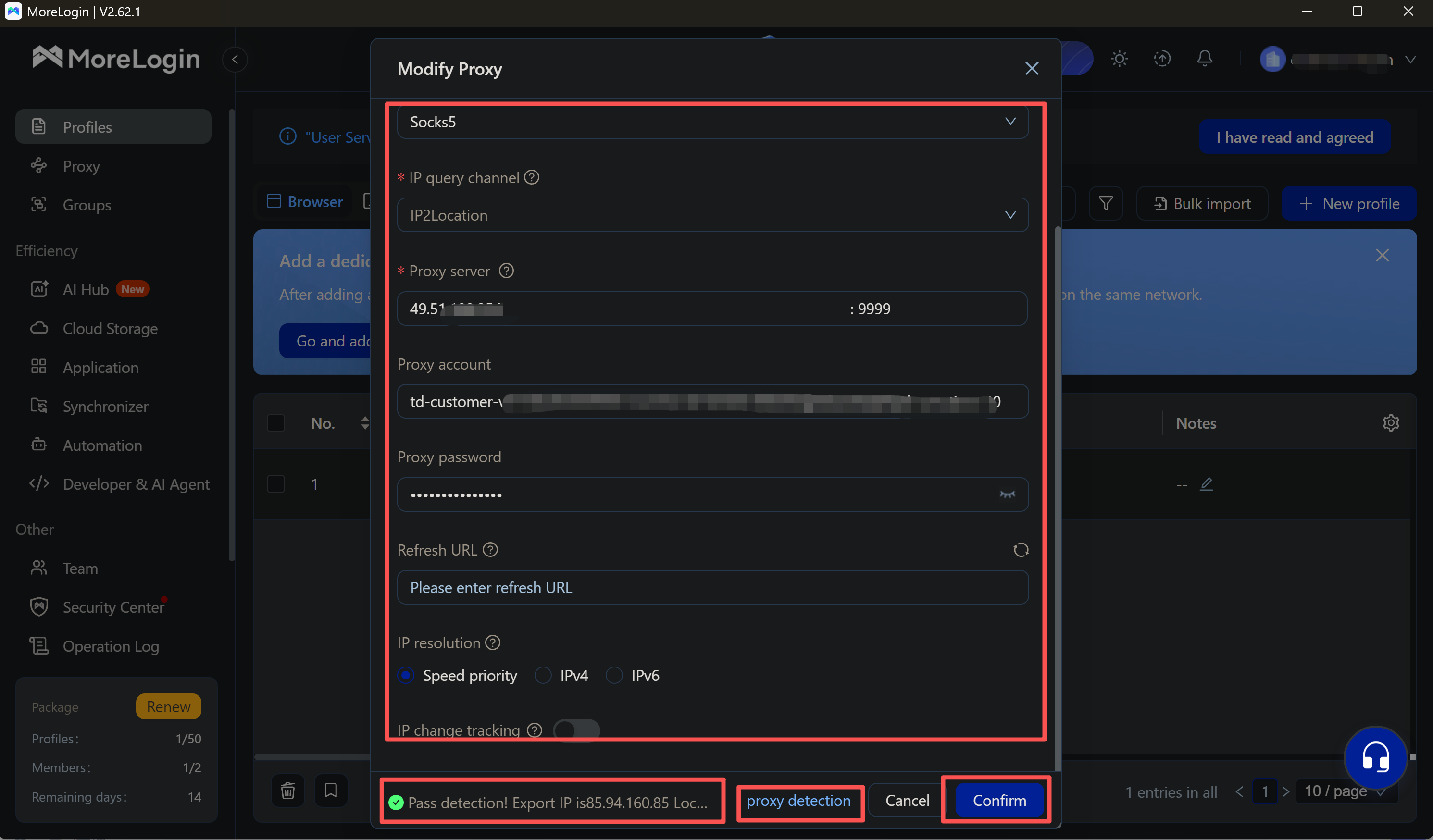
Image 15. Step 2. Enter the Dexodata port details, run proxy detection, then Confirm.
Assign one Dexodata port per profile, and use MoreLogin’s batch tools to apply or update proxies across many profiles at once.
A failed check is almost always the connection details, not the browser settings. Before changing anything about the profile, work through this short list:
Connection type. Make sure the type selected in MoreLogin matches the connection method of your Dexodata port.
Host and port. Copy them again from the Dexodata dashboard instead of typing them by hand.
Login and password. Use the port’s own credentials, not your Dexodata account login.
Port status and balance. If the port was removed or the tokenized balance ran out, the check can fail; top up and try again.
MoreLogin creates, isolates, and manages the browser profiles, while the Dexodata network supplies the exit each one rides on. The two layers are configured independently, so you can match them to the task.
One profile, one address. Assign a single Dexodata port to a long-lived profile for a steady, easy-to-manage setup.
Rotation where it helps. Use “By link” or “On each request” rotation for tasks that need new IPs, without touching the browser fingerprint.
Consistent geo. Country, region, city, and provider-level targeting keep each profile’s location aligned with its fingerprint.
Cost that tracks usage. Pay-as-you-go on a tokenized balance means you pay for what a task actually consumes.
MoreLogin keeps each browser profile’s fingerprint separate, and the Dexodata network gives every profile a relevant residential, mobile, or datacenter IP with precise geotargeting and flexible rotation. Rent a port, paste it into a MoreLogin profile, run proxy detection, and the two layers work as one. You can start on a $1 balance, and the one-time promo code MORELOGIN takes 10% off your port purchase (until September 22, 2027).
1. What proxy types does Dexodata offer for MoreLogin?
Residential, mobile, and datacenter IPs, all in one dashboard on a single balance. Residential IPs come from home connections, mobile IPs from 4G and 5G carrier networks, and datacenter IPs from hosting networks – a scalable, cost-effective pick for automation and high-volume tasks.
2. How do I rent a Dexodata port?
On the dashboard open Ports, click + Add port, choose the proxy type, set the geo (country, region, city, and operator when needed), and pick the IP change mode, then click Order port. The port details are what you connect in MoreLogin.
3. Which IP change modes does Dexodata support?
Three, exactly as named in the interface: by time, by link, and on each request. Keep a steady IP for long-lived profiles, and use link-based or per-request rotation for collection tasks.
4. How do I connect a Dexodata proxy in MoreLogin?
Open a profile’s proxy settings, select the connection type that matches your port, enter the host, port, account, and password from the Dexodata dashboard, set IP resolution to IPv4, run proxy detection, then Confirm.
5. Why does the proxy check fail in MoreLogin?
Usually a detail is off. Confirm the connection type matches the port, recopy the host and port from the dashboard, use the port’s own login and password rather than your account login, and make sure the port is still active with a funded balance.
6. Can I target a specific country or city with Dexodata proxies?
Yes. The Dexodata network supports geotargeting by country, region, city, and provider-level, so you can match each proxy to the exact geography an account should appear from.
7. Are Dexodata’s IP addresses obtained legitimately?
Yes. Every IP in the Dexodata network is obtained with user consent and complies with KYC and AML standards. Set up your MoreLogin profiles, pair each one with its own Dexodata port, and apply promo code MORELOGIN on your port purchase to take 10% off (until September 22, 2027).

 EN
EN