EN
I spent a day testing Multilogin and MoreLogin on the same Windows computer. I configured the same proxy for the main comparison, ran three fingerprint checks, timed profile launches, and checked what happened to saved data after a restart.
A feature list cannot show how easy a proxy form is to fill in or what happens when a profile loses its connection. Those are the details I followed through the setup and testing process.
I also compared their automation tools, team controls, cloud phone options, and annual pricing for 20 profiles. Here is how the two products compare in actual use and what their plans include.
I ran the hands-on checks on November 5, 2026, using Windows 11, an Intel Core i5-13500, 32 GB of RAM, and Wi-Fi. Multilogin was on the Free plan with client version 12.17.0. The MoreLogin client was version 2.71.0.0.
The main paired checks used the same proxy. I checked IPhey, Pixelscan, and the original CreepJS project hosted on GitHub Pages. I also repeated profile launches and checked whether separate browser data remained available after closing and restarting.
For automation, team controls, and paid features, I compared the available interface with the product manuals. Prices were checked against the supplied pricing screens on November 6, 2026.
Multilogin required me to sign in through its website before choosing a download. MoreLogin let me download the client first and sign in afterward.
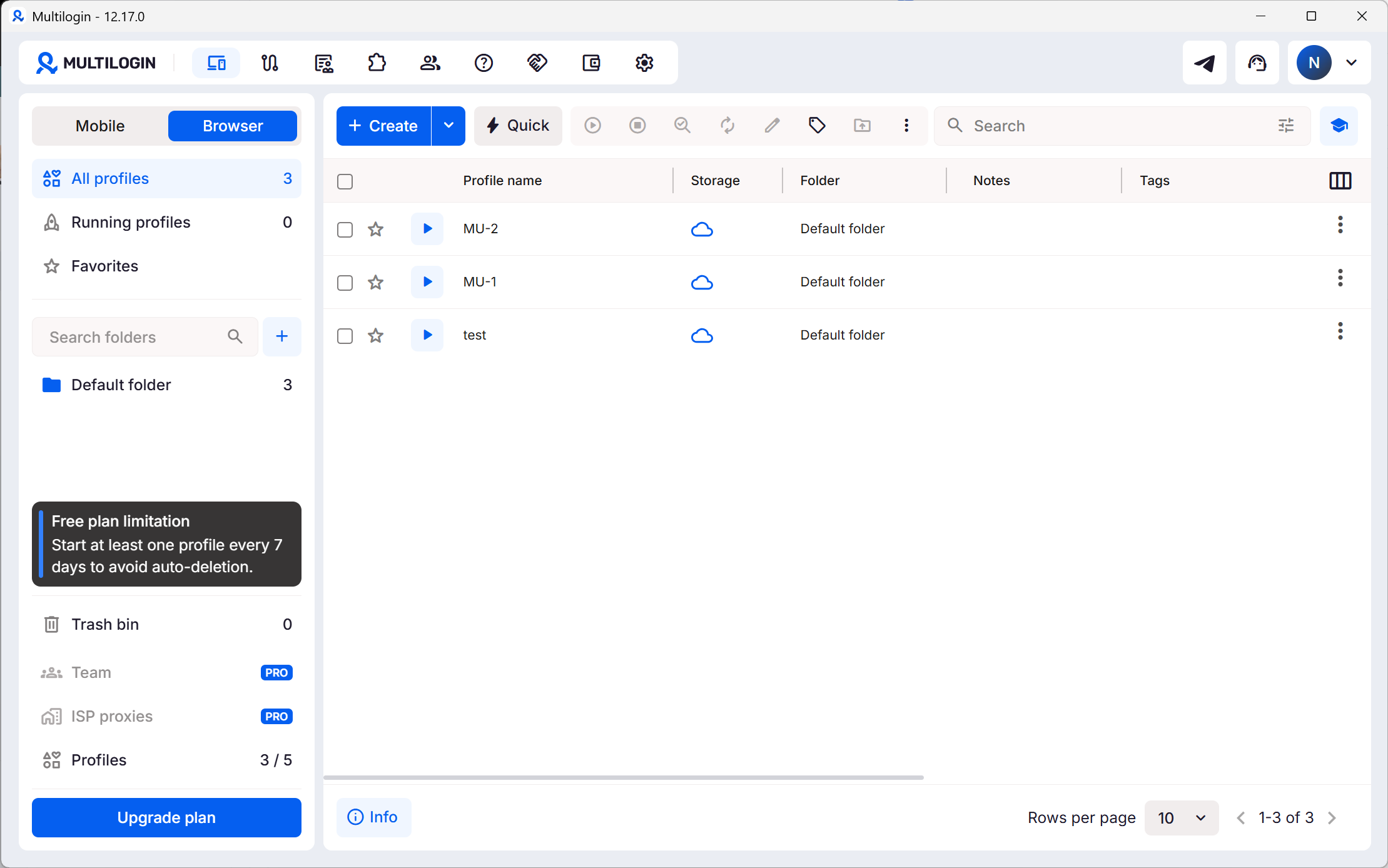
Once inside, Multilogin looked cleaner at first glance. Its compact toolbar leaves more space for the profile list. I needed the interface tips to understand some of the controls, though.
MoreLogin displays more descriptive labels beside its tools. The screen is busier, but I could identify the proxy, automation, and synchronizer sections without working through the icons first. For an initial setup, I found that more helpful.
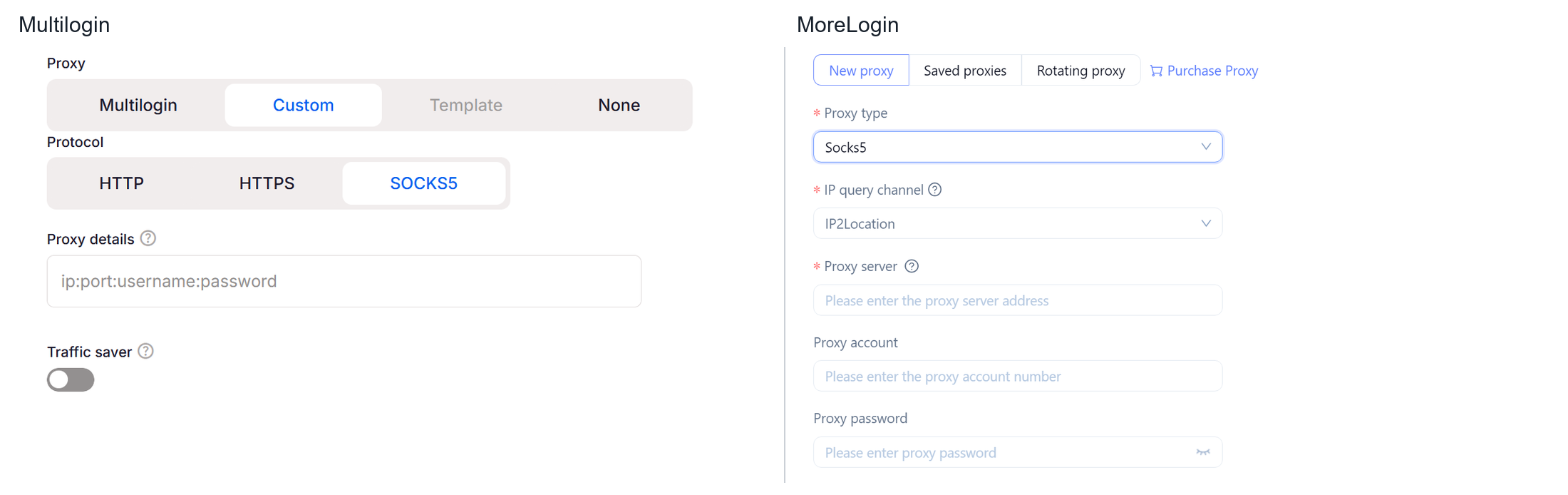
The proxy forms showed a more practical difference.
Multilogin uses a combined string containing the address, port, username, and password. That is quick when the credentials already match the required format. I had to arrange mine before entering them. Once I started typing, the format hint disappeared, so I could no longer refer to it inside the field.
MoreLogin separates those values into individual fields. I selected the proxy type, then entered the server, port, account, and password. The labels stayed visible throughout the process.
I preferred the separate fields for checking my work. When a proxy fails, it helps to see immediately which value belongs where. The same approach also carries over to saved proxies and bulk proxy configuration.
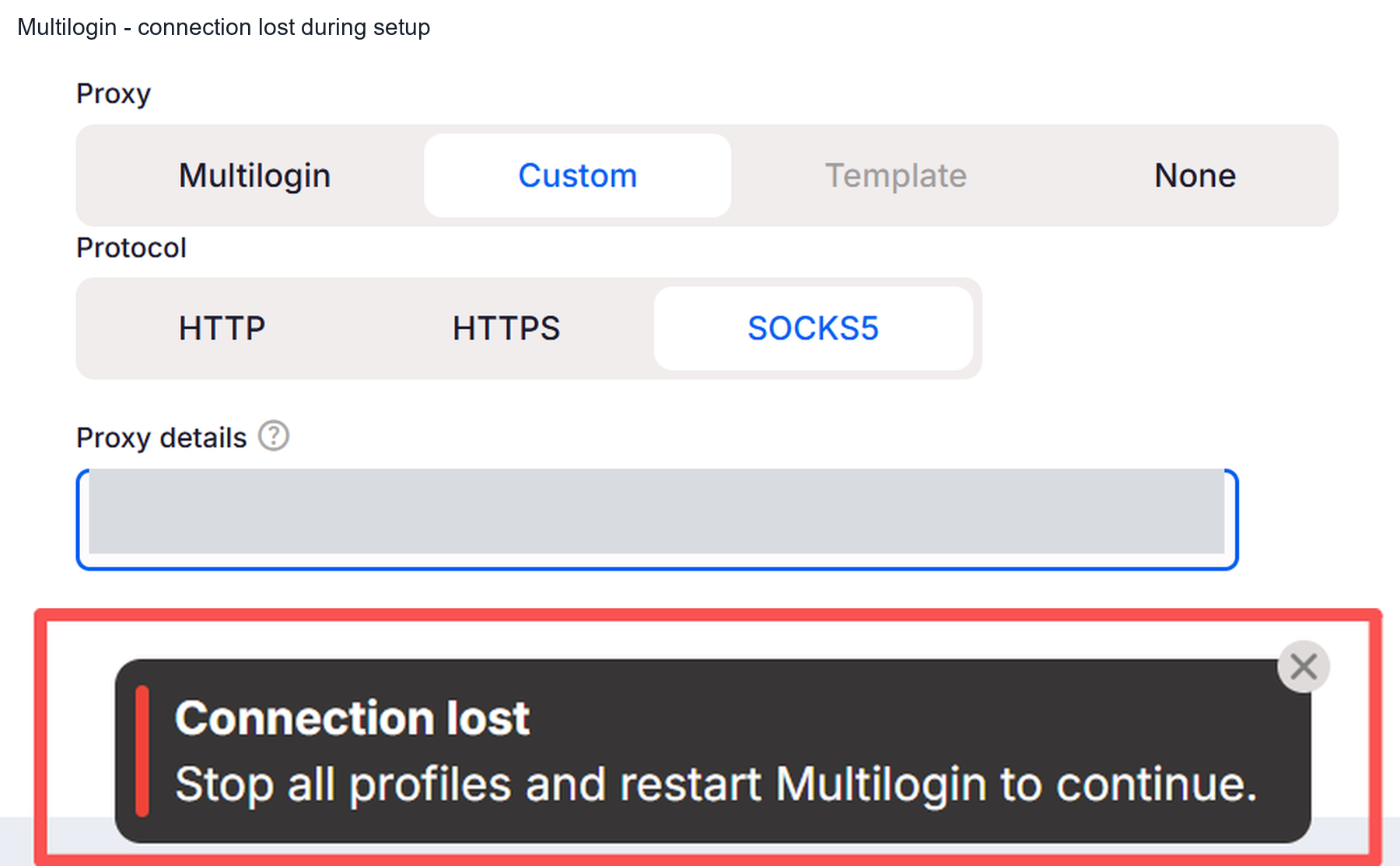
While creating Multilogin profiles, I encountered a Connection lost message. It instructed me to stop all profiles and restart the application. Switching to other tasks during profile creation seemed to make the interruption more likely in my session.
Support was polite, but the issue remained unresolved. A possible conflict with my VPN came up during troubleshooting. I eventually created the profile through the web interface, let it sync to the desktop application, and opened it there.
Multilogin supports both desktop and web interfaces. Its web and desktop setup uses a local component to launch profiles. In my case, recovering that connection took longer than filling in the proxy itself.
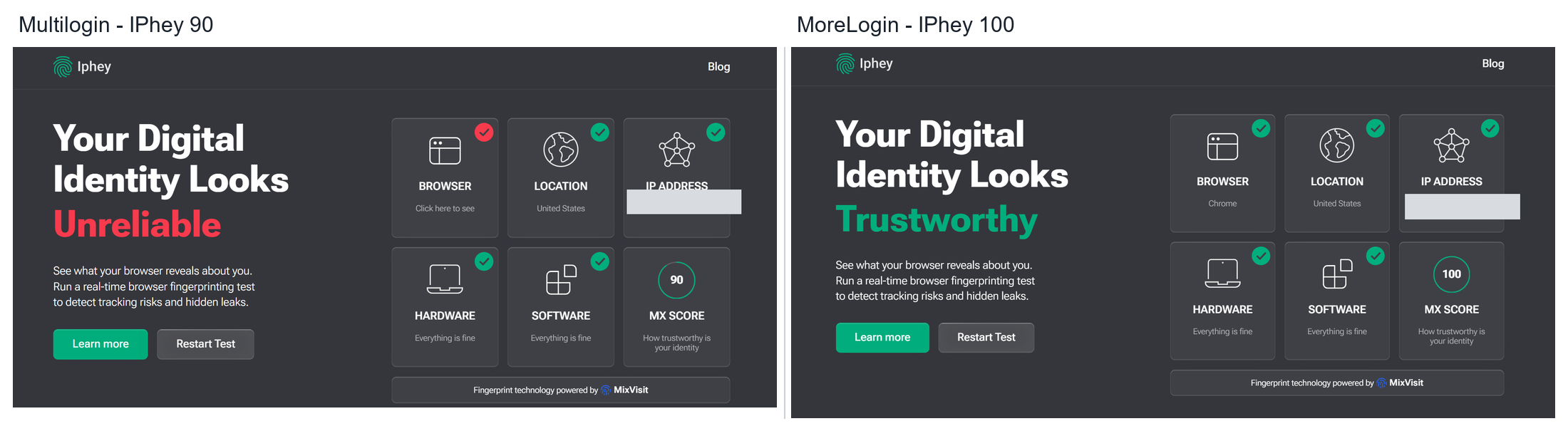
In the main comparison, MoreLogin scored 100 and received a Trustworthy result. Multilogin scored 90 and received an Unreliable result. Both used the same proxy and showed the same exit IP.
The Multilogin detail page identified an inconsistent browser fingerprint and included a whale label. The Browser category was flagged, while the location, IP address, hardware, and software categories showed green checks.
An additional Multilogin profile scored 70 and also received an Unreliable result. That screenshot showed another exit IP, so I kept it as a separate observation. The 100 versus 90 pair is the useful direct comparison.
MoreLogin performed better in this IPhey check. The detail matters more than the score alone because it shows which part of the profile triggered the warning.
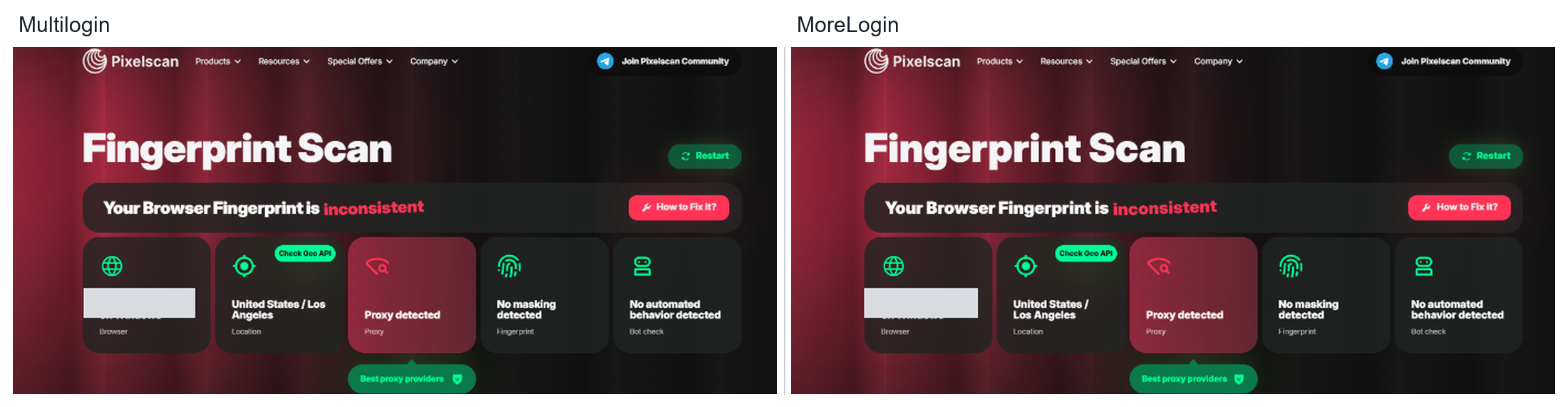
Pixelscan produced similar results for both products. Each received an inconsistent summary and a Proxy detected warning. Both also showed No masking detected and No automated behavior detected.
The proxy warning may have contributed to the overall result. The screenshots do not establish it as the only cause. They do show why reducing the page to a single pass or fail would lose useful information.
An IP classification, a browser mismatch, and an automation signal describe different problems. When examining browser fingerprint consistency, I look at the specific category before deciding what to change.
Here, Pixelscan gave me no clear reason to prefer one product over the other.
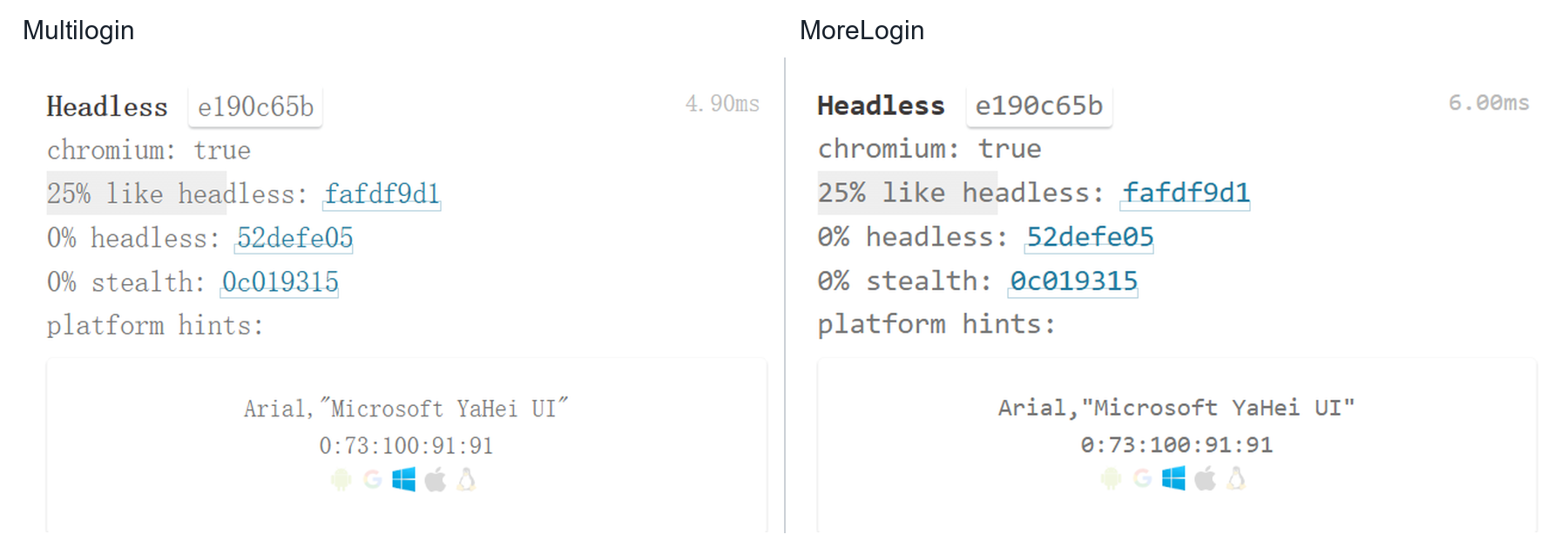
The original CreepJS fingerprint test returned the same values in the Headless section for both profiles.
Other sections exposed different graphics, screen, rendering, and device values. Those differences are expected between configured profiles and do not establish a winner by themselves. Some fields also carried highlighted warnings that would need closer inspection to explain.
The Headless comparison was even. Combined with Pixelscan, it gives a more restrained picture than IPhey alone. MoreLogin had the stronger IPhey result, while the other checks shown here offered less separation.
I timed five launches for each product. Both were in roughly the same ten-second range, with no clear overall advantage in my notes.
For data isolation, I saved different Cookie and Local Storage markers on the same test page in two profiles. Each profile retained its own values. I checked them again after closing the profiles, reopening the applications, and restarting the computer.
Both products kept the markers separate and preserved them through those steps. Basic data retention was therefore not a deciding difference in this comparison.
MoreLogin has a built-in Synchronizer that repeats supported actions across selected browser windows. It also provides visual RPA workflows for tasks that need to follow a saved sequence.
These tools fit different jobs. A synchronizer is useful when an operator is present and wants the same action applied to several windows. RPA is more useful when the sequence is known in advance and needs to run again later.
I did not find a native multi-window synchronizer in the Multilogin interface or the current documentation reviewed. Its automation guide explicitly states that RPA tools are not currently supported. It instead documents API and CLI access, Script runner, and frameworks such as Selenium, Puppeteer, and Playwright.
For a developer with existing scripts, those options may fit the job well. For an operator who wants to build a repeated task inside the application, MoreLogin offers a more direct starting point.
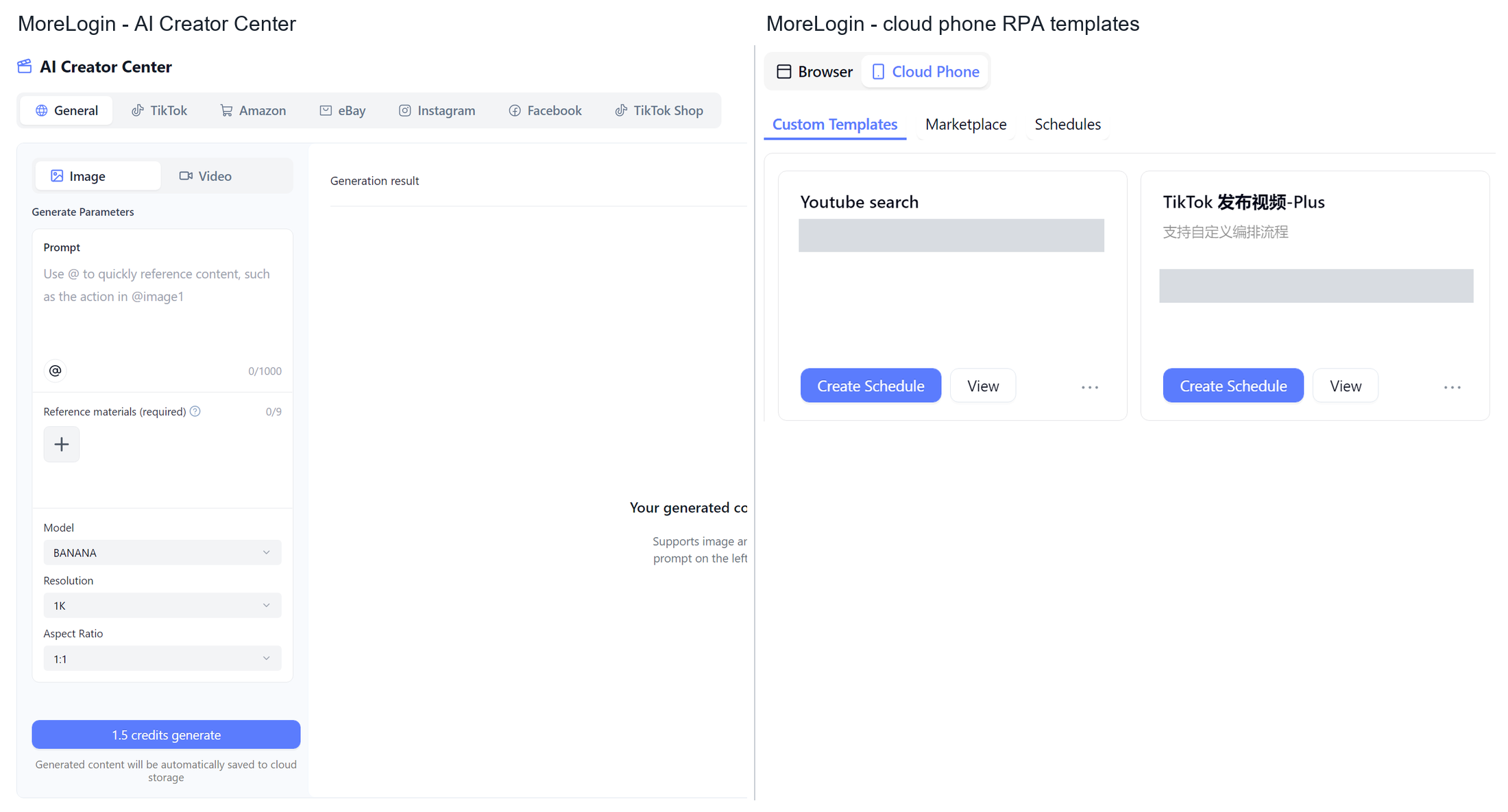
MoreLogin also brings content preparation into the workspace. Its Creator Center generates images and short videos from prompts and reference materials. Generated files are saved to Cloud Storage for preview and reuse.
That supports a practical publishing process:
Generate a product image or short video.
Review the output and approve the material.
Prepare the caption and match the file to the intended account.
Run a supported RPA publishing workflow.
Check the published result and handle any exception.
This is a workflow assembled from the available tools. The approval step matters because generating a file and approving it for a customer account are separate decisions.
For native Android publishing, cloud phone automation provides the mobile execution environment. Browser workflows and mobile workflows need their own steps and compatible templates.
Multilogin also offers AI functionality. Its AI Quick Actions handles profile tasks such as launching profiles, changing proxy assignments, and organizing groups. Its documentation also covers AI agent integrations. The distinction is what the AI is being asked to do, from managing environments to preparing content and executing account tasks.
Both products provide team access controls. The more useful question for a shared account is what happens after a member opens its environment.
A support worker may need orders and customer messages. Finance may need reports. An external operator may need to prepare content without accessing every account setting. A role-based access plan for shared accounts starts with those tasks, then assigns the environments and permissions needed to complete them.
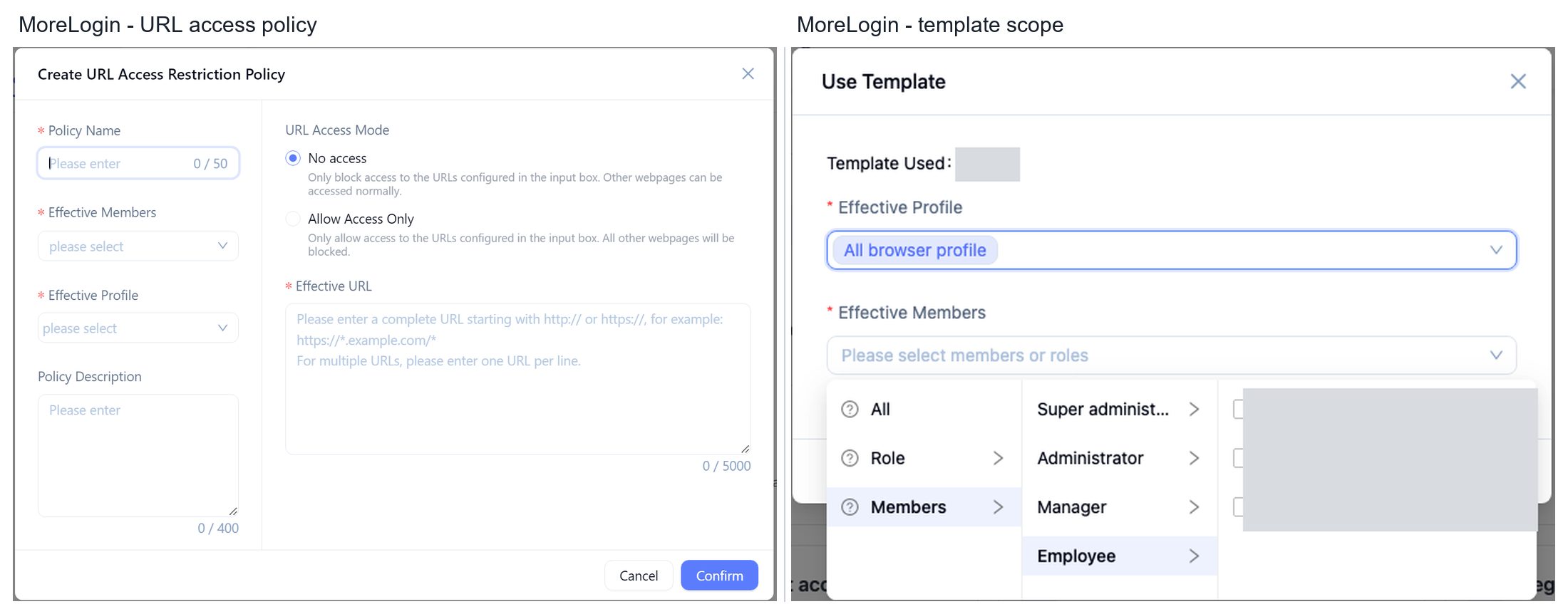
MoreLogin adds browser controls through its Security Center. Administrators can restrict selected websites, hide specified page elements, and apply web rules to particular members and profiles. Basic password controls can also limit access to saved passwords and browser developer tools.
That adds useful control when the same signed-in account is used by people with different responsibilities. For example, a team can allow access to work pages while limiting unrelated areas or hiding sensitive information.
The Security Center configuration also has practical requirements. URL policies need the affected profiles to restart before they take effect. Rules therefore need checking under the intended member account after configuration.
This gives MoreLogin a concrete point to evaluate beyond profile sharing. I found team roles and environment access in Multilogin, but did not confirm an equivalent set of webpage restrictions in the material reviewed.
Multilogin allows five free profiles. Its pricing screen includes a one-time allocation of 200 MB of proxy traffic and 30 mobile minutes. API access and team seats are marked unavailable on that free plan.
MoreLogin allows two free profiles and two users. Its published free feature list includes the Synchronizer and Local API. Proxy services can be purchased separately.
Multilogin gives an individual more room to try separate environments. MoreLogin gives a small team a different starting point, with two users and tools for repeated browser actions.
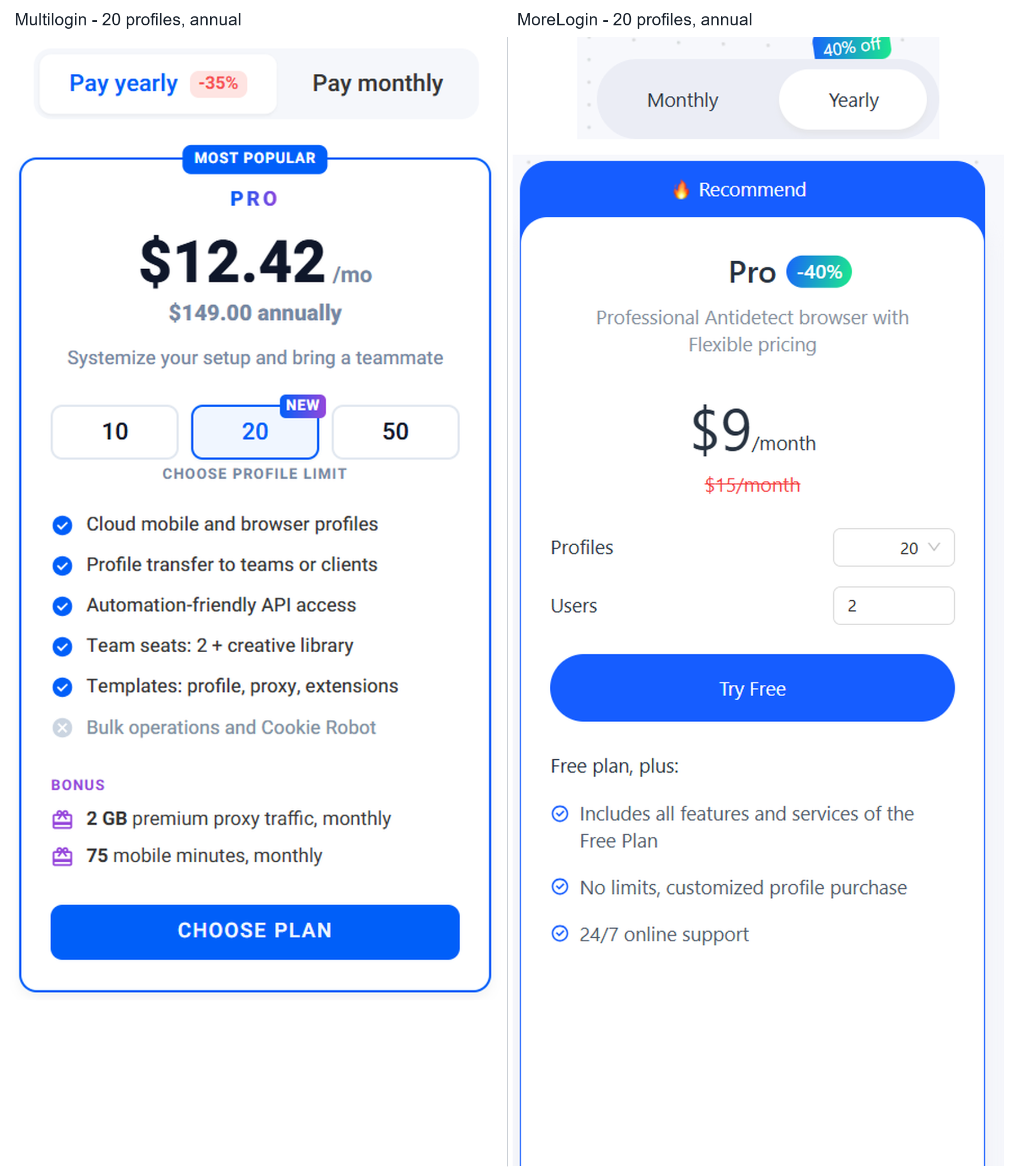
The supplied annual pricing screens use the same profile count.
MoreLogin is $41 lower per year on the browser subscription, or about 27.5%. Multilogin includes resources that may offset some of that difference if you use them.
Both products offer Android cloud phones alongside browser profiles. Multilogin includes a monthly proxy and mobile allowance in the plan compared here. MoreLogin charges for proxy services and cloud phone usage separately. The cost difference depends on how much of each resource you use.
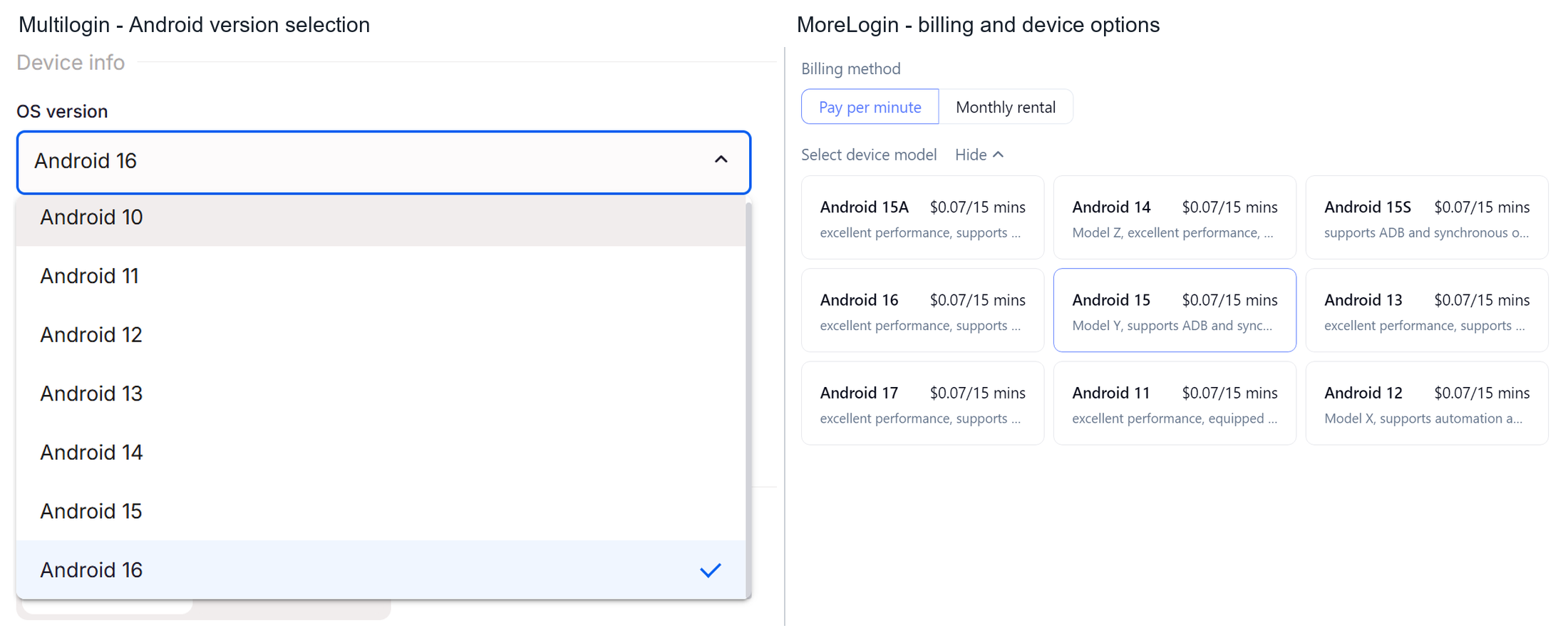
The creation screens show mobile options in both products. Multilogin lists Android versions from 10 through 16. MoreLogin offers several device configurations and a choice between usage billing and monthly rental.
For mobile work, compare the device configuration, required automation features, and expected running time. Then add proxy costs. MoreLogin's lower browser subscription is one part of that calculation, while Multilogin's included minutes cover part of its cloud phone use.
The useful comparison is the bill for your actual workload. Add proxy purchases, cloud phone use, AI credits, extra team members, and applicable taxes where needed.
The current MoreLogin pricing lets you select profiles and users. Match those settings to the competing plan before comparing the monthly equivalent. Annual billing also changes the upfront payment, so keep the annual total visible.
For an operator who wants a synchronizer, visual RPA, and content preparation in the same workspace, I would start with MoreLogin. Its proxy form was easier for me to use, and the tested profile returned the stronger IPhey result. Its Security Center also gives teams specific controls to examine when accounts are shared.
Multilogin remains worth considering if you want more free profiles, use its included proxy and mobile resources, or already run scripts through its automation tools. My startup and data retention checks did not produce a strong reason to switch on those grounds.
Start with two MoreLogin browser profiles and the task you repeat most often. Check how much setup it takes and whether the built-in tools remove steps from your day.
Can I try MoreLogin without buying a subscription?
Yes. The published free plan includes two profiles and two users. Proxy purchases, cloud phone use, and paid AI services have their own costs or allowances.
Does Multilogin have built-in RPA?
Its current automation guide says RPA tools are not supported. It provides automation through APIs, command-line tools, scripts, and compatible frameworks.
Is MoreLogin cheaper than Multilogin?
In the 20-profile annual plans compared here, MoreLogin costs $108 by calculation and Multilogin lists $149. The difference is $41 before accounting for included resources and additional usage.

 EN