- Product

- Pricing
- Affiliate Program
- Developers
- Resource
 EN
EN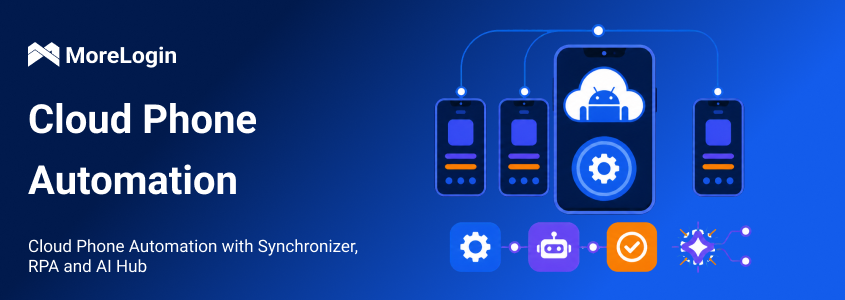
Repetitive mobile work looks small until the device count grows.
Opening one app is easy. Opening it on 20 phones is not. The real drain comes from the small steps around it. Files need to match accounts. Captions need to land on the right device. Login states need checking. Then the whole routine starts again the next morning.
MoreLogin Cloud Phone handles this work at three levels. Synchronizer copies live actions from one phone to others. RPA saves a fixed process and runs it again. AI Hub creates visual content and lets an AI Agent act on natural-language instructions.
The right option depends on one practical question. How much of the next step can be predicted before the task starts?
Cloud phone automation moves repeated Android work away from individual physical handsets. The apps run inside a remote Android phone, where files, app data, and device state remain available between sessions.
Start with the step that wastes time. Then use the lightest method that can handle it reliably.
I would not build an RPA flow for a task that takes two minutes once a month. Synchronizer is often enough. A daily process across 30 phones is different. That is where a tested RPA schedule begins to pay off.
Cloud phone automation can support work across social media, ecommerce, affiliate marketing, and app testing.
Common device and app tasks include:
Starting and stopping cloud phones
Installing, opening, closing, or uninstalling apps
Uploading images, videos, APK files, and documents
Entering text into Android apps
Checking app and device status
Repeating the same setup across several phones
Social media teams can use automation to prepare content, upload media, enter captions, update profile details, check login states, and run scheduled account routines. MoreLogin RPA also provides templates for supported TikTok, Instagram, and YouTube tasks.
Ecommerce teams may use the same tools to upload product images, enter listing details, check mobile storefronts, or repeat product preparation steps. App teams can install an APK, test an onboarding path, inspect buttons, and repeat the test on several Android versions.
MoreLogin AI Hub adds content creation to this workflow. Its Creator Center can generate product images, social media visuals, and short videos. This is a paid feature that uses AI credits. Users can select a model, format, resolution, video length, and sound option before generation.
For a content team, generation is only half the job. The file still needs to reach the right account and device. An approved image or video can be assigned to a campaign, uploaded to the relevant cloud phone, and passed to an operator, an RPA task, or an AI Agent.
The key difference is who chooses the next action. A Synchronizer leaves that choice with the operator. RPA follows choices saved in advance. An AI Agent works from the requested result and the current screen.
For a one-off job that still needs supervision, the Cloud Phone Synchronizer is usually the quickest place to start.
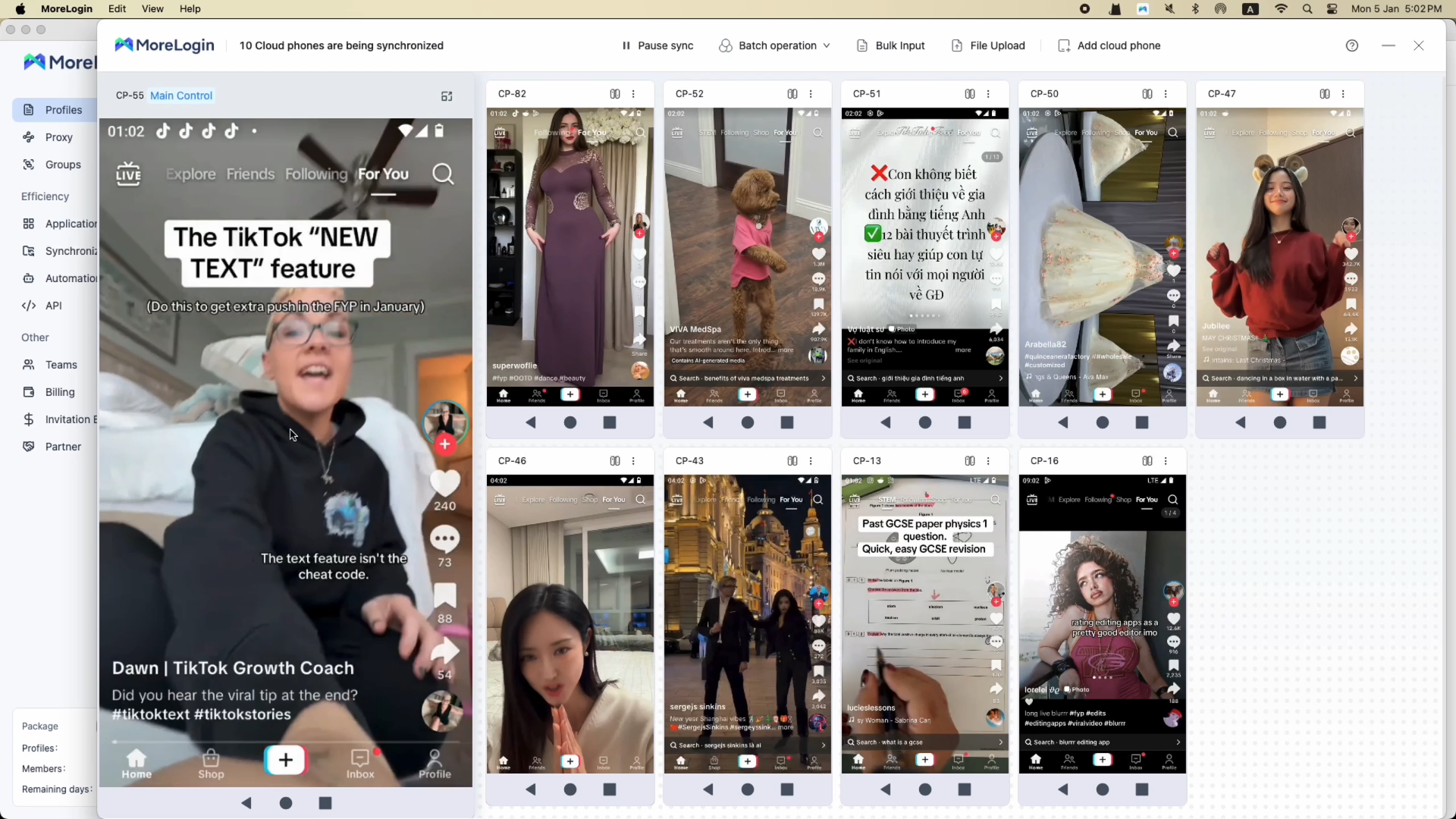
The operator selects one cloud phone as the main window. Other phones become controlled windows. Mouse and keyboard actions made in the main window are copied to the selected phones.
There is no workflow to build first. The operator can see the phones and react while the task is running.
I would use it for actions such as:
Opening the same app on several phones
Installing, starting, or removing an app in bulk
Repeating the same taps and swipes
Checking the same account page on several devices
Entering the same text on all phones
Entering different text for each phone
Uploading images, videos, or documents to several phones
Different text input matters more than it first appears. A team may follow the same publishing path on every phone, but each account still needs its own caption, profile text, product title, or login detail. MoreLogin supports copying prepared values from Excel, which helps keep each value tied to the right device.
File assignment needs the same care. Sending one video to every phone is simple. Sending a different video to each account is where mistakes happen. A clear phone, account, and file mapping is worth preparing before the operator starts.
Synchronizer is attended automation. Someone still controls the main phone and watches the other windows. It fits consistent pages and work that needs an immediate human decision.
It becomes less reliable when phones show different popups, login checks, languages, or page layouts. If the task needs to run at a fixed time without a live operator, RPA is usually a better fit.
At the time of writing, MoreLogin states that batch operations, text input, and file upload in Synchronizer are supported on Model X. Product requirements can change, so teams should check the current device support before building a larger process.
When the same process returns every day, live control starts to lose its advantage. MoreLogin's cloud phone RPA saves that process in a visual node editor. An operations team can build it without writing a full automation program.
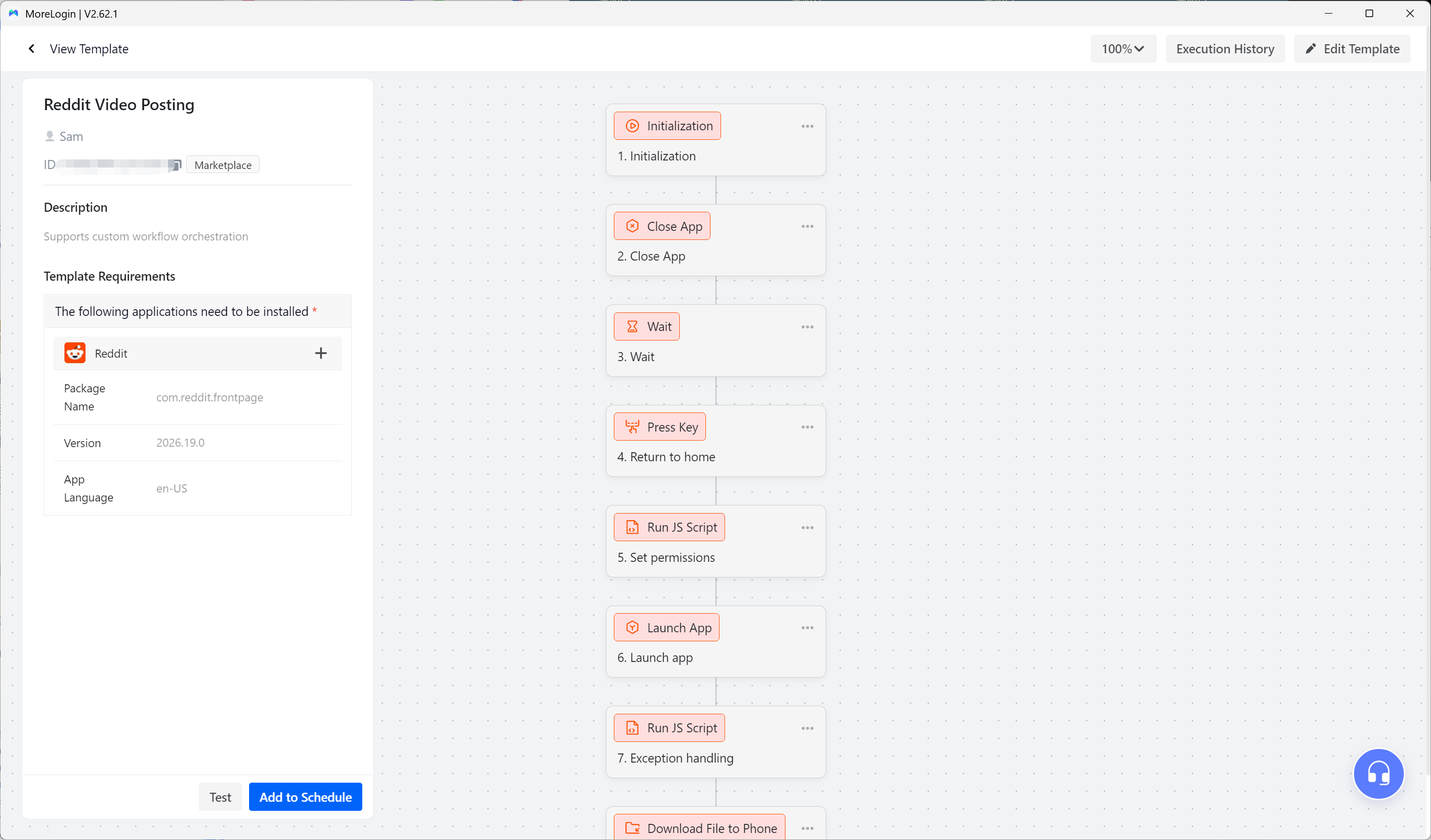
The editor includes actions such as:
Open or close an app
Click a button or screen element
Swipe and scroll
Enter text
Wait for a page or element
Run loops and conditions
Read or process data
Execute JavaScript for advanced logic
This makes the product no-code for standard work and low-code when the flow needs custom logic. A nontechnical operator can arrange visual nodes. A more technical user can add JavaScript or extend the template further.
The workflow shown below is a real Reddit template. It includes initialization, app control, waiting, button clicks, a JavaScript step, element clicks, editing tools, and execution records. The screen makes the product easy to judge. Each action is visible, editable, and testable.
Before building from an empty canvas, check the RPA Template Marketplace. Current templates cover supported TikTok, Instagram, and YouTube video posting tasks. Account warm-up templates are also available.
When a market template does not match the process, the user can create a custom template. The practical workflow is straightforward:
Define the business goal.
Complete the task manually once.
Break the task into small steps.
Build those steps with visual nodes.
Test the complete flow on one cloud phone.
Fix failed steps and save the template.
Add the tested template to a schedule.
Testing one step at a time is important. Mobile apps change. Buttons move. A popup appears on one account but not another. The workflow needs enough waiting, element checks, and exception handling to deal with the pages it is likely to meet.
Once a template survives testing, users can schedule RPA tasks to run once or at a fixed time every day. A recurring plan can include a time zone, an end date, and device-specific parameters. The interface also previews the next three run times.
Daily scheduling suits content tasks, account checks, app setup, profile updates, and other routines that should happen at a known local time.
Each market template may have its own requirements. A template may require a specific app version, language, Android version, or starting device state. Those details should be checked before the task is added to a daily plan.
I would test the schedule on one phone first. Then I would try three phones. Logs from those runs usually reveal more than another hour spent looking at the flow editor.
RPA works best when the path is known. Some mobile tasks are less predictable.
A page may load in a different state. One device may need a login check. Another may show a permission request. Building a fixed branch for every possible screen can take more time than the task is worth.
An AI Agent makes more sense when the route changes but the goal remains clear.
The Creator Center in MoreLogin AI Hub helps teams prepare visual assets before mobile execution begins.
Users can upload a product image or reference image, enter a short description, and select generation settings. The current product supports image creation and short video creation. Video options include 5, 10, or 15 seconds, several resolutions, horizontal or vertical formats, and optional sound.
The system shows the required AI credits before generation. Finished files are saved to the user's personal cloud drive, where they can be reviewed, downloaded, and reused.
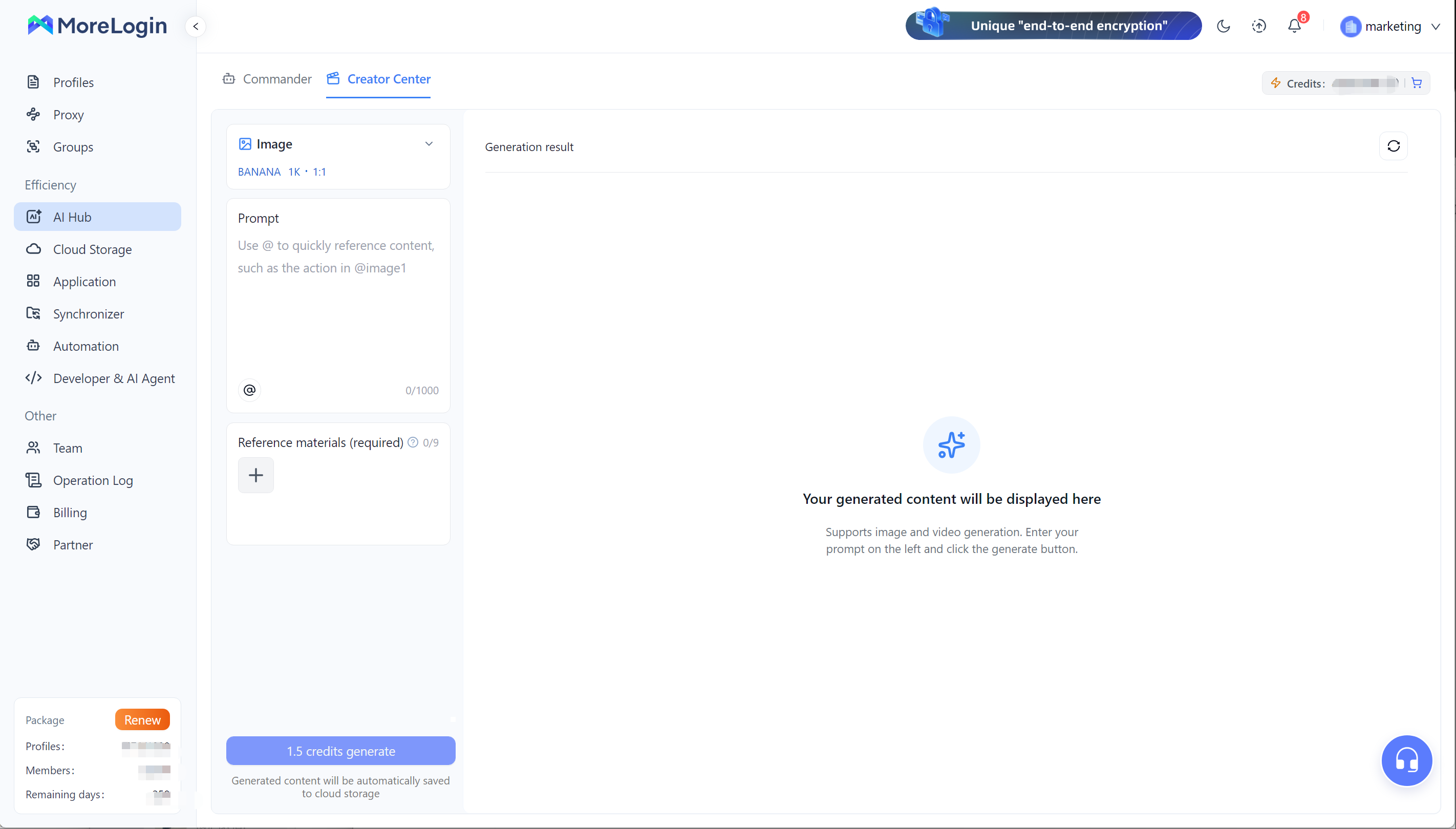
A team can create several product visuals, choose the strongest versions, and assign them to the relevant cloud phones without starting a separate production process.
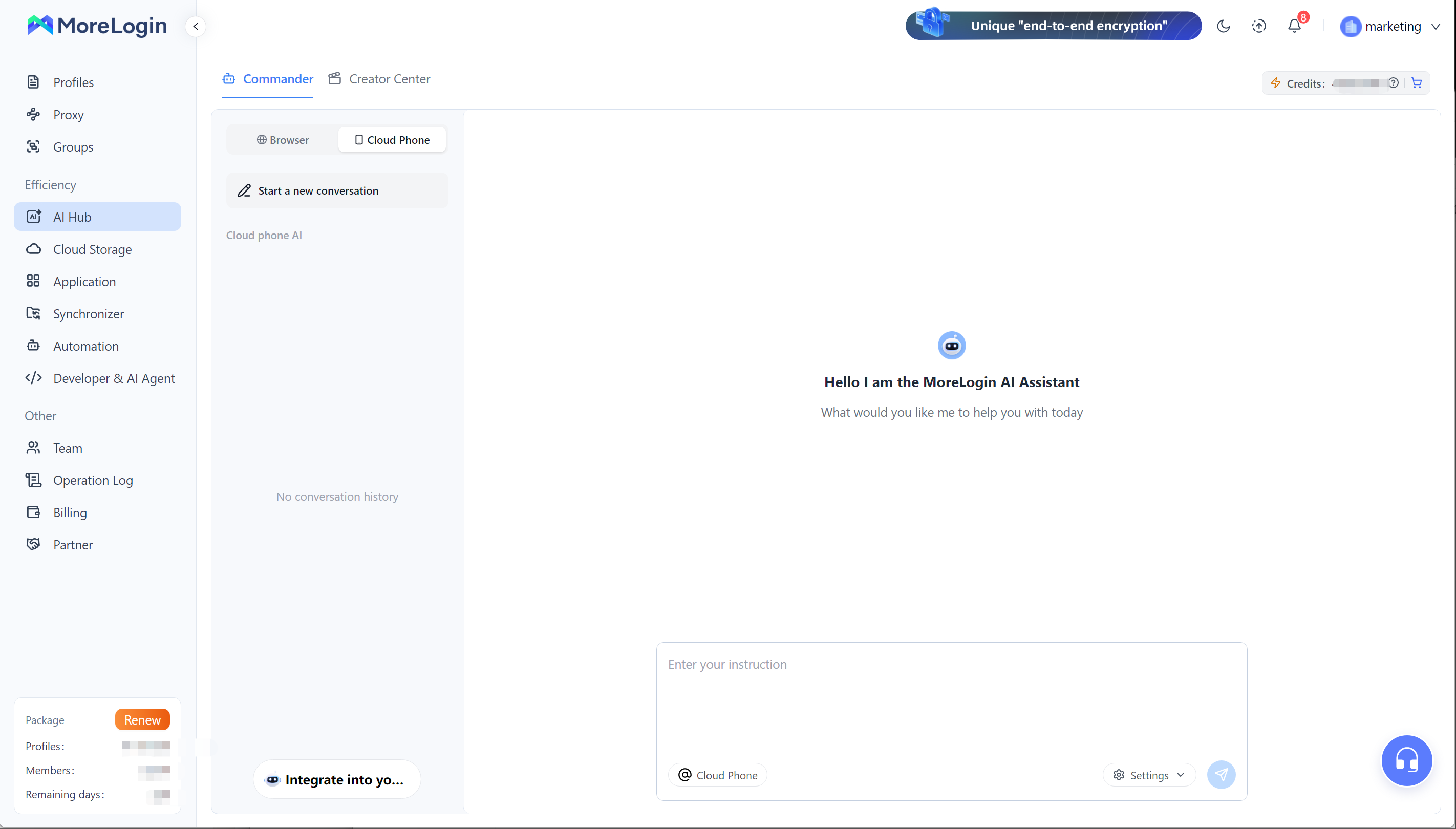
MoreLogin Commander accepts a natural-language instruction and an @ reference to the relevant cloud phone. The AI interprets the task and operates the selected device.
This feels closer to working with an assistant than editing a flowchart.
The working model is similar to Codex. The user describes an outcome. The agent selects the available tools, observes the current state, and performs the next supported action.
A user can describe a lawful task that the selected app and current MoreLogin features can support. The AI Agent can then plan the required steps. Some tasks will still stop for permissions, login checks, unclear instructions, or manual review.
Here are a few practical instruction ideas:
Open the selected cloud phones in sequence, launch the required app, and report which devices need manual login verification.
Open a product app, upload the assigned images, enter the prepared product details, and stop before final submission.
Install an APK on a selected Android test phone, complete the onboarding path, and capture the final screen.
Open a social media app, upload the assigned video, enter the prepared caption, and pause before publishing for review.
The exact instruction should name the device, app, file, expected result, and stopping point. Clear instructions give the agent less room to misread the goal.
Commander supports sequential and parallel device tasks. If a page blocks progress, the system can request manual help. The operator can resolve the issue and continue the task or stop it.
The handoff keeps verification, approvals, and unexpected pages visible. The operator can see why the task stopped instead of finding a vague failure after the run.
RPA and AI Agents overlap, but they are not interchangeable.
I would keep stable, high-volume work in RPA. I would use an AI Agent for tasks that change often or need judgment at each screen. There is no benefit in making a proven daily flow less predictable.
In practice, a clean workflow may look like this:
Use AI Hub to prepare product images, social visuals, or short videos.
Review the content before it enters a live account workflow.
Group the cloud phones and check apps, network settings, languages, and login states.
Map every phone to its account, market, file, and text.
Use Synchronizer for live preparation across several phones.
Use RPA for the stable part that needs to run once or every day.
Give changing or ad hoc work to Commander with a clear stopping point.
Review execution records and failed devices.
Keep a human checkpoint before public posting, deletion, payment, or another sensitive action. Speed is useful, but a fast mistake across 30 phones is still a mistake.
Some workflows begin outside the cloud phone. A new spreadsheet row may arrive. A content manager may approve a file. An internal system may need to start the next task. The guide to Make automation with MoreLogin shows how those external events can trigger supported templates and pass task data into MoreLogin.
Technical teams may need direct control over devices, files, apps, or their own AI tools. The MoreLogin Developer Center covers API, ADB, CLI, MCP, RPA orchestration, and AI Agent integrations for that level of work.
Infrastructure and runtime still affect the final decision. A phone used for a 20-minute daily task has a different cost profile from one that runs for several hours. Compare the available Android cloud phone pricing before turning every routine into a long schedule.
Hardware is another cost. Teams replacing racks of handsets can use a phone farm alternative to reduce charging, cables, storage space, and manual device maintenance.
I judge an automation by how easy its result is to trust.
Before adding more phones, check the following:
Test the task on one phone first.
Confirm the required Android and app versions.
Keep app language and screen layout consistent where possible.
Confirm the starting device state required by the template.
Resolve permissions, update notices, and login prompts.
Verify the account, phone, file, and text mapping.
Review RPA execution records after each early run.
Give AI Agents a clear goal, target device, input file, and stopping point.
Keep manual approval for sensitive actions.
Test the workflow again after a major app update.
Team access needs the same attention. Assign only the cloud phones each operator needs. Remove access when a project ends or a team member leaves. Automation should make delegation easier without weakening control over business accounts and files.
The first five devices can hide a weak process. Fifty devices expose it quickly. A small pilot gives the team a chance to fix the mapping, instructions, and exception handling before the mistakes become expensive.
Cloud phone automation works best as a set of choices, not one large automatic system.
Synchronizer removes repeated live actions. RPA handles stable work that needs to run again. AI Hub creates visual assets and gives teams a more flexible way to assign supported mobile tasks.
Start with one process that already wastes time. Keep the first test small. Watch where it stops. Then choose the next level of automation only when the current one no longer fits.
That approach is slower for the first afternoon. It is usually much faster by the end of the month.
Can MoreLogin RPA be triggered by another app or webhook?
Yes. MoreLogin supports connections with Make, Zapier, and n8n. External systems can trigger supported cloud phone templates and pass task parameters into a workflow.
Can one RPA template receive different text, images, or videos?
Yes. MoreLogin RPA initialization fields support text, decimal values, numbers, images, videos, and Boolean values. A reusable template can therefore receive different content for each task.
How many cloud phones can run RPA tasks at the same time?
The current MoreLogin documentation states that minute-billed cloud phones can run up to five RPA tasks at the same time. Additional plans wait in a queue. Monthly billed cloud phones can run simultaneously. Teams should check the latest limits before planning a large concurrent task.
Where are images and videos generated by AI Hub stored?
Generated files are saved to the user's personal cloud drive. They can be previewed, downloaded, and reused in later content or cloud phone workflows.
Can advanced users add code to a MoreLogin RPA workflow?
Yes. Standard workflows can be built with visual nodes. Advanced users can add JavaScript nodes, and supported workflows can be exported for further development and reuse.
How is AI Hub content generation charged?
AI image and video generation uses paid AI credits. The required credits depend on the selected model and generation settings. MoreLogin displays the expected credit use before the task begins.

 EN
EN