- Product

- Pricing
- Affiliate Program
- Developers
- Resource
 EN
EN
In multi-account management scenarios, independent network egress configuration and browser environment isolation are two distinct technical aspects. This article explains how to combine Lajiao HTTP's residential IP service with MoreLogin's fingerprint browser to configure independent network environments and browser profiles for multiple accounts.
Lajiao HTTP Official Website: https://www.lajiaohttp.com/
Lajiao HTTP specializes in overseas residential native IPs, providing residential IP resources for cross-border e-commerce, social media operations, data collection, and related businesses. IP resources come from real home broadband networks, supporting HTTP, HTTPS, and SOCKS5 protocols, with both username-password authentication and API whitelist access methods available.
Key Features:
Extensive IP pool covering a large number of countries and regions worldwide, with city-level precise targeting and daily updates
Dual-ISP redundant line design to help ensure network continuity
Supports HTTP, HTTPS, and SOCKS5 protocols, compatible with mainstream fingerprint browsers
Provides both username-password authentication and API whitelist access methods
Dynamic residential IP: starting from 3.8 CNY/GB (limited-time promotional price); Static long-term residential IP: starting from 9.9 CNY per IP per 7 days
New users can try for free (up to 50 GB)
Product Types:
MoreLogin is a multi-account management tool that isolates browser environments by creating independent browser profiles for each account. Each profile has its own cookies, cache, residential IP settings, and browser fingerprint.
The free version provides 2 browser environments and 2 members.
Lajiao HTTP provides two acquisition modes:
This is the commonly used mode, suitable for manual configuration in fingerprint browsers.
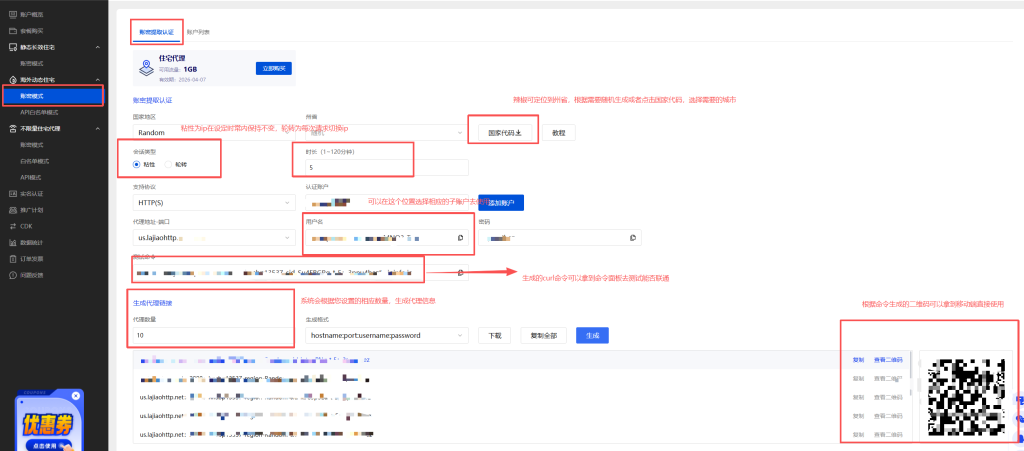
Log in to the Lajiao HTTP dashboard and go to the "Username-Password Authentication" interface in the products page, which includes both static and dynamic authentication modes.
Configure the following settings:
Country/Region: Select the target country (some products support city-level precise targeting)
Session Type: Sticky mode (IP remains unchanged for a period) or Rotating mode (IP switches with each request)
Protocol: Select HTTP(S) or SOCKS5 (recommended)
The system automatically generates residential IP information in the format: Host:Port:Username:Password
Copy the generated residential IP information for use — it can be pasted directly into MoreLogin
Note: Dynamic residential IP is billed by traffic consumption. Please keep an eye on your traffic balance when using it.
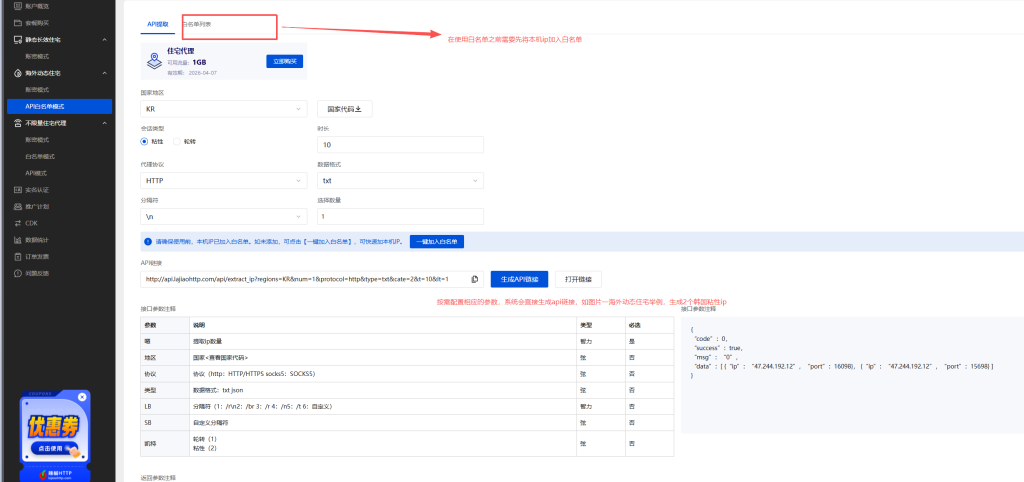
⬇️ The image below shows an example of the dynamic username-password authentication mode.
Suitable for scenarios requiring batch IP acquisition or automated code calls.
Bind IP Whitelist: In your personal center, add the public IP of your device to the whitelist. This method does not require carrying username and password in requests
Generate API Link: In the API generation interface or by directly constructing the link, customize IPs by modifying parameters
Adjustable parameters: num (quantity), regions (region), cate (1=rotating / 2=sticky), protocol (protocol), type (return format)
Sample API link: http://api.lajiaohttp.com/api/extract\_ip?regions=KR&num=1&protocol=http&type=txt&cate=2&t=10<=1\
Use the IP: Open the link in your browser to see the IP list. Copy any set of residential IP information (Host:Port:Username:Password) from it and paste it into MoreLogin
Note: Dynamic IPs are configured the same way in MoreLogin — regardless of whether the residential IP information is obtained via username-password or API mode, the filling method in MoreLogin is identical: protocol type, host, port, username, and password are entered into their corresponding fields.
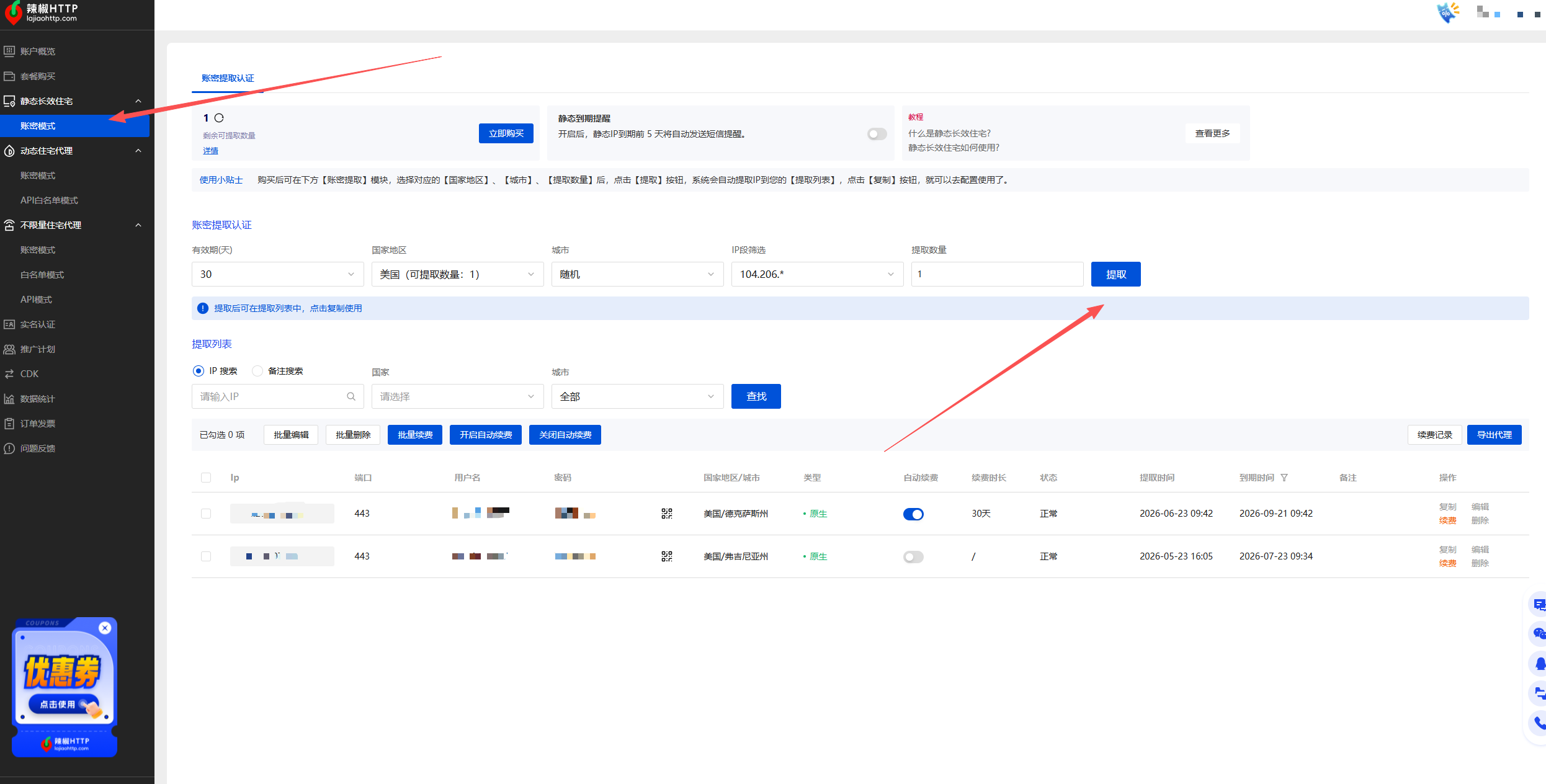
The acquisition method for static long-term residential IPs differs from dynamic residential IPs:
After purchasing a static long-term residential IP, go to the "Extract IP Balance" interface
Filter by validity period (7/30/90 days), country/city, and quantity
Click "Extract" — only then will the IPs be allocated to the list
Copy the residential IP information from the list for use
Key Difference: The balance does not expire before extraction; after extraction, the IP remains fixed for the validity period. Dynamic residential IPs, on the other hand, can be copied and used directly after selecting parameters in the "Username-Password Authentication" interface — no "extraction" step is required.
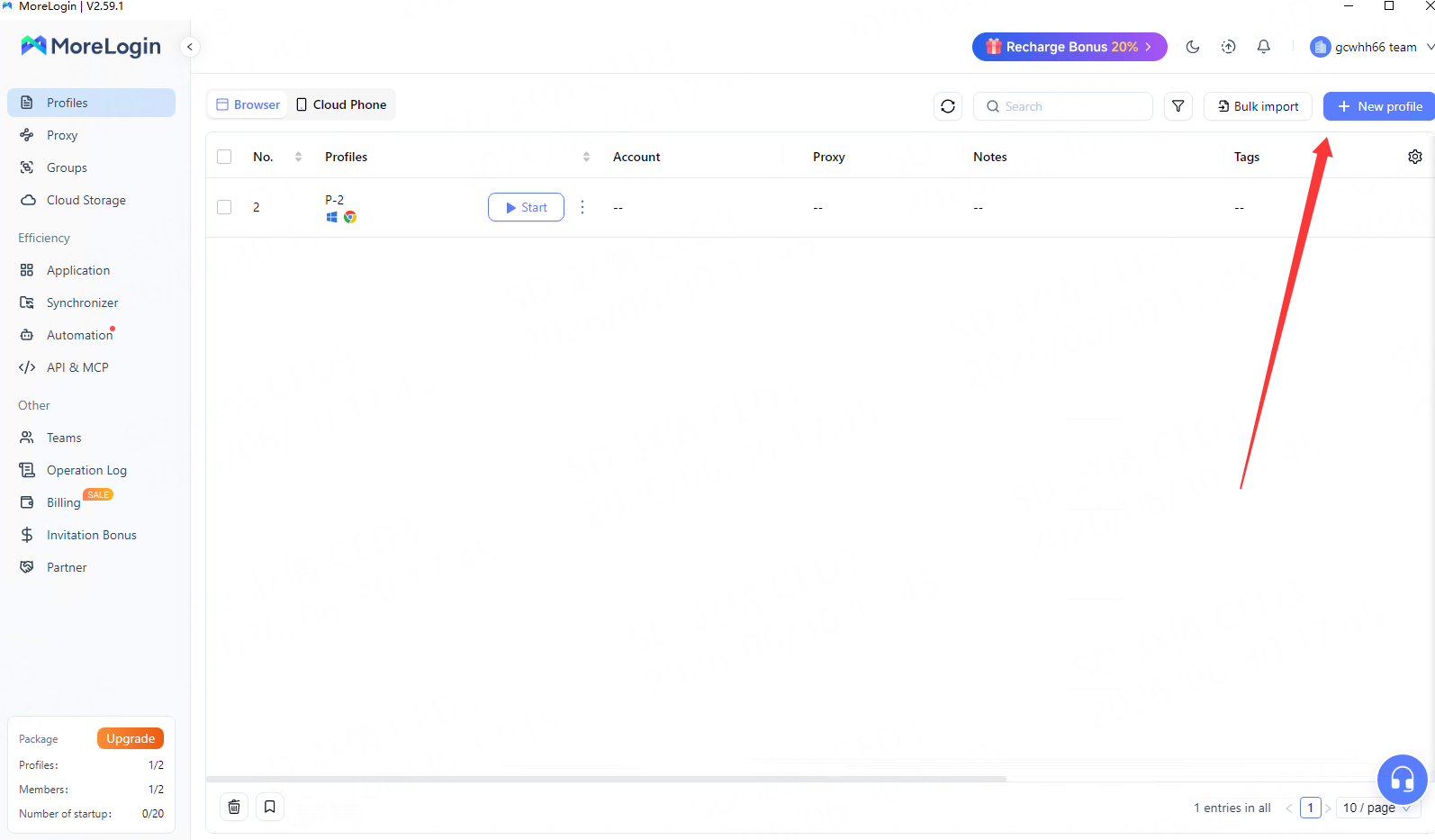
Open MoreLogin and click "New Profile." Fill in basic information such as name, group, etc.
Adjust fingerprint parameters such as User-Agent, timezone, language, etc., as needed. It is recommended to keep them consistent with the IP region.
In the configuration page, find "Proxy Settings" and select "Custom Proxy."
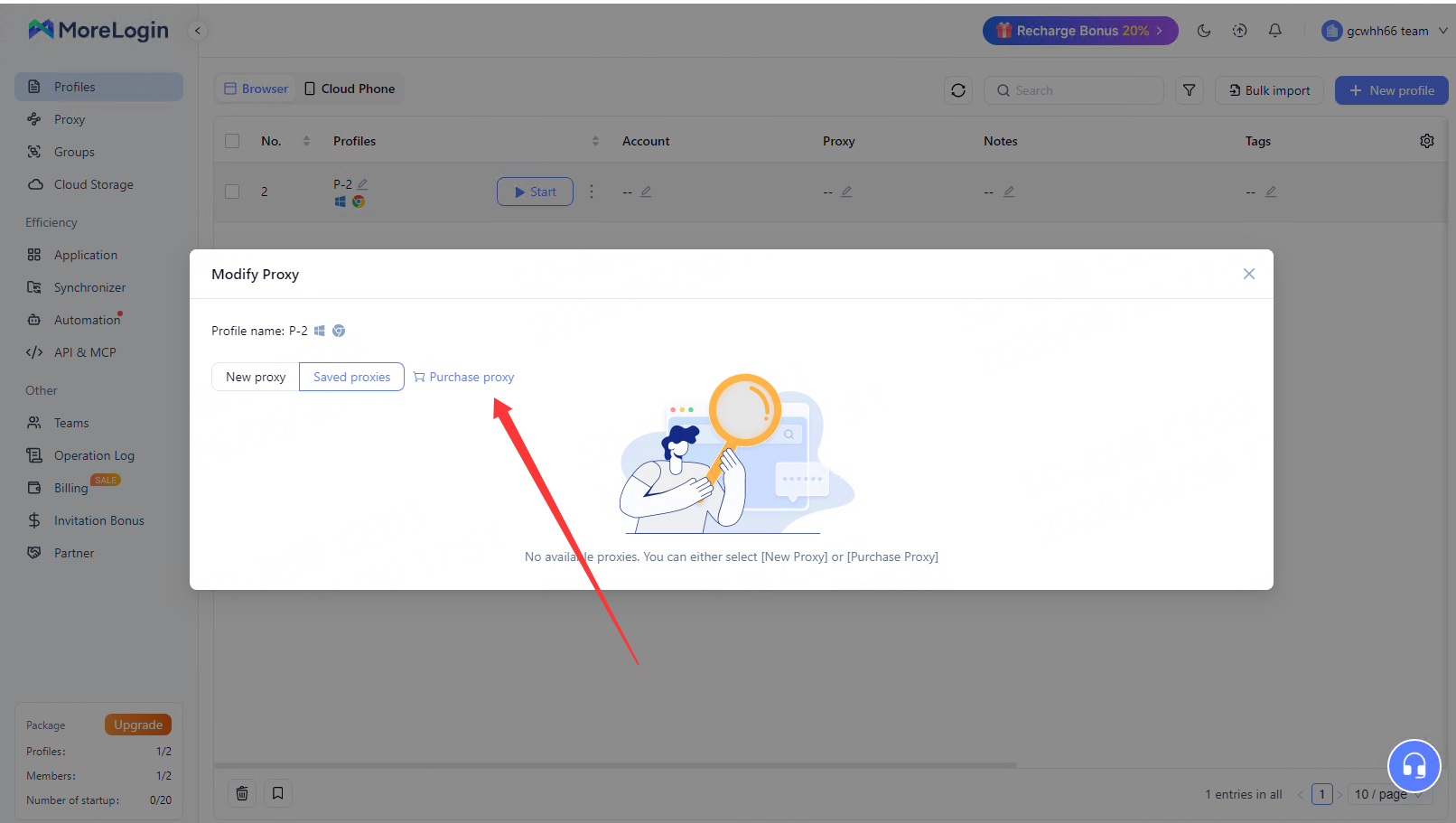
Fill in the following information provided by Lajiao HTTP into the corresponding fields:
Host (IP or domain name)
Port
Username
Password
Protocol (HTTP/HTTPS/SOCKS5 — must match the protocol selected in the Lajiao HTTP dashboard)
Note: The proxy information generated in the Lajiao HTTP dashboard supports one-click copy. After pasting it into MoreLogin, the system will automatically match the corresponding fields.
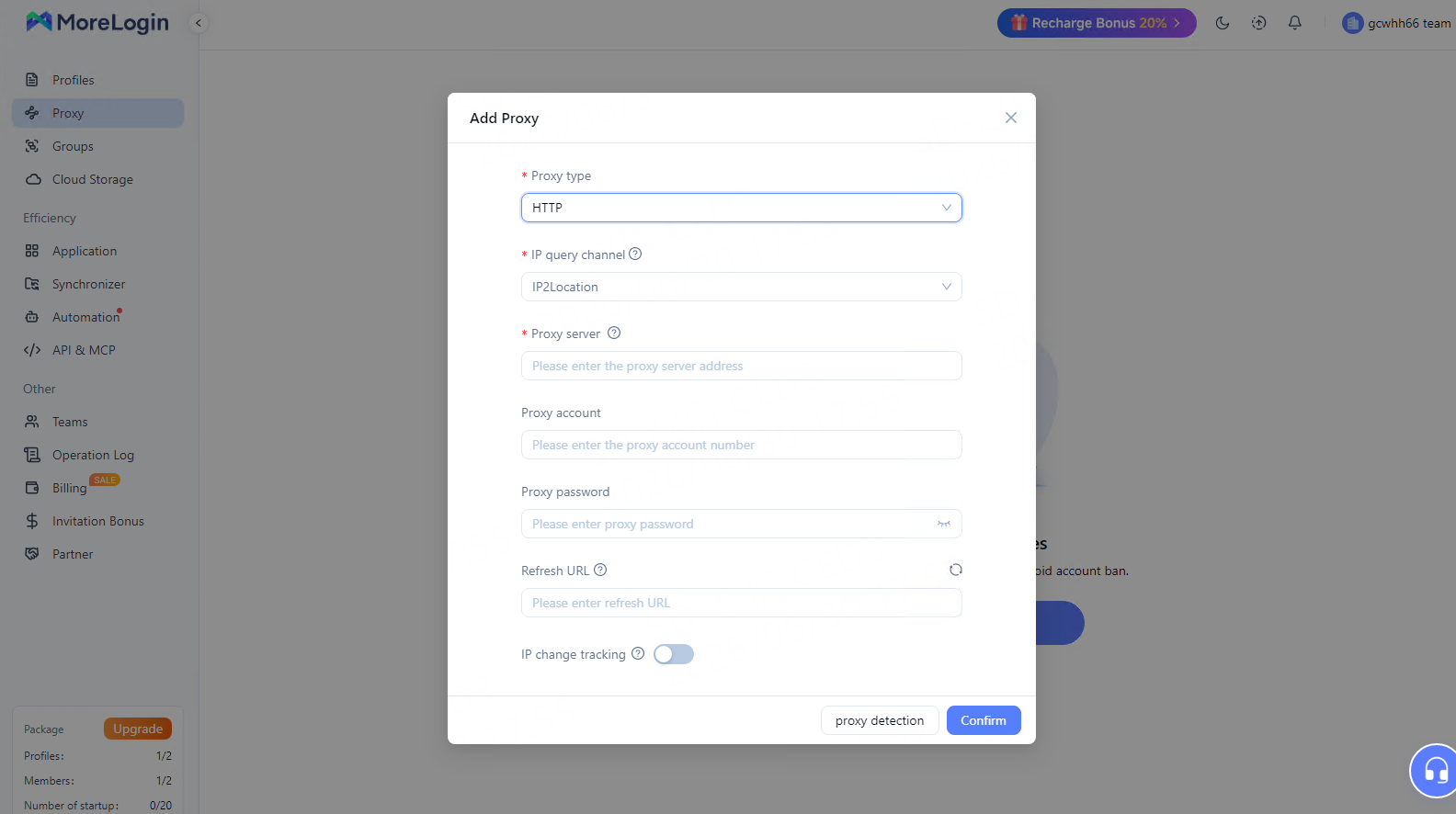
Click "Proxy Detection" to confirm the connection is successful and the IP location is correct. If it fails, check whether the above information is entered correctly.
After the test passes, save the profile and click "Start" to run the independent browser environment.
For better environment consistency, it is recommended to match browser profile settings with the IP location:
Set the browser language to the official language of the IP's location
Set the timezone to the timezone of the IP's location
Open the generated API link in your browser — it will return an IP list (in txt or json format). Copy any set of Host:Port:Username:Password from it and fill it into MoreLogin following Step 5.
We recommend checking the following in order: ① Confirm that the proxy information (host, port, username, password) is copied completely and correctly; ② Check that the protocol type in MoreLogin matches the protocol selected in the Lajiao HTTP dashboard; ③ In API mode, confirm that the device IP has been added to the whitelist.
Dynamic residential IPs can be set to a fixed duration (e.g., 10-30 minutes); Unlimited - Bandwidth supports 1-120 minutes; Static long-term IPs remain fixed throughout their validity period.
Unlimited - Bandwidth is billed based on bandwidth + duration, with no limit on request count — suitable for high-concurrency, high-traffic consumption businesses. Unlimited - Port involves purchasing a fixed port, billed based on port + bandwidth, with flexible configuration — suitable for scenarios requiring independent ports and IP policies for different businesses.
The MoreLogin free version provides 2 browser environments and 2 members.
Lajiao HTTP provides residential IP services, while MoreLogin provides browser profile isolation. Together, they allow you to configure an independent network egress and an independent browser environment for each account.
Lajiao HTTP Official Website: https://www.lajiaohttp.com/
MoreLogin Official Website: https://www.morelogin.com/

 EN
EN