EN

Browser fingerprinting uses information exposed by a browser to distinguish one environment from another. Browser versions, fonts, graphics rendering, language settings, and other attributes can contribute to that process.
CreepJS helps researchers inspect those signals and investigate how browser configurations and privacy protections affect them. Its value comes from examining the reported details and reproducing findings.
CreepJS is an open-source browser fingerprinting research project. It examines browser attributes, rendering outputs, API behavior, and signs of modification or inconsistency.
The project studies weaknesses and privacy leaks in browsers and anti-fingerprinting extensions. Its checks include JavaScript prototype modifications, rendering behavior, and patterns associated with browser settings or extensions.
Developers and privacy researchers can use it to compare configurations, investigate unexpected output, and observe changes across browser versions.
Cookies and local storage save information in the browser. Fingerprinting instead combines characteristics that a website can observe, such as the browser version, timezone, available fonts, and display settings.
Websites can obtain some of these characteristics through JavaScript and CSS. The combination may help distinguish a browser across visits, depending on which signals are collected and how stable they remain. MDN’s fingerprinting explanation describes this process.
A proxy changes the network route and outbound IP. Browser settings and rendering behavior are separate measurements, so an IP change does not automatically change the other values a page can observe.
CreepJS exposes information from areas such as Navigator, Screen, timezone, language, and supported browser features. These fields help describe the environment available to the test page.
Rendering and processing operations can produce different outputs across hardware, drivers, operating systems, and browser implementations.
CreepJS includes Canvas, WebGL, GPU, and Audio checks. When comparing results, retain the original field labels and record the environment that produced them.
The project also includes checks involving fonts, DOM rectangles, SVG, speech voices, CSS, and JavaScript behavior. Its official test page displays these measurements in separate sections.
Privacy tools and extensions may block APIs, standardize values, or modify returned information. CreepJS includes checks intended to identify modifications and inconsistent behavior.
A reported inconsistency is a starting point for investigation. Examine the affected field, configuration, and software version before assigning a cause.
Updates can change available features, rendering behavior, or reported values. Keep the application, browser-core, and operating-system versions with each result.
An extension update or a change to an anti-fingerprinting setting may affect several outputs. Record enabled extensions and their relevant settings before comparing configurations.
Language, timezone, display settings, and other profile options can alter what the page observes. Change one defined setting at a time when investigating a difference.
Errors, blocked APIs, or permission prompts may leave part of a report incomplete. Note those conditions rather than treating missing output as a successful result.
Begin with the specific finding: which field changed, which check reported an inconsistency, and whether the result repeats.
A result describes the checks performed by that CreepJS build in the captured environment. It does not establish how every website or anti-fraud system will classify the browser, and it does not determine a platform account’s verification or suspension outcome.
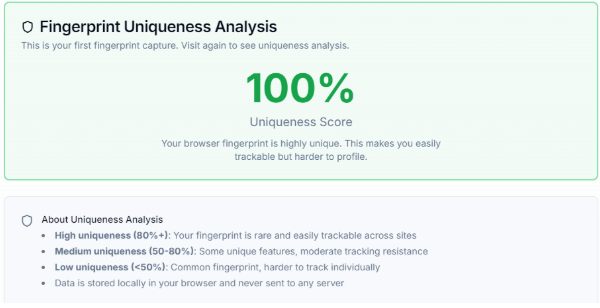
Uniqueness also needs careful interpretation. A highly distinctive fingerprint may be easier to distinguish from others. Read the metric’s definition instead of assuming a higher percentage means better privacy.
Keep observations separate from explanations. “The Canvas output changed after enabling an extension” is an observation. Explaining why it changed requires checking the extension’s behavior or running further comparisons.
MoreLogin browser profiles can organize saved browser configurations and separate cookies, storage, and login states. Use a named profile for each configuration being compared.
Note the MoreLogin version, browser-core version, operating system, extensions, relevant profile settings, and test time. Record any proxy configuration separately.
Open the official CreepJS deployment and save the URL and date. For a test built from source, record the source revision.
Save the relevant fields and screenshots with their original labels. Include incomplete checks, errors, and permission prompts in the record.
Repeat the baseline to see which values remain stable and which vary. Then change one setting and compare the affected outputs.
Retain both configurations and their results. Describe the fields that changed, the findings that repeated, and any unresolved differences. Add compatibility observations if a page feature or extension behaves differently.
CreepJS provides a detailed way to inspect browser-exposed information and investigate fingerprinting behavior.
Use its reported fields, source code, and repeatable comparisons to explain findings. A useful test report includes the environment, method, and original output, with conclusions limited to what those records support.
What does CreepJS examine?
It examines browser attributes, rendering outputs, API behavior, and inconsistencies. The project’s source code identifies the checks implemented in a particular build.
Does CreepJS predict whether an account will be banned?
No. It reports observations from its own checks. Platform account decisions are outside the result’s scope.
Does a high uniqueness score mean better privacy?
Not necessarily. A distinctive fingerprint may be easier to recognize. Check how the tool defines the metric and which data it uses.
Does an inconsistency prove that a browser is malicious or unusable?
No. Investigate the affected field. Extensions, privacy controls, updates, and implementation differences can change the output.
How should I compare two configurations?
Record the environment and test build, repeat the baseline, then change one setting. Compare the relevant fields and retain both outputs.
What should accompany a published test result?
Include the date, test URL or source revision, browser and application versions, operating system, extensions, settings, method, and original output labels.

 EN