- Product

- Pricing
- Affiliate Program
- Developers
- Resource
 EN
EN
An AI model from Adobe is already a reason to pay attention. Large companies rarely release random products — most of the time, they deliver reliable tools with well-designed functionality and consistently high content quality. Let’s take a closer look at whether Firefly truly lives up to expectations and whether it can be considered one of the leading solutions in the generative AI space.

Adobe Firefly is an online service that combines a full suite of generative AI tools for creating images, videos, and audio. Like any large-scale neural network, Firefly offers its own distinctive features — one of the most notable being support for vector graphics, which is still uncommon among competing AI platforms.

One of Firefly’s key advantages is its deep integration with other Adobe products. Certain AI features can be used directly inside Photoshop and other applications within the Adobe ecosystem, making the content creation workflow more seamless and familiar for professionals.

To use Adobe Firefly without limitations, it is recommended to work through the MoreLogin browser. It enables secure management of multiple Adobe accounts, helps bypass regional or technical restrictions, and protects personal data during authorization.
The Adobe Firefly platform offers a broad set of tools covering all major areas of generative content. Its core strength lies in multimodality — the system can process text, images, video, and audio, transforming text prompts into finished visual or sound outputs.
Firefly can generate images from simple text prompts. A user might enter something like “a futuristic city at sunset” or “a comic-style illustration,” and the AI produces several variations that can later be refined. Image generation is not limited to static visuals: Firefly is also capable of producing short video clips by interpreting narrative descriptions. This is especially useful for quick visual content and advertising inserts where speed and artistic quality matter.
The platform also supports audio and video processing. Adobe’s AI audio tools can translate speech while attempting to preserve the original voice tone and intonation. This feature is particularly valuable for video localization and podcast translation, where natural-sounding speech is critical. In addition, Firefly can generate sound effects and music using voice commands or text prompts — from short ambient sounds to full soundtrack fragments.
Another noteworthy feature is video generation with visual avatars. While this function is not displayed on the platform’s main page, it is available through a separate link. With this technology, users can create realistic videos in which a virtual character speaks a given script with synchronized lip movements and facial expressions.
Beyond generation, Firefly provides advanced image editing capabilities. Users can add new elements, remove unwanted objects, or change the composition of a scene using text prompts — without manually editing images in traditional graphic editors. As a result, Firefly functions as an all-in-one tool that combines content generation and post-processing within a single interface.
Each action in Firefly consumes a certain number of credits. Without a paid subscription, users receive limited access: approximately 10 image generations and 2 video generations per month, along with minimal access to additional features. More detailed and up-to-date usage conditions are available on the official Adobe Firefly page.
To begin using the service, follow a few simple steps:
Sign in using any available login method via the official link.
Choose the required tool — for image generation, video creation, audio processing, or vector graphics.
Start generating content and adjust the results according to your needs.
Firefly is not limited to the web version — Adobe also offers a mobile app that syncs seamlessly with your account.
Let’s first test how the AI handles image generation. Prompts can be entered in any language, as Firefly automatically translates them.
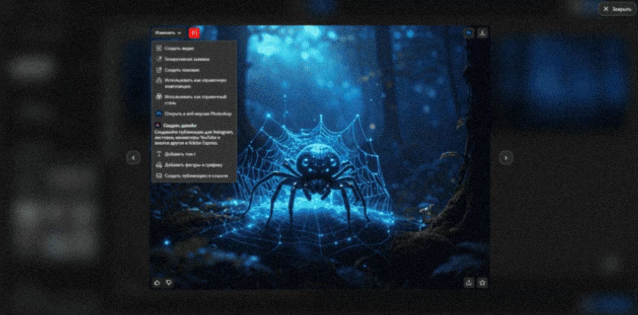
For example, we try the prompt “a mystical spider in an enchanted forest.”
The result looks solid: composition and lighting are well thought out, although some physical inaccuracies appear — for instance, the spider web is partially floating in the air.
After generation, the image can be downloaded or edited. To do so, simply open it and click the “Edit” button in the top-left corner.
Firefly allows detailed control over generation parameters:
selecting the model and image aspect ratio;
defining content type, composition, and style;
adjusting lighting, color tone, camera angle, and effect intensity.
In addition to raster images, Firefly supports vector graphics. The platform can generate scalable vector visuals, making it suitable for design workflows that require flexibility and precision.
Next, we test Firefly’s video capabilities.
With a prompt like “a spider weaving a web,” the visual result looks impressive, but there are logical inconsistencies: while movement and background are rendered well, the actual weaving process is not shown — the spider simply moves within the frame.
The tests were conducted using the Firefly Video model. More advanced models, such as Veo 2 or Veo 3, may provide improved realism in motion and detail.
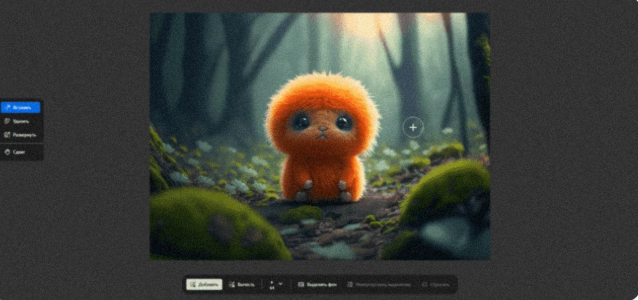
Next, we examine the Generative Fill tool, which allows users to modify images using text prompts.
We take an example from Adobe’s library — a magical creature — and add winter accessories. By roughly drawing the shapes of a hat and scarf and entering a prompt, Firefly automatically generates the missing elements.
The result is visually appealing, although the model slightly smooths the fur texture. On one side, the hat looks natural, while on the other, the fur appears to blend into the fabric. Despite this, the feature works consistently and demonstrates a high level of detail processing.
Adobe Firefly is a versatile generative AI platform that balances ease of use with a wide range of creative tools. While it may still fall behind Midjourney in terms of artistic detail, Firefly stands out for its versatility. The platform goes beyond basic image and video generation by offering audio creation, voice-preserving translation, and flexible visual customization.
As a result, Adobe Firefly positions itself as a comprehensive solution for creators who need an integrated workflow for images, video, and sound within a single ecosystem.

 EN
EN