- Product

- Pricing
- Affiliate Program
- Developers
- Resource
 EN
EN
People usually search for linkvertise bypass after they hit the same annoying problem a few times.
The page keeps loading. The timer starts again. The final button never appears. On mobile, the page may look half broken. With a VPN, it may load but show a warning. Without the VPN, it may not load at all.
I would not rush to install a bypass extension in that situation. Most of the time, the first thing worth checking is much simpler. Your browser may have bad cookies. Your ad blocker may be blocking part of the page. Your VPN or proxy may be confusing the session.
This guide is not about teaching people to bypass Linkvertise. It is about fixing the access issues that make people search for bypass tools in the first place.
A linkvertise bypass usually means a website, extension, script, or bot that tries to skip the Linkvertise page and send users straight to the final link.
That is the basic idea. Skip the ads. Skip the waiting time. Skip the extra clicks.
It sounds simple, but it rarely stays simple for long. Linkvertise is not just a page with a timer. It also works with sessions, redirects, browser signals, and network checks. When those checks change, many bypass tools stop working or start returning broken results.
That is why people keep searching for bypass linkvertise, how to bypass linkvertise, or new tools that still work. The old method fails, so users look for the next one.
The bigger issue is trust. A random extension can ask for browser permissions. A script can run on pages you visit. A bypass site can send you through extra redirects before showing anything useful. If you only wanted to open one file, that is already a lot of risk for a small task.
So before treating every problem as a bypass problem, it is better to ask one basic question.
Is Linkvertise blocking you, or is your browser setup breaking the page?
Linkvertise problems often come from the browser environment.
Cookies are a common reason. If the page has an old or broken session, it may keep looping. You click, wait, refresh, and the same thing happens again. The page may not be able to finish the normal flow because your browser is holding old site data.
Ad blockers are another common cause. Linkvertise depends on scripts, ads, buttons, and redirect steps. If an extension blocks one part of that chain, the whole page can stop. From your side, it looks like the website is broken. Behind the scenes, the browser may have removed something the page needed.
VPNs and proxies can also cause problems. If the IP changes while the page is loading, the session may fail. If the IP has poor reputation, the page may show a warning. If the connection is slow, the redirect may time out.
Mobile is its own headache. Some Linkvertise pages do not behave well on every mobile browser. A button may not show. A task may not fit the screen. A weak mobile connection may interrupt the page before it finishes.
That is why a linkvertise bypass tool is not always the real fix. Sometimes you just need a cleaner browser, a stable network, or a better testing environment.
Use this table before trying any third-party tool. It gives you a quick way to match the problem with a likely cause.
The point is not to make Linkvertise perfect. The point is to stop guessing. Once you know what kind of issue you have, the fix becomes much easier.
Some may be fine for a quick test. Some are not worth touching.
The biggest problem is not only whether a tool works. It is what the tool can see.
A browser extension may ask for permission to read and change data on websites. That matters if you use the same browser for email, social media, client dashboards, or ad accounts. A small shortcut can become a privacy problem very quickly.
Scripts are also tricky. A public script can look clean, but most users will not read every line of code. Fake copies are easy to make. Old scripts can also break after Linkvertise changes its page flow.
Online bypass sites have a different risk. Some show fake download buttons. Some add extra ad redirects. Some work one day and fail the next. You may save a few seconds, or you may end up opening something worse than the original page.
For people who manage multiple accounts, I would be more careful. Do not test unknown bypass tools in the same browser where important accounts are logged in. That is asking for trouble. Cookies, sessions, and browser data are too close together.
A cleaner rule is this:
Fix the browser first. Check the network. Use a separate environment for testing. Only then decide whether another tool is worth the risk.
This is the first thing I would check.
Linkvertise uses browser sessions while you move through the page. If that session gets stuck, the page may keep loading. The timer may restart. The final button may not appear.
Old cookies can also cause strange behavior. You may be opening a new link, but your browser still holds old data from a failed visit. That can push you back into the same loop.
You do not need to wipe your whole browser first. Start smaller.
Clear only the site data for Linkvertise. Then close the tab. Open the link again in a fresh tab.
A simple process works well:
Open your browser settings
Find site data or cookies
Search for Linkvertise
Delete the stored data for that site
Restart the browser
Open the link again
Do not keep smashing refresh. That rarely helps. It can create more failed sessions and make the page even more confusing.
Also avoid opening the same Linkvertise URL in five tabs at once. It may feel like you are forcing it to load, but you are really creating more session noise.
This fix is boring, but it is clean. No unknown extension. No random bypass site. No extra risk.
Ad blockers are not the enemy. I would not tell anyone to browse the web without protection.
But some Linkvertise pages need ad scripts, redirect buttons, or task elements to load. If your blocker removes one of those parts, the page may freeze. On mobile, broken or missing advertisements can also stop buttons or tasks from loading correctly.
This is why users often think they need a linkvertise bypass. The page is not moving, so they assume Linkvertise is blocking them. In reality, the blocker may be stopping the page from working.
The better fix is narrow.
Do not turn off every security tool in your browser. Just pause the ad blocker for the Linkvertise domain. Most ad blockers allow this. You can keep protection active on other sites.
After that, refresh the page once and see if the flow continues.
Also check script blockers and privacy extensions. Sometimes the main ad blocker is not the problem. A smaller extension may be blocking JavaScript, popups, or redirects.
While testing, stay alert. Do not click every download button on the page. Do not accept random notification prompts. Do not install anything from a pop-up.
You are not trying to make the whole browser weaker. You are only checking whether one blocker is breaking one page.
If the page still fails, open it in Incognito Mode.
This is a quick way to test your browser state. Incognito usually starts without old cookies. Many extensions are also disabled unless you turn them on manually. That gives you a cleaner test. A clean profile is often a more reliable and automated test than repeatedly changing extensions in a normal browser.
If the Linkvertise page works there, your normal browser profile is probably the issue. It may be old cookies, cached data, extensions, or site permissions.
But Incognito is only a quick test. It is not a proper setup for repeated work.
If you open Linkvertise links often, or if you work with multiple accounts, use a clean browser profile instead. Keep your personal browser separate from link testing. Keep client accounts separate from random downloads. Keep each workflow in its own space.
This makes troubleshooting much easier.
For example, if a link fails in your main profile but works in a clean one, you know the link itself is probably not the problem. If it fails everywhere, the issue may be the link, the network, or Linkvertise itself.
Many users search for how to skip Linkvertise waiting time when the better move is to remove browser clutter. A fresh profile will not shorten the required flow, but it can stop browser clutter from wasting your time.
Network settings can make Linkvertise act strangely.
A VPN may trigger a warning. A proxy may be too slow. A public WiFi network may block parts of the page. A custom DNS setting may fail to resolve the page properly.
The mistake I see often is constant switching. A user opens the link with one VPN server, then changes region, then refreshes, then changes again. That can make the session look unstable.
Keep it simple.
Test the link on one stable network first. If you use a VPN, try turning it off once. If you need a proxy, use one stable proxy and keep the region consistent. For example, some teams use residential proxy providers such as CyberYozh, which offers 50M+ residential IPs for account isolation, maintain one consistent IP per session, and in some setups keep the same city location for consistency checks. Do not switch IPs while the page is loading.
Also check basic browser settings. JavaScript should be enabled. Redirects should not be fully blocked. If many websites are slow, restart your router or test another network.
If Linkvertise works on another WiFi network, your local network may be the issue. If it works without VPN, the VPN IP may be the problem. If it works on desktop but not phone, the issue may be mobile compatibility.
This is not about tricking the page. It is about removing unstable signals.
A stable network often fixes more than people expect.
This is the part that matters most for people doing real work.
If you open one Linkvertise link once a month, your normal browser is probably fine. But if you are dealing with many Linkvertise links, manage multiple accounts, use proxies, or work in a team, one shared browser becomes messy fast and you need a cleaner setup.
Cookies pile up. Sessions overlap. Extensions interfere. One proxy setting affects the wrong task. A risky link opens in the same browser where important accounts are logged in.
That is not a good setup.
A separate browser environment gives you cleaner control. You can test links away from your main accounts. You can keep cookies separate. You can assign different proxies to different profiles. You can compare results without mixing everything together. It can also save time when you need to compare results across profiles.
Mobile testing needs the same thinking. Some Linkvertise problems only show up on phones. A page may work on desktop but fail on Android. A button may not show correctly. A redirect may behave differently in a mobile browser, and annoying ads can load differently in the background before the page finishes.
For teams that do mobile-heavy work, a cloud phone can help test pages in separate Android environments without switching between many physical phones. It does not bypass Linkvertise. It helps you check mobile access, app behavior, and account workflows in a cleaner way.
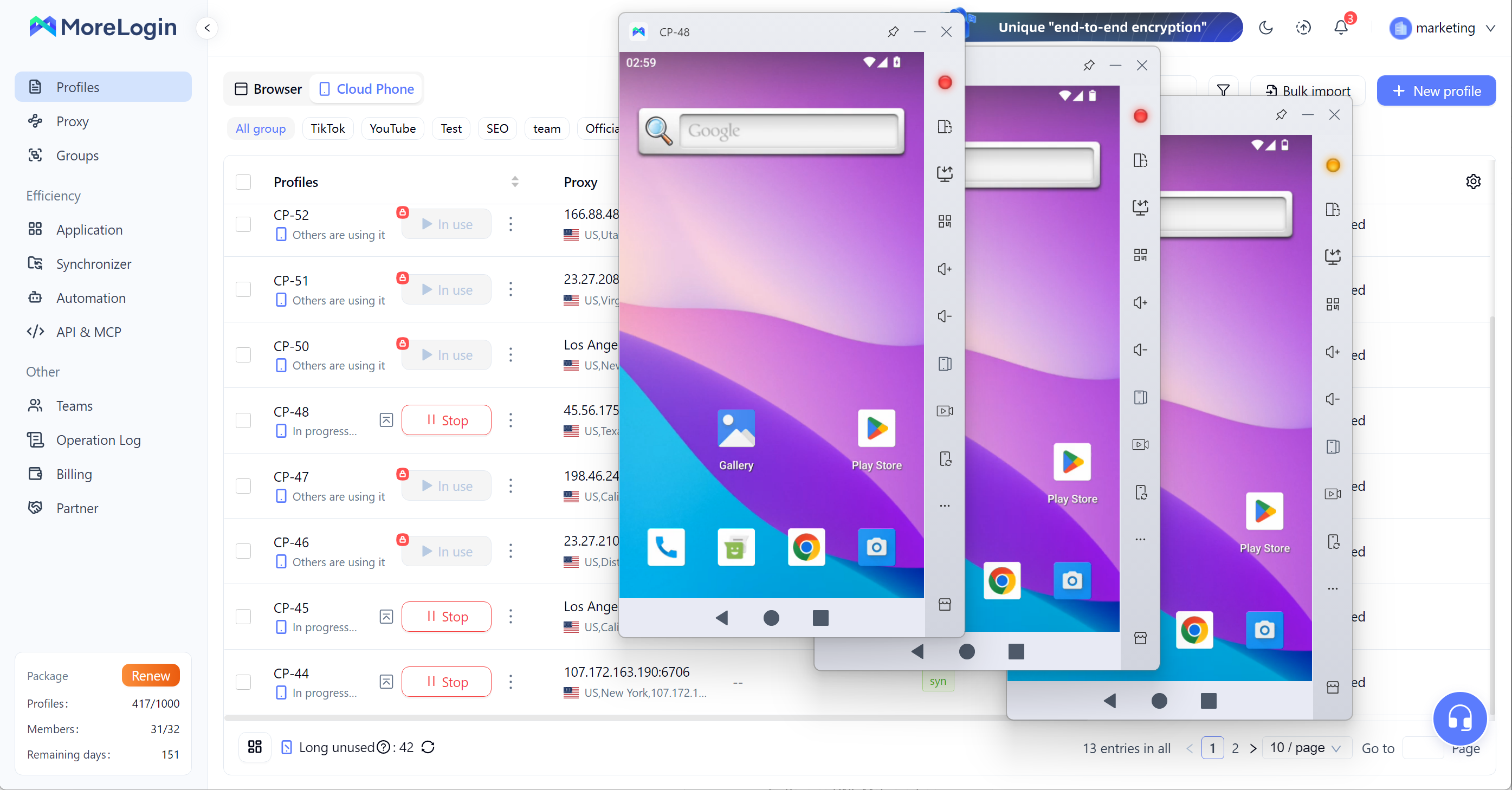
That difference matters. You are not trying to skip the platform. You are trying to understand where the problem comes from.
MoreLogin cloud phone should not be described as a Linkvertise bypass tool. That would be the wrong angle.
It does not remove ads. It does not skip timers. It does not create direct destination links. Some users compare external bypass service options such as Bypass.vip or BypassUnlock.com, but those are separate from MoreLogin; reported figures often cite 85% for Bypass.vip, 90% for manual redirect inspection, and 80% for BypassUnlock.com as a backup option, with BYPASSUNLOCK supporting over 50 link shorteners.
The better use case is environment control.
If you manage many accounts, test links, use proxies, or handle different sessions, MoreLogin helps keep those workflows apart. That is where it fits naturally.
MoreLogin lets users create separate browser profiles. Each profile can have its own cookies, session data, proxy settings, and fingerprint configuration, with separate profiles assigned their own proxy settings instead of sharing one network identity across every task.
This is helpful when you need to test links without polluting your main browser. If one profile fails, you can try another clean one and compare the result. That gives you a clearer answer.
Maybe the link is broken. Maybe the profile has bad cookies. Maybe the proxy is unstable. Maybe the issue only appears with one browser setup.
For teams, this is even more important. One person can test links. Another can manage accounts. Another can handle outreach or research. They do not all need to work inside the same browser mess.
Cleaner sessions do not solve every problem, but they reduce a lot of avoidable confusion.
Mobile issues are easy to miss if you only test on desktop.
Some pages work fine in a desktop browser but fail on Android. Some redirects behave differently. Some buttons or tasks do not render well on a small screen.
MoreLogin Cloud Phone gives teams separate Android environments for mobile testing. Some bypass tools such as KeyBypass are available on chrome and Android, but Cloud Phone is for testing access in separate Android environments rather than bypassing pages. This helps when you need to check mobile pages, social apps, redirects, or account behavior without buying and managing many physical devices.
It is a practical setup for teams that already work across accounts and regions.
Again, the point is not to bypass Linkvertise. The point is to test access issues in a clean mobile environment.
If none of the fixes work, stop forcing it for a moment.
Check the original source. The creator may have posted a new link, a mirror, or a direct option somewhere else. Look at the website, Discord server, Reddit thread, Patreon page, or community post where the link came from.
If the file or page is important, contact the creator. Many creators know that Linkvertise can fail for some users. Some will offer an alternative link, especially if you are a buyer, supporter, or active community member.
You can also try again later. Sometimes the issue is not your browser. It may be a temporary problem with Linkvertise, an ad provider, or the destination site.
What I would avoid is downloading unknown bypass software out of frustration. That is when users make bad security decisions. A stuck link is annoying. A stolen browser session is worse.
A linkvertise bypass search usually starts with a bad experience. The page does not load. The timer restarts. The VPN gets flagged. The mobile page breaks.
But the first fix should not be a random tool.
Start with the basics. Clear site data. Check blockers. Try a clean profile. Keep the network stable. Use a separate environment if you test many links or manage accounts.
For casual users, this absolutely saves time. For professional users, it also lowers risk.
If your workflow involves multiple accounts, proxies, browser profiles, or mobile testing, MoreLogin can help you keep those environments cleaner and easier to manage.
Is Linkvertise itself safe to use?Linkvertise is a link monetization platform, and it helps creators track and monetize links before users reach the destination. The final destination link is still separate. Always check the source and be careful with unknown files.
Can a Linkvertise link expire?Yes. Some sessions or destination pages may expire. If an old link fails, check the original post for an updated version. It is also good practice to check the update date on any script or tool you consider using, because a maintained system is usually more dependable than an abandoned one.
Why do some Linkvertise links lead to different pages?The page may change based on country, device, browser, network, or ad campaign. The platform may also track device or campaign differences when serving pages. Mobile and desktop users may not always see the same result.
Are there browser add-ons that claim to bypass Linkvertise?Yes. Some users look for browser extensions on Chrome or Firefox, including a linkvertise bypass extension, but these tools often need constant updates and can create privacy risks.
Can I copy a Linkvertise link into a web tool to skip the ad page?Sometimes. Some sites ask you to copy and paste the link to try to unlock the destination URL, and some methods inspect redirect requests to find it. Results vary, may stop working, and similar claims also appear around services like Work.ink.
What should I check before downloading files from a Linkvertise destination?Check the creator, file type, comments, and download source. Scan the file when possible. Be careful with executable files from unknown pages.
Can creators provide an alternative link if Linkvertise fails?Yes. Some creators offer mirrors, direct links, Discord access, or supporter links. Some also share replacements through services such as AdFocus, Lootlabs, or ShrinkEarn. Asking the creator is often cleaner than using unknown tools.
How to cancel Linkvertise subscription?Log in to your Linkvertise account and check billing or subscription settings. Also review your email receipts, PayPal subscriptions, or card payment settings. If needed, contact Linkvertise support.

 EN
EN