- Product

- Pricing
- Affiliate Program
- Developers
- Resource
 EN
EN
Is Facebook down? If you’re curious about this issue right now, you’re definitely not the only one online. A large group of users relies on Facebook daily for messaging, brand building, content posting, and community interaction, so even brief interruptions can feel significant. But here’s the tricky part: sometimes Facebook is actually experiencing a platform-wide outage, while sometimes the problem comes from your own device, browser, or network instead.
This guide will show you exactly how to check “is Facebook down right now” and diagnose whether the issue is on Facebook’s side or yours. More importantly, we’ll walk through easy solutions so you can quickly fix access problems and get back online. Whether you’re posting content, managing ads, or chatting with your community, these tips will help you stay connected when things suddenly stop working.
Before troubleshooting your phone or online browser, it’s wise to confirm whether the “Is Facebook down” issue works for everyone or if the issue is only happening on your end. A quick check can save time and point you in the right direction.
Method 1. Use Online Status Tools
Sites like DownDetector and IsItDownRightNow can display real-time user reports about platform outages. If you see a sudden spike or a large red indicator on the chart, it usually means a system-level problem rather than a local one.
Method 2. Check Other Social Media
Open Twitter and search #facebookdown, or browse related discussions on Reddit or Telegram groups. Users usually post complaints and screenshots there immediately when Facebook services fail.
Method 3. Ask Friends or Use Another Device
If Facebook loads normally for someone else, or on a different device you own, the problem may be your browser, app, or Internet connection rather than a global outage.
Even if Facebook is down, the issue might only be on your side. Before assuming it’s a global outage, it's helpful to understand a few common causes of access issues at a personal level.
Local Internet Problems: Slow networks, misconfigured routers, DNS errors, or unstable Wi-Fi can block Facebook from loading pages or videos. Switching networks or restarting your router often solves this.
Device or App Glitches: Outdated apps, cache buildup, corrupted browser data, and compatibility conflicts may cause login failures, blank screens, or features not loading properly. Clearing the caches or updating the app usually restores performance.
Account-Related Issues: You may experience account-related issues such as temporary bans, login verification failures, or restricted access due to suspicious activity. In those cases, you’ll need to follow Facebook’s security prompts to restore normal functionality.
After knowing the reasons for the issue “Is Facebook down?”. If Facebook isn’t working properly, or you simply need a break, you can temporarily deactivate your account instead of permanently deleting it. This action hides your profile and pauses activity without losing any data. Here’s how to quickly deactivate your Facebook account step by step.
If Facebook isn’t loading properly, a simple device restart can often fix the problem. Temporary system glitches, app errors, or background processes can interfere with Facebook's performance, making it seem like Facebook is down. Turn off your smartphone, tablet, or computer, wait a few seconds, and then power it back on. After restarting, reopen the Facebook app or website and check if everything loads correctly. This quick step refreshes your system, clears minor errors, and often restores normal functionality without any advanced troubleshooting.
Sometimes Facebook won’t load because of a weak or unstable Internet connection, not because the platform itself is down. Try switching between Wi-Fi and mobile data to see if the problem persists. Connect to another Wi-Fi network, or enable your phone’s hotspot and access Facebook that way. When it works on a new network, you know the issue is with your original connection, allowing you to troubleshoot or wait for it to stabilize without worrying about a wider outage.
A slow or unresponsive Facebook app often points to corrupted cache or stored data on your device. Clearing these files can help the platform load properly and prevent repeated errors. On a smartphone, head to Settings → Apps → Facebook → Storage, then tap Clear Cache (or Clear Data if the problem persists, keeping in mind this will log you out). On a desktop browser, go to Settings → Privacy → Clear browsing data and select cached files and cookies. Once cleared, reopen Facebook to establish a fresh connection to the servers and restore normal functionality.
Outdated apps can cause glitches, crashes, or slow performance, making it feel like Facebook is down. Ensuring your app is up to date can resolve many of these issues. Open your App Store or Google Play Store, check for updates, and install the latest version. If problems continue, try reinstalling the app entirely to delete it from your device and download it again. This clears corrupted files and refreshes the installation. After updating or reinstalling, log back in and check if Facebook functions normally, often restoring smooth access without any additional troubleshooting.
Browser compatibility or temporary glitches can prevent Facebook from loading correctly. Switching to a different browser often solves these issues. For example, if you usually use Chrome, try opening Facebook in Firefox, Edge, or Safari. This helps determine whether the problem is browser-specific or a broader issue. Make sure the alternative browser is up to date and free of excessive extensions or ad blockers that could interfere with page loading. Using a different browser often restores access quickly and can be a simple solution before diving into more complex troubleshooting steps.
A VPN or proxy can sometimes interfere with Facebook access, especially if the server you’re connected to is unstable or blocked by the platform. To check if this is the cause, temporarily disable your VPN or proxy and try accessing Facebook again. If the site loads normally, the VPN or proxy was likely the issue. Alternatively, switching to a different server or region can also help maintain access while keeping your connection secure. This simple adjustment often resolves connectivity problems without affecting your device or account settings.
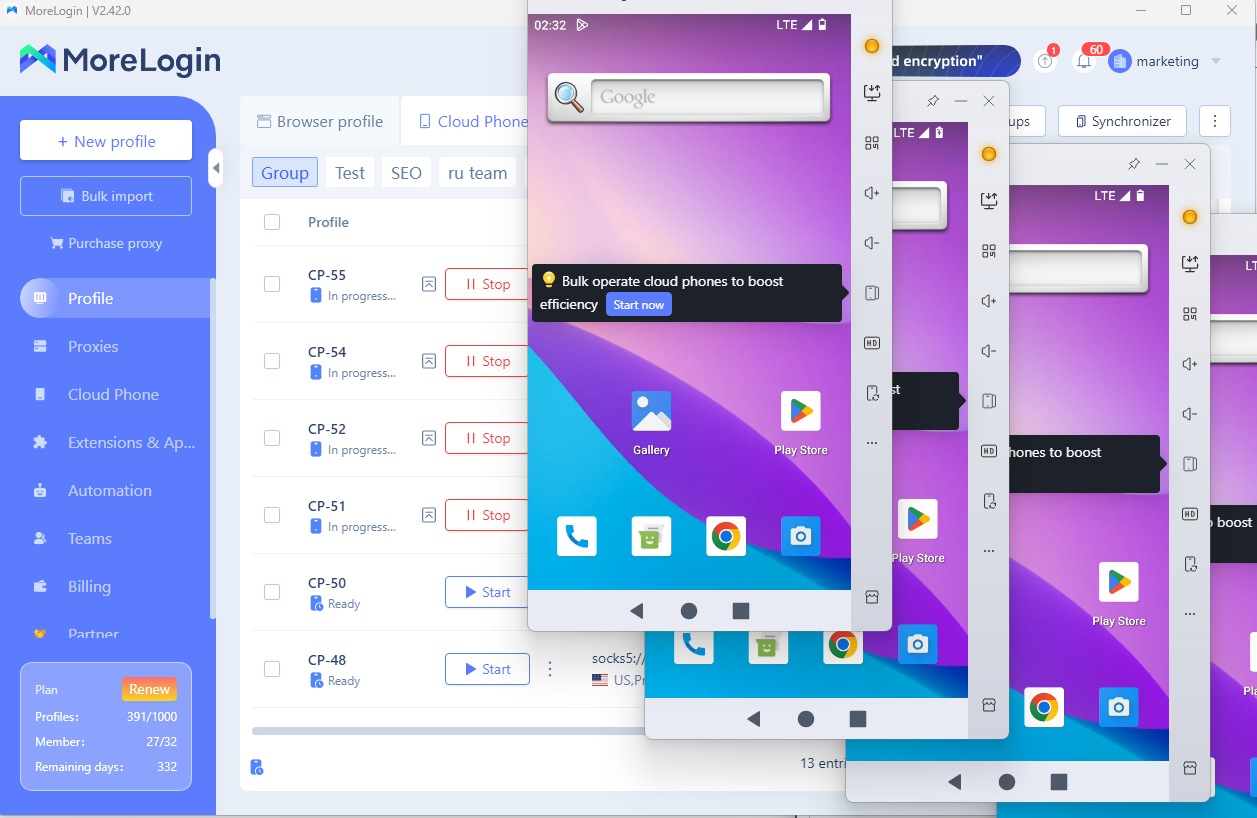
Frequent device or browser switching when the “is Facebook Messenger down” problem can sometimes trigger security flags, leading to temporary account suspensions. MoreLogin Cloud Phone provides a stable and isolated fingerprint environment, reducing the risk of wrongful suspensions and keeping your accounts safe.
Even if your primary account becomes temporarily inaccessible, MoreLogin allows you to manage a backup account. This ensures you can continue running ads, posting content, or managing pages without interruption. Running multiple accounts in parallel through MoreLogin improves business continuity and minimizes downtime caused by Facebook’s temporary issues.
Use MoreLogin to resolve the issues of Facebook logs you out and Facebook accounts getting disabled, and restore your account access.
Currently, the year-end carnival 2025 promotion offers: Save up to 50% on plans / get up to 20% extra on top-ups. Two free trial profiles are also available. Try them out now!
When you encounter access issues and wonder if is Facebook down, it’s important to first identify whether the problem is global or local. Simple steps like restarting your device, switching networks, clearing cache, or updating the app can resolve most issues.
For marketers and businesses, frequent device or browser changes may risk account suspension. Using MoreLogin Cloud Phone ensures a stable fingerprint environment, allowing multiple accounts to run safely in parallel. This not only protects your primary account but also improves efficiency and business continuity. Take control of your operations and minimize downtime by integrating MoreLogin into your workflow today.

 EN
EN