- Product

- Pricing
- Affiliate Program
- Developers
- Resource
 EN
EN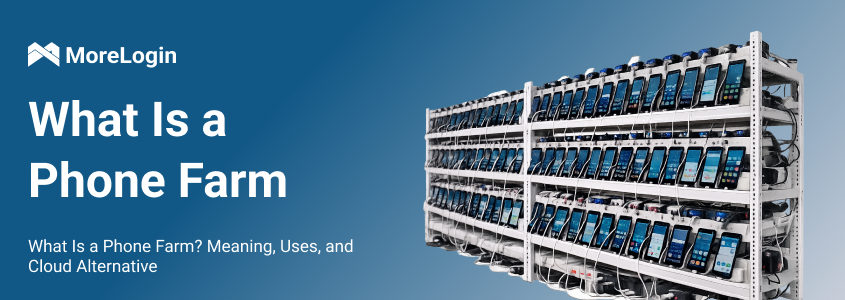
What Is a Phone Farm? A phone farm is a setup that uses many mobile phones together to run repeated mobile tasks. In many cases, it looks like a rack, shelf, or wall full of real smartphones. This is why some people also call it a device farm or a phone wall.
Traditional phone farms were once a common way to handle mobile workflows at scale. But this model is becoming harder to manage. Physical phones need space, power, cables, network stability, cooling, repairs, and manual checks. As the number of devices grows, the cost and maintenance pressure grow with it.
This is why cloud phone farms are becoming a newer option. They keep the idea of multiple mobile environments, but move the devices to the cloud.
A phone farm is a group of mobile phones used together to complete repeated mobile tasks. These phones are usually connected to power, internet, and sometimes control tools. Each phone can run apps, accounts, browser sessions, tests, or mobile workflows.
The simple phone farm meaning is this: many phones are managed as one system. The goal is not just to own many devices. The goal is to let those devices work in parallel.
A small phone farm may only have a few phones. A larger setup may include dozens or even hundreds of devices. Some setups use cheap Android phones. Others use second-hand phones. More advanced setups may place the phones in racks and connect them with USB hubs, Wi-Fi routers, charging stations, cooling fans, and control software.
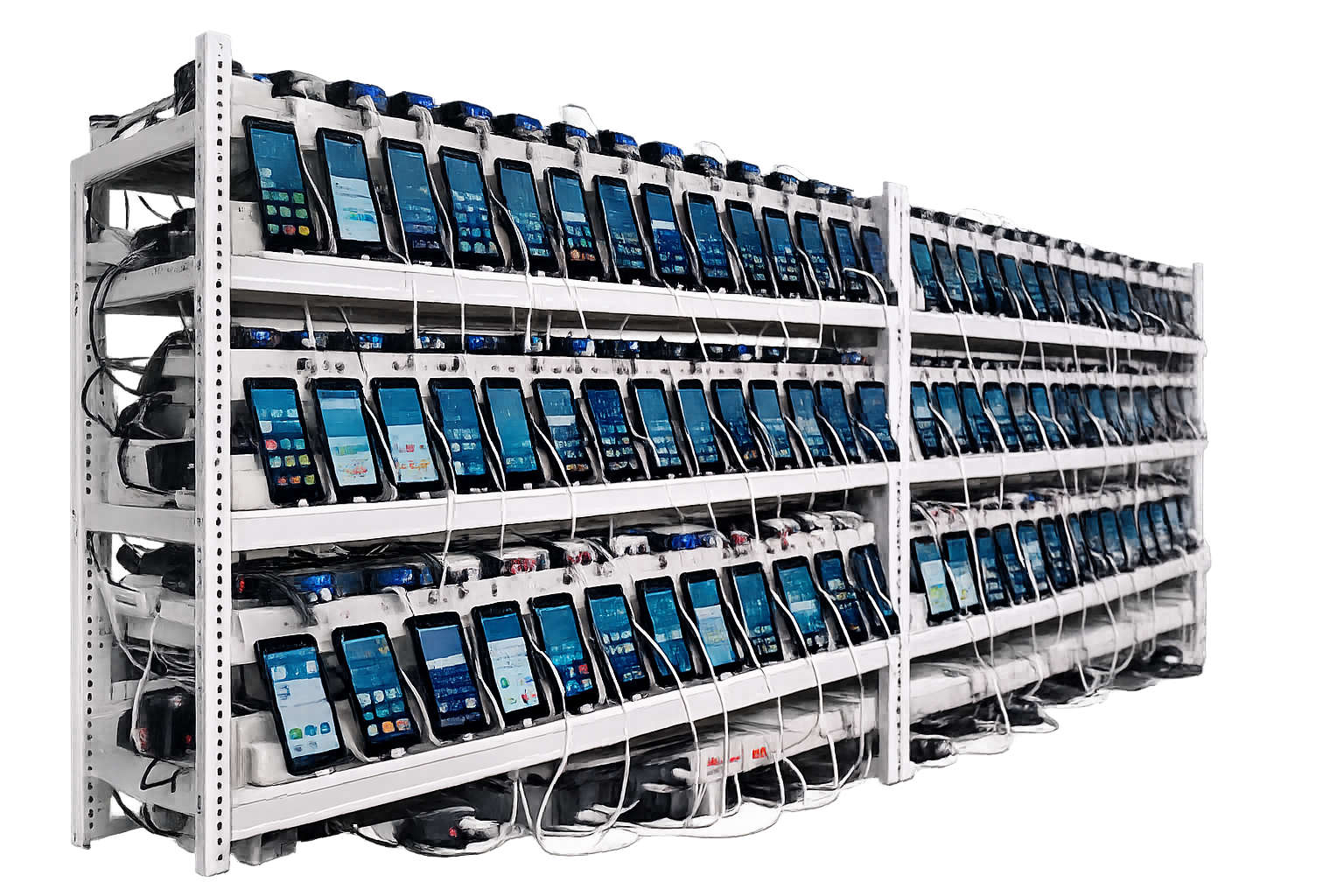
The key idea is device separation. Each phone can act as a separate mobile environment. One phone may run one app account. Another phone may run another task. A third phone may check a mobile page in a different region or under a different network setup.
Phone farms can be used for different purposes. Some are used for app testing, mobile workflow checks, account-based operations, ad review, or region-based verification. Some are also used in risky or abusive areas, such as social media manipulation, generating fake clicks on online ads, spam, inflated app ratings, boosted social media engagement, or fake ad views designed to mimic legitimate activity. In many cases, these uses are illegal or unethical and often violate app or platform terms. That is why the term has a mixed reputation.
So, What Is a Phone Farm in plain words? It is a device-based system for scaling mobile environments. It is not only about clicking. It is about using many phones to run mobile tasks at the same time.
After understanding the definition, the next question is how a traditional phone farm actually works. It is not just a pile of phones. It is a physical system made of devices, power, network, apps, accounts, and control methods.
A small setup can be simple. A large setup needs structure. Without structure, the operator spends too much time fixing failed devices, checking cables, restarting apps, and replacing old phones.
A traditional phone farm usually starts with real smartphones. The phones are placed on a desk, shelf, rack, or metal frame. Each device needs power. Most setups use USB hubs, multi-port chargers, power strips, and cable organizers.
The phones also need internet access. Some use Wi-Fi. Some use SIM cards. Some use mixed network setups, depending on the task, especially when coordinating multiple devices at once.
This physical layer is easy to underestimate. Five phones are easy to handle. Operators can start with a few devices and scale up to larger setups as needs grow, but fifty phones are different. Cables get mixed. Devices stop charging. Some phones disconnect from Wi-Fi. Some screens freeze. Some devices overheat after running for a long time.
A traditional phone farm may look simple in a photo, but the daily operation is not simple.
Each phone has its own system, apps, cache, device state, and login sessions. This is the main reason people use phone farms instead of only using one computer.
For example, a team may use one phone to test an app login flow. Another phone may check a mobile landing page. Another phone may run a different app account. In abusive setups, different apps may run across dozens of devices to exploit incentive based programs and other incentive based programs for money. Each device works as a separate mobile entry point.
This matters because some mobile tasks cannot be fully checked in a desktop browser. Mobile apps behave differently from websites. Push notifications, app permissions, device settings, and app storage may all affect the workflow.
A phone farm gives the operator many mobile environments at the same time.
The control method depends on the size of the setup.
A small phone farm may be controlled by hand. The operator taps each screen, opens apps, checks results, and repeats the same process. This works for a few devices, but it becomes slow when the number grows.
A larger setup may use control tools. These tools may help mirror screens, input text, open apps, or repeat fixed actions across many phones. Some teams also use scripts or automation software for simple repeated workflows across different platforms.
Even with tools, traditional phone farms still depend on physical devices. Operators also have to monitor platform policies, since bans and anti-fraud systems used by companies can disrupt the setup. The phones still need charging, updates, storage management, network access, cooling, and repairs.
Phone farms exist because many mobile tasks need device-level environments. A desktop browser can handle many web tasks, but it cannot replace a phone in every mobile workflow.
The use cases vary. Some are normal business use cases. Some are risky or policy-violating. The tool itself is only one part of the story. The real issue is how the setup is used.
One common use of a phone farm is mobile app testing. Developers, QA teams, and teams working in software development may need to test how an app works on different devices.
A phone farm can help check:
Whether an app opens correctly
Whether login works on different devices
Whether buttons and forms display properly
Whether the app crashes on older phones
Whether a new version creates problems
Whether mobile pages display correctly on different screens
This use is close to a device lab. The goal is quality control. One legitimate benefit is app testing, unlike setups used to generate passive income or manipulated engagement. It is not fake traffic.
Some teams, including agencies and some businesses, use phone farms for account-based mobile workflows to manage multiple social media accounts across social media platforms. This may include social media accounts, marketplace accounts, app accounts, or region-based mobile tasks.
The value is separation. This can let users schedule posts in advance and monitor social media activity in real time. Different phones can be used for different accounts, clients, regions, or projects. This makes it easier to avoid mixing sessions and tasks.
This area needs careful use. If the setup is used for spam, fake engagement, or platform abuse, it can create serious risk, and platforms such as Facebook actively look for inauthentic behavior. But if it is used for organized mobile workflow management, the focus is usually account separation, task tracking, and team control. Teams may also use these setups to respond to messages and comments faster across platforms, improving engagement with customers, while inflating follower counts or other metrics crosses into abuse.
A phone farm can also be used for mobile verification and regional checks. Some teams need to see how a mobile page, app, ad, or feature appears in different locations.
Common examples include:
Checking mobile ad placement
Reviewing app content by region
Testing mobile landing pages
Checking app store behavior
Reviewing local mobile user flows
These tasks are simple on one phone. They become harder when a team needs to repeat them across many devices, regions, or accounts.
Many phone farm tasks are repetitive tasks that can be turned into automated tasks. The operator may need to open an app, log in, check a screen, upload a file, input text, or collect a result, and in social media management that can include posting content and tracking account performance.
The task itself may not be complex. The problem is volume. A process that takes one minute on one phone becomes a large workload when it needs to be repeated across 50 phones, as operators may perform the same actions or run actions repeatedly to reach a certain outcome.
This is where phone farms become useful. They allow many mobile workflows to run at the same time, which can save a significant amount of time, but also makes abuse easier at scale. But they also create the management problems that make traditional phone farms harder to scale.
Traditional phone farms solved a real problem: they gave teams access to many mobile environments. But the physical model becomes weaker as the setup grows.
The issue is not only cost. It is daily management. A traditional phone farm needs phones, power, cables, space, cooling, stable internet, manual checks, and replacement planning.
Every new phone adds cost. The team needs to buy the device, charger, cable, rack space, and sometimes extra network equipment. If the phone breaks, it needs repair or replacement.
Cheap phones may reduce the starting cost, but they often bring other problems. Some people use second-hand or outdated phones because that can feel more cost effective, be more portable than server setups, and extend device life instead of adding e-waste. They may run slowly. They may overheat. They may lose battery health. They may fail to support newer apps.
At small scale, this may be acceptable. At larger scale, hardware becomes a real budget item.
Phones are not static machines. Apps update. Operating systems update. Batteries age. Screens fail. Storage fills up. Devices slow down.
A phone that worked well last month may start crashing this month. Another device may disconnect from Wi-Fi. Another may stop charging overnight. These small failures are easy to ignore when there are only a few phones, but they become a daily problem in a larger setup.
This creates hidden labor. Someone has to check the devices, restart failed phones, update apps, remove broken devices, and replace old hardware. Over time, maintenance can take more effort than the actual mobile workflow.
A large phone farm needs physical space. Phones need to be placed, labeled, connected, and kept visible. Once the number of devices grows, the setup can quickly become messy.
Heat is another issue. Many phones running for long periods can become unstable without cooling. Batteries may drain faster. Devices may slow down. Some phones may freeze or shut down.
Power and network stability also matter. Dozens of devices need safe charging and reliable Wi-Fi. Weak power strips, poor cable management, or unstable network connections can cause failed tasks across many phones at the same time.
These problems are not exciting, but they decide whether the setup can run every day.
Scaling a traditional phone farm is slow because every new phone must be purchased, prepared, connected, configured, labeled, and assigned.
This also makes team operations harder. A physical phone stays in one place. If another team member needs access, they may need remote-control tools or help from someone near the device.
This is one reason physical phone farms are less attractive for modern teams. The business may need faster mobile workflows, but the hardware setup moves slowly.
Many people search for click farm vs phone farm because the two terms often appear together. They can overlap in some cases, but they do not mean the same thing.
A click farm is defined by the action. A phone farm is defined by the device setup.
A click farm is usually built to generate large amounts of online activity. This may include clicks, views, likes, follows, reviews, registrations, installs, or survey submissions.
Some click farms use human workers. Some use bots or scripts. Some use phones, computers, tablets, or mixed setups. The main goal is to create repeated activity at scale.
This is why click farms are often discussed in relation to fake engagement, click fraud, survey fraud, and low-quality traffic.
A phone farm focuses on the mobile device environment. It uses many phones to run apps, accounts, tests, or mobile workflows.
A phone farm can be used for legitimate testing, verification, automation, and account-based workflow management. But it can also be abused if the operator uses it to fake installs, fake engagement, or manipulate ad systems.
So the device setup is not the whole story. The use case matters.
The simplest way to separate the two is this:
A click farm scales actions.
A phone farm scales mobile devices.
A click farm may not need real phones. It may rely on workers, bots, browsers, scripts, or mixed traffic sources. A phone farm relies on many phone environments.
This difference matters because the risks are different. Click farms are usually judged by the quality and legitimacy of the actions. Phone farms are judged by how the mobile environments are used and managed.
Traditional phone farms are not becoming weaker because mobile workflows are gone. They are becoming weaker because the physical setup is heavy.
A cloud phone farm keeps the useful part of a phone farm: multiple mobile environments. But it moves those environments to the cloud. Instead of buying and maintaining rows of physical phones, teams use cloud-based Android devices.

A cloud phone is a mobile device environment that runs on cloud infrastructure. The user can access and control it remotely.
This means teams do not need to keep a wall of phones in the office. They can open cloud phones from a dashboard and use them for mobile workflows.
Cloud phones are useful when the team needs Android app access, persistent sessions, mobile account separation, or repeated app-based tasks.
A cloud phone farm reduces the local hardware burden. The team does not need to buy dozens of phones, replace batteries, manage cables, or cool racks of devices.
This does not mean cloud phones remove every problem. Provider quality still matters. Performance, stability, device configuration, network setup, automation support, and team permissions all affect the result.
But compared with physical device walls, cloud phones are usually easier to scale and manage.
A traditional phone farm gives you real physical devices. A cloud phone farm gives you cloud-based mobile environments.
The better option depends on the workflow. If you need hardware-specific testing, physical phones may still be useful. If you need scalable mobile workflows, remote team access, and repeated app operations, cloud phones are usually cleaner.
For a deeper comparison, you can read this guide on cloud phone farm vs traditional phone farm.
At this point, the difference is easier to see. A traditional phone farm is about physical devices. A cloud phone farm is about cloud-based mobile environments. A click farm is about repeated engagement actions.
The table below gives a clearer view.
For teams that need mobile environments without building a physical device wall, MoreLogin Cloud Phone can work as a cleaner phone farm alternative.
It keeps the useful part of the phone farm idea: separate mobile environments. But it removes much of the local hardware burden.
MoreLogin Cloud Phone provides cloud-based Android devices. Teams can use them for mobile workflows without buying, storing, charging, or repairing physical phones.
This is useful for tasks that need a mobile app environment but do not require the user to physically hold the device.
Persistent sessions also matter. A workflow does not always end in one session. Teams may need to return to the same mobile environment later. Cloud phones make that easier than passing physical devices between team members.
Many teams do not need a phone farm because they like hardware. They need it because they manage many mobile workflows at the same time.
MoreLogin Cloud Phone is built for this kind of work. Teams can create and manage multiple cloud phones, organize them by task or account, and use them for app-based operations.
This is cleaner than keeping rows of phones on a shelf. It also makes remote work easier because team members do not need to be near the devices.
Repeated mobile tasks are where physical phone farms become painful. Opening apps, uploading content, inputting text, checking pages, and repeating the same steps across many devices can waste hours.
MoreLogin supports RPA, Synchronizer, batch input, bulk upload, API, and team permission management. These features are useful when teams need to repeat mobile workflows without manually touching every device.
The main value is not only automation. It is control. Admins can assign access, manage team members, and reduce the confusion that comes from sharing physical devices.
What Is a Phone Farm today? It is still a setup that uses many mobile phones together to run repeated mobile tasks. In simple terms, it is a device-based system for scaling mobile environments.
It is not the same as a click farm. A click farm is about scaling actions such as clicks, views, likes, installs, or registrations. A phone farm is about scaling mobile device environments. The two can overlap, but they should not be treated as the same thing.
Traditional phone farms still have some uses, especially when real physical hardware is required. But for many teams, the old model is becoming too expensive and too hard to manage. Devices age. Batteries fail. Cables break. Heat builds up. Scaling takes time.
Cloud phone farms are a response to these problems. They move mobile environments to the cloud and make them easier to access, manage, and scale. For teams that need repeated mobile workflows, multi-account mobile operations, or remote collaboration, MoreLogin Cloud Phone is a cleaner alternative to building a physical phone wall.
Yes, it can become expensive as the setup grows. The cost is not only the phones. You also need chargers, cables, racks, power supply, internet, cooling, repairs, and replacement devices.
Yes, but it becomes inefficient very quickly. A small setup can be handled manually. A larger setup usually needs synchronization, scripts, dashboards, or automation tools to stay manageable.
There is no fixed number. In general, when multiple phones are used together for repeated mobile tasks, people may call it a phone farm. A small setup may start with only a few devices.
No. Phone farms can also be used for app testing, mobile verification, region-based checks, ad review, mobile workflow testing, and other app-based tasks.
The most common problems are device maintenance, battery issues, heat, space, power load, unstable network, cable mess, and slow scaling. Team access also becomes harder when all devices stay in one physical place.
Not every setup. If a team needs physical sensors, real device handling, or hardware-specific testing, physical phones may still be needed. But for many repeated mobile workflows, cloud phones are easier to scale and manage.

 EN
EN