- Product

- Pricing
- Affiliate Program
- Developers
- Resource
 EN
EN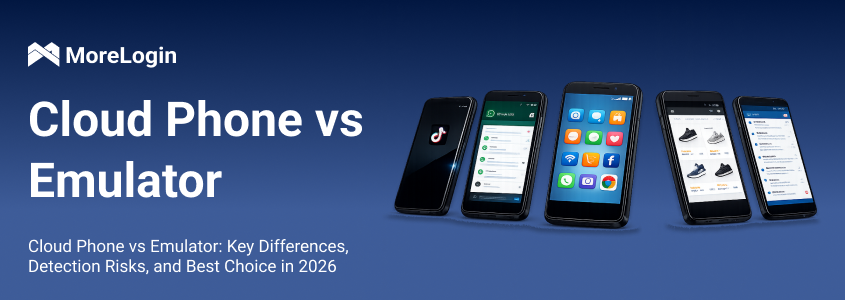
Cloud phones and Android emulators both let you run Android apps without relying on a physical smartphone. However, they use different infrastructure and are designed for different workflows.
An Android emulator runs a virtual Android environment on your local computer. Its performance—and the number of instances you can operate—largely depends on your computer’s CPU, RAM, storage, and graphics capabilities.
A cloud phone runs Android on remote cloud infrastructure. You control the device through a client, while the Android workload runs in the cloud.
For a single app, a local emulator may be the simpler choice. For remote access, multi-device operations, team collaboration, and centralized automation, a cloud phone is usually more suitable.
This guide compares the two options across infrastructure, app compatibility, multi-device management, automation, platform risk, and total cost.
The key question is not simply whether the tool can open an Android app. The better choice depends on how many Android environments you need, where they need to be accessed, and how your team operates them.
An Android emulator is software that reproduces an Android operating environment on a Windows, macOS, or Linux computer.
Developers frequently use the official Android Emulator to test applications across different screen sizes, hardware profiles, and Android versions. Consumer-focused emulators such as BlueStacks are commonly used to run Android games and mobile apps on PCs.
Because the Android environment runs locally, the computer must provide the resources needed by the emulator and every Android instance it opens.
One instance may run smoothly on an ordinary computer. As more instances are added, the emulator must divide the available CPU, RAM, storage, and graphics resources among them. Performance can therefore vary substantially between computers.
An Android emulator for Windows is generally suitable when you need:
One or a small number of Android environments
Local app development and debugging
Android gaming on a PC
Direct access to local files and development tools
A low-cost way to run occasional Android tasks
Android emulators offer several practical benefits:
Many products are free to install.
You can start with your existing computer.
Development tools can connect directly to the local Android environment.
Some products support multiple instances, macros, keyboard mapping, and ADB.
Local files can usually be imported easily.
The local architecture also creates several constraints:
Performance depends on the host computer.
Running several instances can increase resource consumption.
Workflows are usually tied to one computer.
Sharing environments with team members may require remote-access software.
Compatibility varies across emulator products and Android images.
Some apps treat emulated environments differently from conventional mobile environments.
These limitations do not make an emulator a poor choice. They mean it is generally most effective for local workflows with a manageable number of Android instances.
A cloud phone is a complete Android environment hosted on remote cloud infrastructure. Instead of asking your computer to run the Android system locally, the service streams the device interface to you while the Android workload runs remotely.
MoreLogin Cloud Phone runs full Android environments on ARM-based cloud infrastructure. It is built for mobile workflows that require remote access, multiple independent devices, team management, synchronization, and automation.
Each Cloud Phone profile maintains its own Android environment and device configuration. Teams can organize these profiles by project, account, platform, or operator without purchasing and maintaining racks of physical smartphones.
Because the Android workload runs remotely, expanding a Cloud Phone workflow does not require installing a new local emulator or upgrading the host computer every time another Android environment is needed.
The local MoreLogin client still uses some computer and network resources to display and control devices. However, it does not need to run the entire Android operating system for every Cloud Phone profile.
The fundamental difference is where the Android system runs.
An Android emulator runs on your computer. Every additional instance competes for the same local CPU, RAM, storage, and graphics resources.
A cloud phone runs on remote infrastructure. Your computer displays the device interface and sends control instructions, while the Android environment operates in the cloud.
This makes cloud phones easier to use across different computers and locations. It also makes expansion less dependent on the specifications of one host computer.
Network quality still matters. A stable connection helps maintain a responsive remote-control experience, especially when several Cloud Phone screens are open simultaneously.
Android emulators may use virtualization, translated instruction sets, customized Android images, or emulator-specific system components.
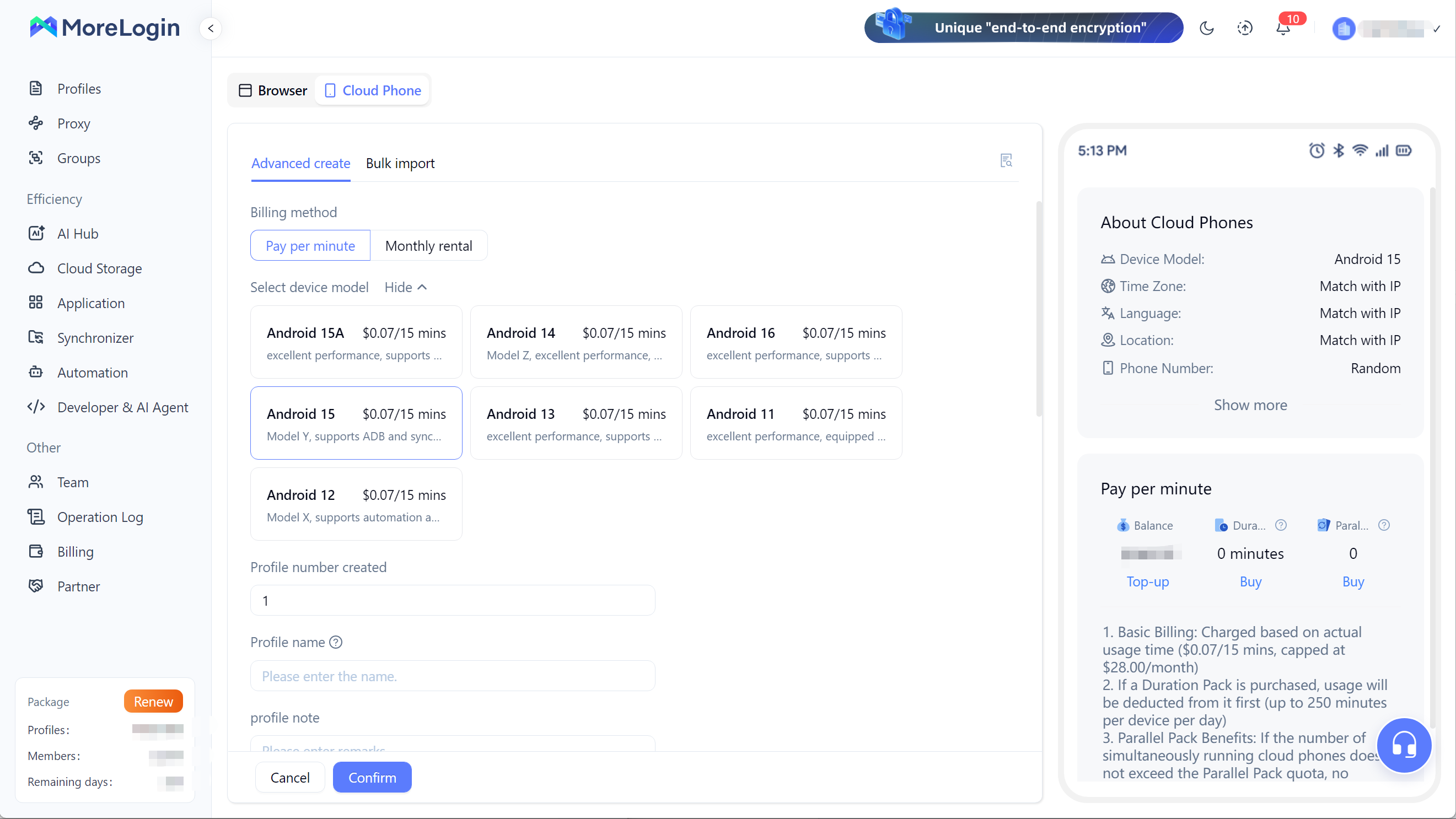
The MoreLogin android cloud phone uses ARM-based cloud infrastructure to provide Android environments designed for mobile application workflows. Current configurations support Android 12 through Android 15.
However, neither a cloud phone nor an emulator can guarantee compatibility with every Android app. Compatibility may depend on:
The required Android version
Google Play Services
App integrity requirements
Camera or audio access
Root-detection rules
Regional availability
The app developer’s device policies
Our basic Cloud Phone configuration supports automation, camera and audio functions, and file uploads. If a particular application is essential to your workflow, test it on a small number of Cloud Phone profiles before expanding your device fleet.
Many local emulators allow users to create multiple instances. BlueStacks, for example, provides a Multi-instance Manager for running more than one Android environment.
The practical number of local instances still depends on the computer. As the number of active instances increases, users may need to allocate more CPU cores and memory or reduce the performance settings of individual instances.
Cloud phones move device capacity away from the local computer and into a centralized cloud platform.
MoreLogin’s Cloud Phone Synchronizer lets you designate one device as the main control and synchronize supported mouse and keyboard actions to other selected devices.
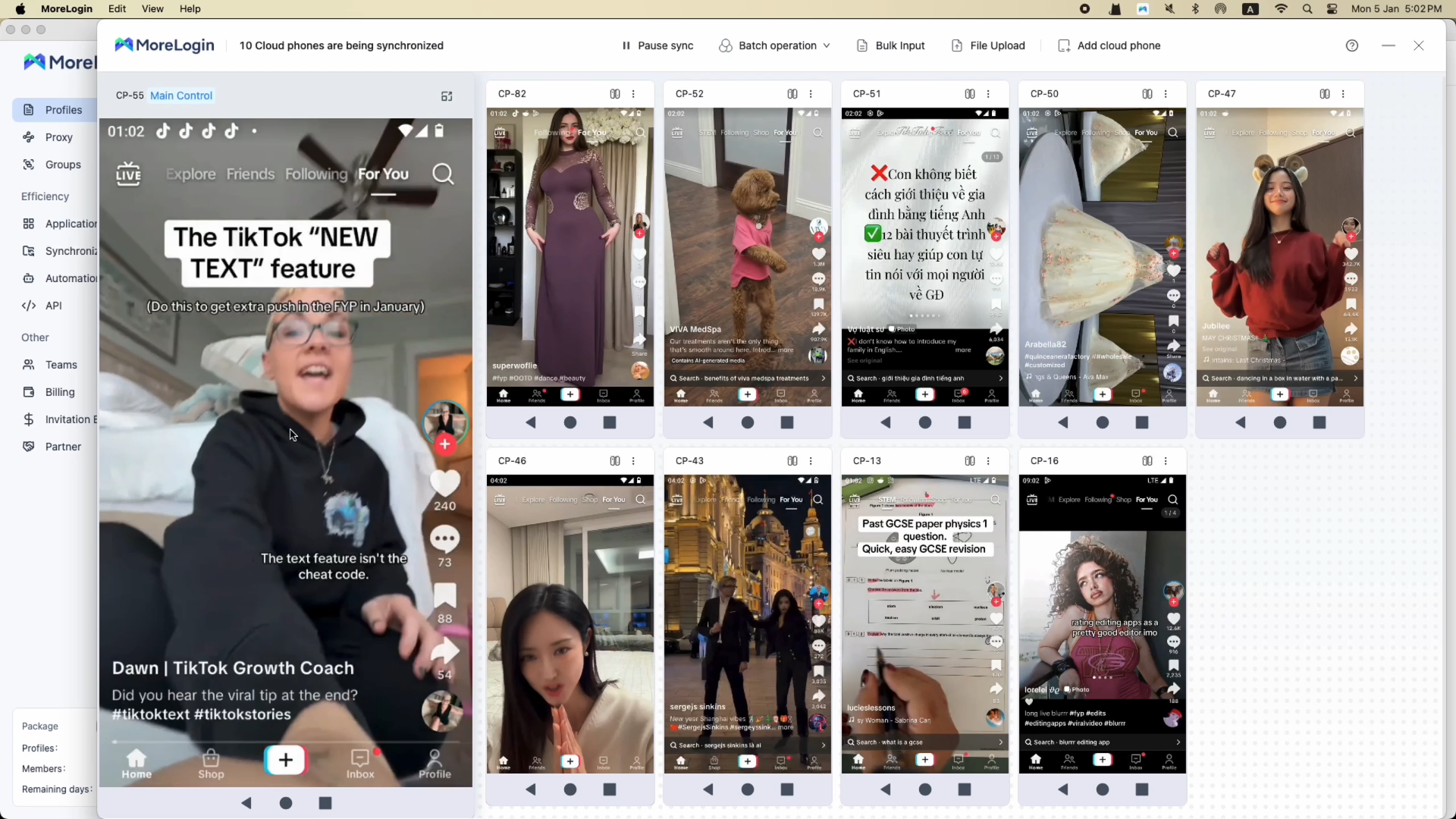
You can also perform operations such as:
Batch-installing applications
Opening or closing apps across selected devices
Entering text into multiple Cloud Phones
Uploading photos, videos, and other files
Adding more Cloud Phones to the workspace
Pausing synchronization when devices require different actions
This is useful when several devices need to complete the same workflow without operating each device individually.
A local emulator normally remains on the computer where it was created. If another team member needs to use it, they may need physical access to that computer or a separate remote desktop solution.
Cloud phones are designed for remotely managed device access.
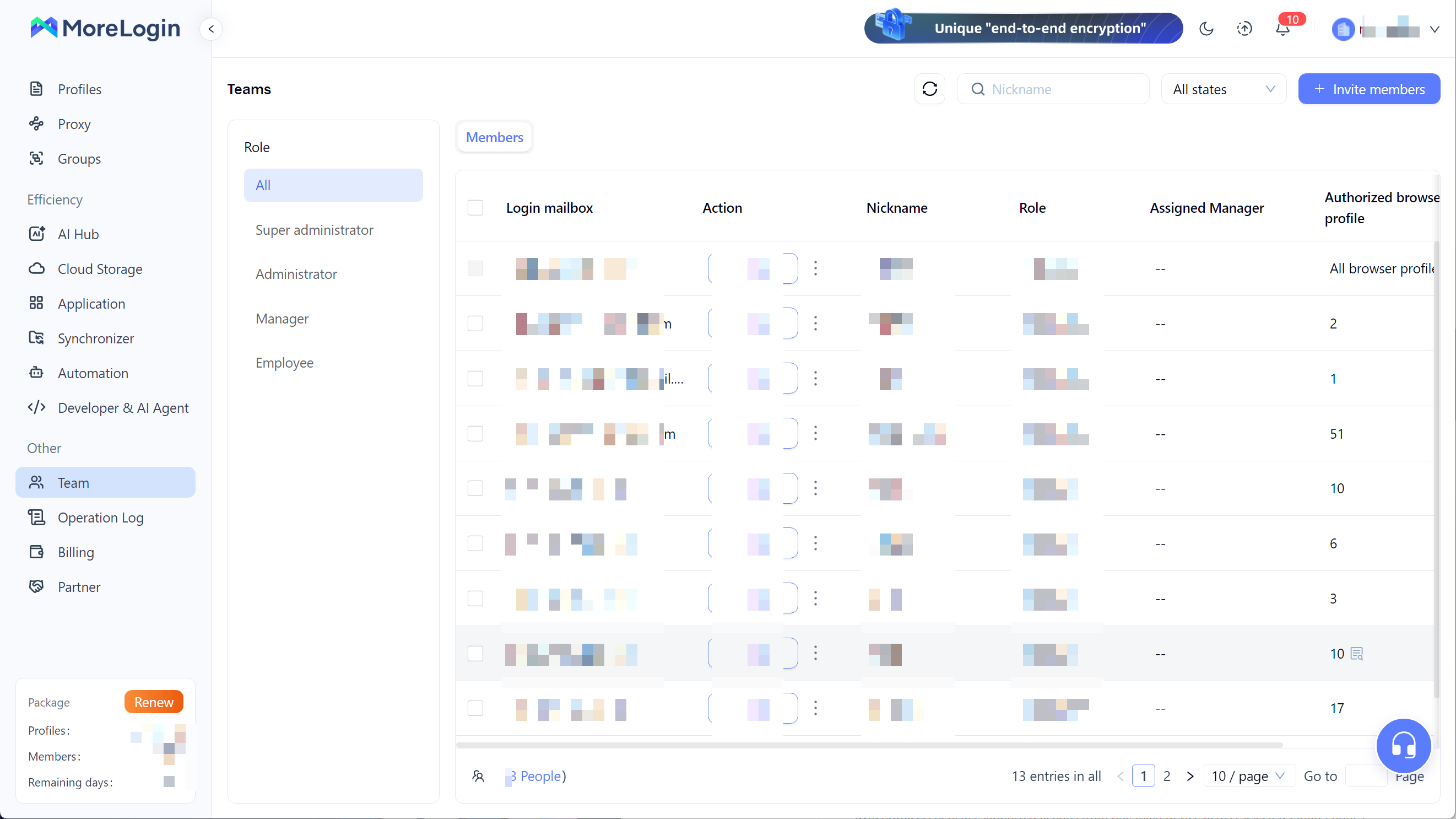
With MoreLogin, administrators can assign profiles to team members and control which devices each person can access. Permissions can also be changed or revoked without transferring physical phones or sharing the host computer.
This is particularly useful for teams that:
Work from different locations
Divide devices by project or market
Need controlled access to mobile environments
Frequently add or remove team members
Want to reduce physical device handovers
Need centralized operational oversight
The result is a more manageable workflow than storing applications and accounts across separate employee computers or physical devices.
Android emulators often support ADB, local scripts, macros, and development frameworks. These tools work well for developers and technical users operating a limited number of local instances.
Cloud phones can extend automation across a centrally managed group of remote devices.
MoreLogin supports several types of Cloud Phone automation:
Synchronizer: Repeats supported actions from one main device across selected Cloud Phones.
Bulk Input: Sends matching or differentiated text to multiple devices.
File Upload: Distributes files across selected Cloud Phone environments.
RPA: Builds repeatable workflows using predefined actions.
ADB: Supports technical application and device operations.
API: Connects Cloud Phone management with external systems and automated workflows.
The MoreLogin Cloud Phone API can be used to manage operations such as powering devices on or off, installing apps, and configuring proxies.
These options allow teams to select an automation method based on the complexity of the task instead of relying on a single form of macro recording.
Android emulator software is often free, but the software license is only one part of the operating cost.
A larger local emulator setup may also require:
Higher-specification computers
Additional RAM and storage
Hardware upgrades or replacement
Electricity
Remote-access software
System maintenance
Time spent configuring and troubleshooting different computers
Cloud phones replace much of that hardware investment with a usage-based or device-based service fee.
Our current Cloud Phone pricing is:
Pay as you go: $0.006 per minute
Daily cap: $1.50 per device
30-day plan: $23–$25 per device
Android versions: Android 12–15
With pay-as-you-go billing, a Cloud Phone does not generate usage charges while it is powered off. This can be economical for occasional or short-duration tasks.
For devices used regularly, the 30-day option provides more predictable operating costs.
If your workflow requires a paid proxy, include that service separately when calculating the total budget.
To evaluate a practical multi-device workflow, we opened ten Cloud Phone environments in MoreLogin Synchronizer.
One device was selected as the main control, while the other Cloud Phones remained visible in the same workspace. During this session, the devices responded to synchronized operations without noticeable lag.
Ten Cloud Phone environments displayed in MoreLogin Synchronizer, with one device selected as the main control.
This demonstrates the practical value of bringing several mobile environments into one control panel. An operator can monitor device states and repeat supported actions without switching between separate emulator windows or physical smartphones.
The session was a real workflow observation rather than a laboratory benchmark. Actual responsiveness can vary based on network conditions, the apps being operated, screen activity, and the number of simultaneously active devices.
For this reason, we do not use the session to claim a universal latency, frame rate, or local resource-consumption figure. It shows that MoreLogin can organize and synchronize ten Cloud Phones in one operational workspace.
BlueStacks is a popular Android emulator designed primarily for running Android games and applications on a computer. MoreLogin Cloud Phone is designed for remotely managed Android workflows involving multiple environments, teams, and automation.
If BlueStacks is the local emulator on your shortlist, this MoreLogin vs BlueStacks comparison looks more closely at hardware use, multiple instances, proxy setup, automation, and team access.
BlueStacks may be sufficient when you primarily want to play Android games or run a few apps on one computer.
MoreLogin Cloud Phone is more suitable when you need to manage remote Android environments, expand beyond the capacity of one computer, assign devices to team members, or automate multi-device operations.
LDPlayer is another Windows-focused local emulator, with a stronger emphasis on gaming and synchronized multi-instance control. The MoreLogin vs LDPlayer comparison covers the differences in hardware use, proxy setup, automation, and team access.
Physical phones provide native hardware and direct access to the complete device. However, managing a large number of physical devices can become expensive and operationally complex.
A physical phone setup may require:
Purchasing every device
Charging and powering multiple phones
Replacing damaged hardware
Manually installing and updating apps
Labeling and organizing devices
Providing physical access to operators
Maintaining cables, hubs, racks, and network connections
Cloud phones remove much of this physical maintenance. New Android environments can be created without purchasing another smartphone, and devices can be accessed remotely by authorized team members.
A physical phone remains necessary when a workflow depends on specialized physical hardware or functions that the cloud environment does not support. For remote application management, repeatable mobile operations, and scalable device access, a cloud phone can provide a more efficient alternative to a physical phone farm.
Detection risk is an important part of the cloud phone vs Android emulator comparison, but it should not be reduced to a simple claim that one tool is “undetectable.”
Applications and online platforms may evaluate multiple signals, including:
Operating-system and device properties
App installation and integrity
IP address and network quality
Time zone, language, and location consistency
Account history
Login patterns
User behavior
Connections between related accounts
Some applications may identify characteristics associated with particular emulator environments. An ARM-based cloud Android environment can provide a different technical foundation from a traditional PC-based emulator, but infrastructure is only one part of the overall evaluation.
Google’s Play Integrity API, for example, allows Android apps to assess aspects of the application, device, and account environment. Individual platforms may also use their own systems.
MoreLogin Cloud Phone is designed to provide separate Android environments with independent device configurations and proxy settings. This helps teams organize mobile workflows more consistently, but no cloud phone, emulator, proxy, or browser can guarantee that an account will never face verification or restrictions.
Users should always:
Follow the rules of the platform they operate on
Use stable and appropriate network connections
Keep IP location, time zone, language, and operational context consistent
Avoid sudden or unrealistic changes in account behavior
Test application compatibility before scaling
Maintain clear internal access and operating procedures
The purpose of a well-configured environment is to support stable, legitimate operations—not to replace responsible account management.
Choose an Android emulator if:
You need Android mainly for application development or testing.
You want to run Android games on a PC.
You only need one or a few local instances.
Your computer has sufficient hardware resources.
Remote team access is not important.
You want to minimize recurring service fees.
Choose a cloud phone if:
You need to access Android environments remotely.
You expect the number of devices to increase.
Multiple team members need controlled access.
You want to manage devices from one platform.
You need synchronization or batch operations.
You plan to use RPA, ADB, or API automation.
You want to reduce dependence on physical phones and local computer hardware.
After selecting the category, choosing a cloud phone should include checking Android versions, application compatibility, automation options, team permissions, network requirements, and billing rules.
MoreLogin combines Cloud Phone management with the tools required to organize and operate multiple Android environments.
A typical workflow can include:
Create separate Cloud Phone profiles.
Select the required Android versions.
Configure the appropriate network settings.
Install the apps needed for each project.
Group devices by account, market, client, or operator.
Assign access to the appropriate team members.
Use Synchronizer for repeated multi-device actions.
Use RPA, ADB, or API tools for structured automation.
The Cloud Phone profile creation process supports both individual profile creation and bulk import. After profiles are created, centralized Cloud Phone app management helps teams organize application access across devices.
The main advantage is not simply that MoreLogin can run an Android app. A local emulator can already do that.
The advantage is bringing cloud-hosted Android environments, multi-device controls, application management, team permissions, and automation into one operational platform.
Android emulators and cloud phones are suited to different levels of operation.
An Android emulator is usually the simpler choice for development, testing, gaming, and smaller workflows that remain on one computer. It can be inexpensive to start, but its capacity is closely tied to local hardware.
A cloud phone is a better fit for remote access, expanding device fleets, team collaboration, and centralized automation. It introduces a recurring service cost but reduces the need to purchase, configure, and maintain separate physical phones or high-specification computers for every Android environment.
MoreLogin Cloud Phone is designed for businesses and teams that need to move beyond isolated local emulator instances and manage multiple Android environments from one place.
Start with a small number of Cloud Phone profiles, verify the applications and workflow you need, and expand your device fleet when the configuration meets your operational requirements.
No. An Android emulator normally runs Android locally on a computer. A cloud phone runs Android on remote cloud infrastructure and streams the device interface to the user.
MoreLogin Cloud Phone is a complete virtual Android environment running on ARM-based cloud infrastructure. It provides remote mobile application access without requiring users to purchase or maintain a separate physical smartphone for every profile.
App compatibility depends on factors such as Android version, Google services, regional availability, app integrity requirements, and the functions required by the application. Test business-critical apps before scaling to a larger number of devices.
The Android workload runs remotely, but the MoreLogin client still uses some local resources to display and control the devices. Network conditions and the number of open device screens can also affect the user experience.
MoreLogin Synchronizer is designed for multi-device operation. In our practical session, we displayed and synchronized ten Cloud Phones in one workspace without noticeable lag. Actual responsiveness can vary by network and workload.
Yes. MoreLogin supports Synchronizer operations, bulk input, file upload, RPA, ADB integration, and Cloud Phone API automation.
No tool can guarantee that an account will never be verified, restricted, or suspended. Account outcomes can depend on device, network, behavior, account history, content, and platform policies. MoreLogin provides independent Android environments and management tools, but users must still follow the rules of each platform.
Our current Cloud Phone pricing is $0.006 per minute, capped at $1.50 per device per day, or $23–$25 per device for 30 days. Visit our Cloud Phone pricing page for the latest details.

 EN
EN