- Product

- Pricing
- Affiliate Program
- Developers
- Resource
 EN
EN
A Multi Account Browser is a browser tool built for people who need to manage several accounts without mixing their browser environments. In a normal browser, switching between accounts may leave shared cookies, cache, login records, IP changes, and browser fingerprint signals. These signals can make different accounts look connected.
A real Multi Account Browser helps solve this by creating separate browser profiles for different accounts. Each profile can keep its own cookies, proxy, login session, and browser fingerprint, making every account environment cleaner, more stable, and easier to manage.
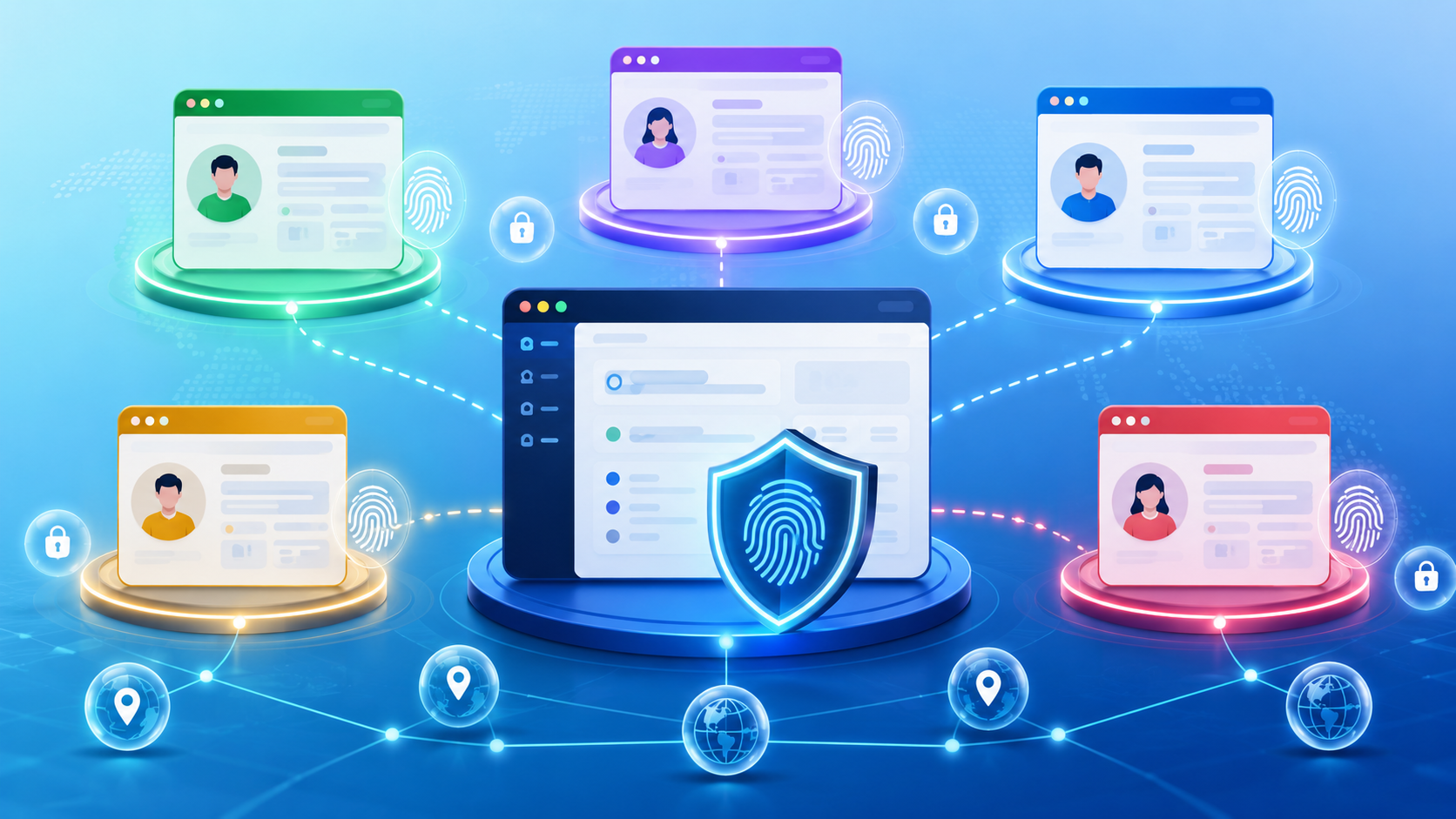
A Multi Account Browser is a browser designed to help users manage multiple online accounts in separated browser environments. It is not the same as simply opening many tabs or using different browser windows.
In a regular browser, multiple accounts may still share the same browser storage, cookies, cache, device signals, and fingerprint data. Even when you log out of one account and log into another, some traces may remain in the same browser environment.
A Multi Account Browser works differently. It allows users to create separate browser profiles. Each profile can act like an independent browser environment with its own login status, cookies, cache, proxy settings, and fingerprint configuration.
So, what is a Multi Account Browser in simple terms? It is a browser for multiple accounts that helps keep each account in its own isolated digital environment.
This is useful for users who manage social media accounts, ecommerce stores, affiliate accounts, advertising accounts, research accounts, or client accounts from one device or team workspace.
Many users start with a normal browser because it feels simple. They log into one account, log out, and then log into another account. At a small scale, this may seem fine.
The problem starts when the number of accounts grows.
If several accounts are used in the same browser, they may share the same cookies, cache, extensions, browsing history, and device signals. Websites collect digital fingerprints to identify users, and reusing the same fingerprint across accounts can lead to account bans. If the IP address also changes suddenly, platforms may see this as unusual behavior.
For example, one account may appear to log in from one region today and another region tomorrow. Another account may use the same browser fingerprint but a different proxy. These mixed signals can make accounts look connected, as if they are controlled by the same person, or suspicious.
Never log into multiple accounts in the same standard browser window or profile.
A Multi Account Browser helps reduce this problem by keeping every account in a separate profile.
Platforms do not only check IP addresses. They can also look at many browser and device signals.
These signals may include:
User-Agent
Timezone
Language settings
WebRTC
Canvas
WebGL
Fonts
Screen resolution
Operating system
Browser version
Together, these signals form a unique digital fingerprint built from device and browser parameters such as screen resolution, installed fonts, and timezone settings. If many accounts use the same fingerprint, the platform may connect them even when the IP addresses are different.
That is why using proxies alone is not always enough. If the proxy says one thing but the browser fingerprint says another, the account environment may look inconsistent.
A safer setup should keep the proxy, timezone, language, geolocation, and fingerprint signals aligned.
The core idea of a Multi Account Browser is simple: one account, one profile.
Each browser profile should have its own environment. That means one account does not need to share cookies, cache, proxy settings, or fingerprint data with another account.
This creates cleaner digital identity separation because each profile gets its own unique digital fingerprint, so to websites it can look like a different device.
For example, a social media manager may create one profile for each client account. An ecommerce operator may create one profile for each store. An affiliate marketer may create separate profiles for different projects, regions, or campaigns.
Instead of forcing many accounts into one browser identity, a Multi Account Browser helps every account keep its own stable environment, which is also why an anti detect browser is often used for managing multiple profiles safely.
The main feature of a Multi Account Browser is profile isolation.
Each profile works like a separate browser environment. When you open one profile, it keeps its own cookies, cache, local storage, extensions, proxy settings, and login status. When you open another profile, it uses a different environment.
This helps prevent different accounts from sharing the same browser data. While most browsers allow completely separate user environments with different caches, cookies, history, and saved passwords, dedicated multi-account tools make them easier to manage at scale. In practice, many browsers offer basic separation, but these tools are built for handling many profiles efficiently.
For users, this also makes daily work easier. You do not need to log in and out all the time. You can open the correct profile and continue working with the saved account session.
Cookies and cache are important because they help websites remember users. They can keep login status, preferences, browsing behavior, and session data.
In a normal browser, different accounts may leave data in the same environment. Over time, this can create overlap.
A Multi Account Browser separates this data by profile. One profile can keep the cookies and session for one account, while another profile keeps different cookies and a different session for another account.
This is useful for long-term account management. Each account can keep a stable environment instead of starting from a fresh login every time.
A Multi Account Browser should also provide proxy integration so browser fingerprints and proxies stay aligned in a consistent way.
A proxy changes the network location. A browser fingerprint shows device and browser details. If these two parts do not match, the environment may look unnatural.
For example, if a profile uses a US proxy but the timezone is set to Asia, the language is different, and WebRTC leaks another location, the account environment may look inconsistent.
Users should be able to assign proxies per profile, and dedicated proxies help each session look like a separate real user from a stable location. A good Multi Account Browser should help users match proxy region with browser signals such as timezone, language, geolocation, and WebRTC. The goal is not to create random settings. The goal is to create a realistic and consistent environment.
The most direct benefit is efficiency.
Without a Multi Account Browser, users may need to switch between different browsers, devices, virtual machines, or systems. This becomes messy when the account number grows.
With separated profiles, users can manage many accounts from one dashboard. Each account has its own profile name, proxy, tags, folders, and saved login state, and using consistent naming conventions and tags keeps online profiles easy to identify.
This makes multi-account work easier to organize and supports seamless management. Multiple browser profiles also make switching between accounts easier without repeated logins.
Cross-account tracking happens when platforms connect different accounts through shared signals.
These signals may come from the same cookies, same browser fingerprint, same IP pattern, same login behavior, or same device environment.
A Multi Account Browser helps reduce this risk by separating profiles. Different accounts do not need to share the same browser storage or fingerprint settings.
This does not guarantee account safety. But a dedicated multi-account browser reduces cross-account tracking by giving each profile a unique fingerprint, so accounts are less likely to look linked to the same person and trigger bans or suspensions.
A reusable profile is important for stable account work.
Once an account is logged in inside a profile, the profile can save its cookies, session, proxy, and fingerprint settings. The next time users open the profile, they can continue from the same environment.
This is useful for social media accounts, ecommerce stores, ad accounts, and client accounts that need long-term maintenance.
It also reduces unnecessary repeated logins, which can sometimes create extra verification steps.
Many teams do not work alone. A company may have account operators, managers, advertisers, customer service staff, and freelancers using different account assets.
A Multi Account Browser can help teams use profile sharing from one dashboard while keeping full control through role-based permissions for different team members.
For example, a manager can give one team member access to a group of profiles, with permissions limited by role or account group, without sharing raw passwords or account assets outside the workspace. If an employee leaves, the team can revoke access and keep the profiles inside the company account.
This is especially useful for agencies and teams that manage client accounts.
When account work becomes repetitive, manual operation is not enough.
Advanced teams may need to create profiles in batches, but relying on manual work slows setup, while API-based workflows let them create, edit, and manage profiles programmatically instead.
This is where batch operation and API support become useful. A Multi Account Browser with automation features can help teams handle large-scale workflows more efficiently while keeping account environments separated, with extra tools for bulk actions such as clone profiles and proxy assignment.
Social media teams often manage several accounts across platforms, regions, brands, or clients.
A Multi Account Browser helps each social account stay in its own profile. This makes it easier to separate login sessions, content workflows, client workspaces, and regional account environments.
For agencies, this also helps reduce mistakes. Operators can open the right profile for the right client instead of switching accounts inside one browser.
E commerce sellers may be managing multiple stores, seller accounts, customer service accounts, or regional profiles across different e commerce platforms.
Using one normal browser for all accounts can create messy login records and overlapping browser data. A Multi Account Browser helps store operators keep different store environments separate.
This is useful for cross-border sellers, marketplace teams, and agencies that manage several ecommerce stores for different clients. An anti-detect setup is especially useful in digital marketing and e-commerce when teams need distinct identities across stores or seller accounts.
Affiliate marketers may need different accounts for testing campaigns, managing traffic sources, checking landing pages, or separating project workflows.
Some users also research creating and farming accounts for long-term account preparation. In this case, environment separation is only one part of the workflow.
Users still need stable proxies, realistic behavior, proper account warm-up, and platform-compliant operations. A Multi Account Browser can help separate account environments, but it cannot make unsafe behavior risk-free.
A Multi Account Browser can also be useful for ad verification, market research, and web scraping.
For ad verification, teams may need to check how ads appear in different regions. For market research, they may need to view localized pages. For data collection, they may need separate environments for different projects or websites.
Separated profiles help keep these workflows organized and reduce environment overlap.
A Multi Account Browser cannot fix bad proxies.
If a proxy is unstable, overused, blacklisted, or mismatched with the account region, it can still create risk. A clean browser profile is not enough if the network environment looks suspicious.
Users should choose proxies carefully and make sure the proxy location matches the profile settings.
Platforms may also look at behavior.
If many accounts repeat the same actions at the same time, post the same content, click in the same pattern, or follow the same schedule, the behavior itself may look unnatural.
A Multi Account Browser can separate browser environments, but it cannot replace realistic account behavior.
Some users think random fingerprint settings are always safer. This is not correct.
A safer profile should be consistent. The proxy region, timezone, language, geolocation, WebRTC, browser version, and device signals should make sense together.
If the settings conflict with each other, the profile may look less natural.
Account farming is a sensitive workflow. If accounts are created too quickly, operated too aggressively, or used in ways that violate platform rules, they may still be limited or banned.
A Multi Account Browser can help with profile isolation, but it cannot guarantee account safety. Good proxies, consistent fingerprints, realistic behavior, and careful workflow planning still matter.
A Multi Account Browser and an antidetect browser are closely related, but they are not exactly the same.
A Multi Account Browser focuses on managing many accounts through separated browser profiles. Its main value is account organization, profile isolation, reusable sessions, and multi-account efficiency.
An antidetect browser goes further. It focuses on browser fingerprint control, proxy consistency, privacy signals, and environment isolation. It helps each profile look more like an independent browser environment.

In practice, many advanced Multi Account Browser tools are also antidetect browsers. If a user only needs simple account switching, a basic profile tool may be enough. But if the user needs stronger fingerprint control, proxy matching, team permissions, and automation, an antidetect browser is usually a better fit.
When choosing a Multi Account Browser, users should not only look at how many profiles it can create. A good tool should also support profile isolation, fingerprint control, proxy support, team permissions, automation, and data security.
MoreLogin is built around these needs.
MoreLogin allows users to create separate browser profiles for different accounts, clients, projects, or regions.
Each profile can store its own browser environment. This helps users avoid mixing account sessions and makes daily multi-account work easier to manage.
For example, a social media operator can create one profile for each platform account. An ecommerce team can create separate profiles for each store. An agency can organize profiles by client, region, or project.
MoreLogin supports browser fingerprint settings and proxy configuration to help account environments stay consistent.
When creating profiles, users can match browser signals with proxy regions, such as timezone, language, and location settings. Many multi-account browsers also include built-in proxy management, so users can configure and switch proxy settings directly inside profile setup. This helps reduce obvious conflicts between network identity and browser identity.
A profile should not only have a proxy. It should have a complete and consistent browser environment shaped by advanced browser fingerprinting.
MoreLogin also supports team collaboration.
Managers can assign browser profiles to team members, control access permissions, and keep account resources inside the team workspace. This helps reduce the risk of account assets being scattered across personal devices or personal browsers.
When a team member leaves, managers can revoke access and keep the profile under company control.
For larger workflows, MoreLogin provides features such as Synchronizer and Local API.
Synchronizer helps users sync keyboard and mouse actions from one main browser window to multiple other windows. This can improve efficiency for repetitive multi-account tasks.
Local API helps developers and advanced teams create, launch, stop, and manage browser profiles through automation workflows. It can work with tools such as Selenium, Puppeteer, and Playwright.
These features make MoreLogin useful not only for simple account switching, but also for scalable multi-account operations.
Before choosing a Multi Account Browser, check these points:
Does it provide real profile isolation?
Can it manage browser fingerprints?
Does it support stable proxy setup?
Can team members use profiles with different permissions?
Does it support batch operations or automation?
Does it protect profile data and local browser data?
If a tool only opens many browser windows but does not handle fingerprints, proxy consistency, or team access, it may not be enough for serious multi-account management.
A Multi Account Browser is useful for anyone who needs to manage multiple accounts with cleaner separation and more stable browser environments. It helps reduce account overlap, save login sessions, organize profiles, and support scalable workflows.
However, it is not a magic tool. Account safety still depends on proxy quality, fingerprint consistency, realistic behavior, and careful operation.
For teams that need profile isolation, fingerprint control, team permissions, Synchronizer, and Local API support, MoreLogin can be a practical Multi Account Browser for safer multi-account management.
A Multi Account Browser is a browser tool that helps users manage multiple accounts in separated browser profiles. Each profile can keep its own cookies, cache, login session, proxy, and fingerprint settings. This helps reduce account overlap compared with using one normal browser for many accounts.
Not exactly. A Multi Account Browser focuses on managing many accounts through separated profiles. An antidetect browser usually adds deeper fingerprint control, proxy matching, and privacy signal management. Many advanced Multi Account Browsers are also antidetect browsers.
You can, but it is not ideal for serious multi-account work. A normal browser may share cookies, cache, login records, and browser fingerprint signals across accounts. This can increase the chance of account connection. A browser for multiple accounts gives each account a cleaner separated environment.
A Multi Account Browser can help create safer account environments, but it does not guarantee account safety. Users still need stable proxies, consistent fingerprint settings, realistic behavior, and platform-compliant workflows. The tool reduces environment overlap, but it cannot fix risky account behavior.
A browser for multiple accounts is useful for social media managers, ecommerce sellers, affiliate marketers, ad verification teams, market researchers, agencies, and teams that manage many client accounts. It is especially useful when accounts need separate login sessions, proxies, and browser environments.
You should check profile isolation, fingerprint control, proxy support, team permissions, automation features, and data security. A good Multi Account Browser should not only open many profiles. It should also help users keep each account environment consistent, reusable, and easier to manage.

 EN
EN