- Product

- Pricing
- Affiliate Program
- Developers
- Resource
 EN
EN
If you are looking into make.com pricing, the monthly fee is only the starting point.
What really matters is how far each plan can take you before it starts getting in the way. That usually comes down to credits, scheduling speed, execution priority, file limits, API access, and whether the plan can support the way you actually work.
That is why make pricing can feel a little confusing at first. On paper, the plans look simple. In practice, each tier fits a different type of user. A Free plan might be enough for testing. A Core plan may work well for a solo marketer. A Pro or Teams plan can make much more sense once workflows become heavier, more frequent, or shared across a team.
This guide breaks down the Free, Core, Pro, Teams, and Enterprise plans practically. It also looks at how Make fits into larger content workflows, especially when paired with MoreLogin RPA for bulk publishing and multi-account execution.

Make.com is a visual automation platform. It helps users connect apps, move data between systems, and build automated workflows with a drag-and-drop interface.
People use it for all kinds of work: lead routing, CRM updates, Slack alerts, internal approvals, AI-assisted content pipelines, reporting, and more. It is flexible enough for small tasks, but it can also support much larger automation setups.
The important thing to understand is that make.com pricing is not just about users or seats. Your plan also affects how much automation capacity you get and how usable that capacity is in day-to-day work.
In simple terms, a plan upgrade changes more than the price. It can also change:
how many active scenarios you can run
how often scheduled automations can execute
how large your files can be
whether you get API access
whether your workflows run with higher priority
whether a team can share and manage automations together
whether you get enterprise controls like SSO and audit logs
That is why pricing matters more here than with many simple SaaS tools. With Make, the lower-cost plan is not always the better value if your workflows are growing.
Based on the pricing for 10,000 credits per month under monthly billing, here is the clearest summary.
*Based on the pricing screenshots shared in this conversation for a 10,000 credits a month billing context.
At a glance, the structure is logical.
The Free plan is for testing. Core is the first real paid tier. Pro is where Make starts feeling much more capable for production use. Teams is built for shared workflows. Enterprise is for organizations that need security, governance, and support at scale.
That is the big picture. The more useful question is where each plan starts to make sense in real work.
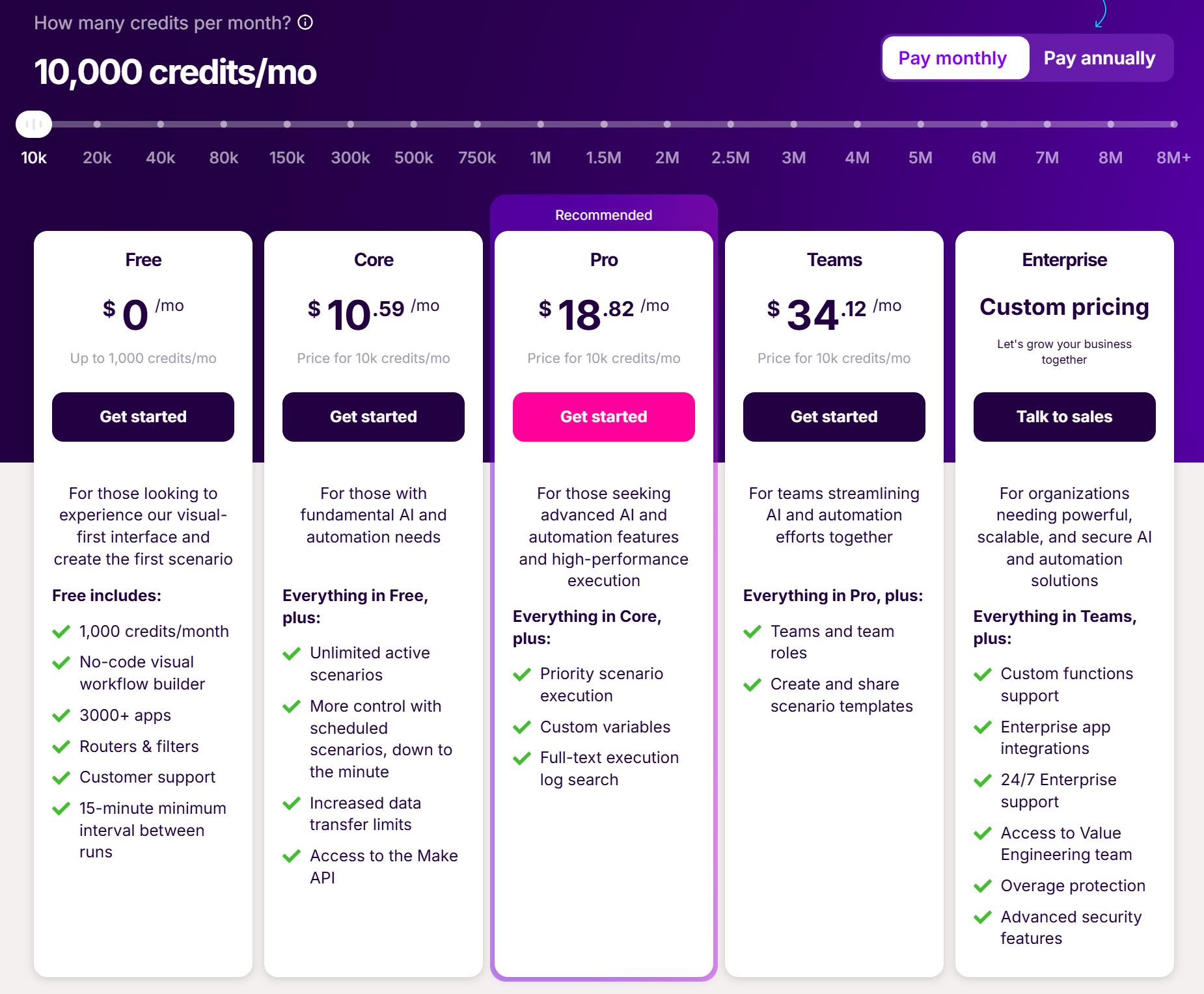
The Free plan is fine if you just want to understand how Make works. You can explore the interface, build a few simple automations, and test basic app connections without paying anything.
The issue is that the limits show up quickly.
You only get two active scenarios. The minimum interval between scheduled runs is fifteen minutes. A single scenario can only run for five minutes. Those limits are not small details. They affect how usable the platform is once you go beyond casual testing.
So while the Free plan is useful, it is better seen as a trial environment than a production environment.
Core is the plan most people should look at first if they want to use Make regularly.
This is where several important restrictions disappear. You get unlimited active scenarios, one-minute scheduling, API access, and more data transfer. That alone makes a big difference. Workflows become easier to scale, easier to trust, and much less frustrating to manage.
For solo users, marketers, small businesses, and operators building useful day-to-day automations, Core is often the best value point in the whole lineup.
Pro is the tier where Make feels less like a lightweight automation tool and more like a system you can rely on.
The biggest upgrades are not flashy, but they matter. Priority scenario execution helps with speed and consistency. Custom variables make larger workflows easier to manage. Full-text execution log search makes troubleshooting faster. Higher file limits help when your automations involve content assets, uploads, or more complex handling.
If you run higher-frequency workflows or need better visibility into what is happening, Pro is usually a meaningful step up from Core.
Teams is the plan for workflows that are no longer owned by one person.
Once multiple people need access, the conversation changes. At that point, shared templates, team roles, and better workflow coordination become more important than saving a little on monthly cost.
This is why Teams makes sense for agencies, content operations teams, and businesses managing several publishing processes or client systems at once. It is less about extra power and more about structure.
Enterprise is not just a bigger version of Teams. It is aimed at companies where workflow ownership, access control, security, and reliability are business-critical.
Features like SSO, audit logs, overage protection, advanced support, and enterprise integrations are not there for convenience. They are there because larger organizations need them.
If automation touches multiple departments, sensitive systems, or compliance-heavy environments, Enterprise is the right category.
Many pricing guides stop at listing features. That is not very helpful. The real question is how those feature differences affect daily work.
This is one of the clearest differences between plans.
The Free plan only allows two active scenarios, which is a real limit once you start automating more than a few tasks. Core and above remove that restriction, which immediately gives you more room to build actual working systems instead of one-off experiments.
The scheduling interval matters too. A fifteen-minute minimum interval may sound acceptable until you need fast lead routing, quick alerts, frequent syncs, or timely publishing triggers. In those cases, one-minute scheduling is a real upgrade, not a small convenience.
Execution priority matters more than it first appears.
On lighter workloads, you may not notice a difference. But once workflows become more frequent or more time-sensitive, better execution priority can reduce friction. Pro introduces higher priority execution, while Teams and Enterprise go further.
If timing matters to your workflow, or if delays create extra manual work, this becomes easier to justify.
For simple app-to-app automations, file limits may not matter much. For content workflows, they absolutely do.
If your automations involve image uploads, media processing, creative assets, or repeated file handling, lower tiers can feel tight. This is one of the reasons Pro often makes more sense for content-related work, even when Core looks cheaper.
API access begins with Core, and that changes what Make can do in a larger system.
Without API access, you are mostly using Make as a standalone automation layer. With API access, it becomes much easier to connect Make to internal tools, dashboards, custom systems, or more structured publishing flows.
Higher API rate limits on larger plans matter too. For teams with frequent or high-volume automation, that can make a real difference.
This is where the gap between solo use and team use becomes obvious.
If only one person owns the workflows, a lower-tier plan may be fine. If multiple people need access, review, accountability, and shared templates, then collaboration features stop being optional.
That is why Teams and Enterprise are not just about “more features.” They are for different operating models.
The best plan depends less on company size and more on workflow maturity.
If you are just learning Make, start with Free. It is enough to understand the interface and test basic automations.
If you already know you want to use Make for real work, skip the idea of staying on Free too long. Core is usually the better long-term starting point.
For solo marketers, the decision is usually Core or Pro.
Core is enough for lighter automations such as routing leads, syncing tools, sending notifications, and organizing content inputs. Pro becomes easier to justify if your automations run often, handle larger assets, or need better debugging and execution performance.
Agencies often sit between Pro and Teams.
If one person builds and maintains most workflows, Pro may be enough. If several people need access or if workflows are reused across clients, Teams is usually a better fit. Shared templates and team roles become more valuable as accounts and use cases grow.
For content operations teams, Teams is usually the strongest choice.
These teams often rely on repeatable processes, shared ownership, campaign coordination, and standard templates. That is exactly the kind of environment where a team plan starts to pay off.
Large organizations should look at Enterprise if automation is tied to security, governance, or business continuity.
The main value here is not that Enterprise has the longest feature list. The value is that it supports larger, risk-sensitive operating environments better.
This is where Make becomes more interesting for content teams.
Make is very good at orchestration. It can collect data, trigger steps, move information between tools, and structure repetitive processes. That makes it useful for content planning, asset routing, approvals, and workflow coordination.
But large-scale publishing often includes actions that are not fully covered by APIs.
In many real publishing workflows, the last mile still happens inside a browser.
That can include:
logging into different accounts
switching between browser identities
uploading files through web interfaces
filling in captions, titles, or tags
clicking through publishing forms
repeating the same actions across multiple accounts or platforms
Make is strong at handling the logic around these tasks. It is less suited to doing the browser-side execution itself when those actions depend on real interface interaction.
This is where MoreLogin RPA fits in.
MoreLogin helps with multi-account browser isolation. Its RPA layer can then automate browser actions in those isolated environments. In practical terms, Make can handle the workflow logic, while MoreLogin RPA can handle the execution stage that happens in the browser.
A simple example would look like this:
Make collects content inputs from a form, sheet, or CMS
AI tools generate draft copy, titles, or descriptions
Make organizes the publishing tasks and routes them to the right process
MoreLogin RPA opens the correct browser profile
The RPA flow uploads assets, fills the fields, and completes the publishing steps
That setup is especially useful for repeated publishing workflows, account matrix operations, and scheduled multi-platform posting.
If you are comparing automation stacks more broadly, this related article on Zapier pricing vs competitors adds useful context. And for teams working with scalable device environments, MoreLogin Cloud Phone is also relevant.
The benefit is straightforward.
It reduces repeated manual work. It lowers the friction of switching between multiple accounts. It speeds up execution once content is ready. It also helps move a team from manual publishing to process-based publishing.
Make handles the structure. MoreLogin RPA handles the browser actions. For high-volume content distribution, that is often a more complete setup than using Make by itself.
Credits can be consumed faster than expected, especially when workflows become more frequent or involve more steps. Lower plans can also become limiting when file sizes grow, scheduling needs tighten, or troubleshooting becomes part of daily work.
Then there are the indirect costs.
A cheaper plan can still cost more if it leads to repeated reruns, more manual fixes, workflow delays, or unnecessary operator time. This matters a lot in content operations, where failed automation is often followed by manual cleanup.
That is why it helps to think about pricing in terms of workload, not just subscription fee.
If you only want to test the platform, the Free plan is enough.
If you want dependable day-to-day automation and you work mostly on your own, Core is the best starting point for most users.
If your workflows are becoming more important, more frequent, or more complex, Pro is often the smartest upgrade.
If your automations are shared across a team, Teams is usually the better long-term fit.
If your organization needs stronger governance, security, and support, Enterprise is the right tier.
Overall, make.com pricing is reasonable, but only if the plan matches the kind of workflow you are actually running.
If you only need workflow orchestration, Make is already a strong option. If you are also trying to automate content production and large-scale multi-account publishing, Make becomes more useful when paired with a browser execution layer like MoreLogin RPA.
Yes. Make offers a Free plan with up to 1,000 credits per month. It is best for testing and learning, not long-term production use.
Based on the pricing details shared here, Core includes 10,000 monthly credits, unlimited active scenarios, one-minute scheduling, API access, and higher data transfer limits than Free.
For advanced users, yes. Pro adds better execution priority, custom variables, full-text log search, and larger file support, which can make daily workflow management much easier.
Pro is better for advanced individual users or small owner-led setups. Teams is better for shared workflows, reusable templates, and role-based collaboration.
Credits are a core part of the model, along with feature access, scheduling limits, execution capacity, and plan-level controls.
Core may be enough for lighter content workflows. Pro or Teams is usually a better fit for more serious content operations.
Yes. Make can manage the workflow logic and routing, while MoreLogin RPA can automate the browser-based steps needed for bulk publishing across multiple accounts.

 EN
EN